📅 NGÀY 25: ⚡ Project 3 - Real-time Dashboard
🎯 Mục tiêu học tập (5 phút)
Sau bài học này, bạn sẽ:
- [ ] Tích hợp tất cả hooks đã học vào một project hoàn chỉnh
- [ ] Build production-ready dashboard với real-time data
- [ ] Implement custom hooks để organize code logic
- [ ] Handle complex state interactions và data flow
- [ ] Apply best practices về performance và UX
- [ ] Debug và optimize React applications
- [ ] Hiểu cách structure một medium-sized React app
🤔 Kiểm tra đầu vào (5 phút)
Trước khi bắt đầu, review nhanh những gì đã học:
- useState: Manage component state ✅
- useEffect: Side effects, data fetching, subscriptions ✅
- useRef: Mutable values, DOM access, previous values ✅
- useLayoutEffect: Synchronous DOM measurements ✅
- Custom Hooks: Extract và reuse logic ✅
Hôm nay: Chúng ta sẽ combine TẤT CẢ để build real-world dashboard! 🚀
📖 PHẦN 1: PROJECT OVERVIEW (15 phút)
1.1 Project Specification
📊 Crypto Dashboard - Real-time Cryptocurrency Tracker
Một dashboard theo dõi giá cryptocurrency real-time với các features:
Core Features:
Real-time Data Fetching
- Fetch crypto prices từ API
- Auto-refresh every 30 seconds
- Manual refresh button
Search & Filtering
- Search cryptocurrencies by name
- Debounced search (500ms)
- Filter by price change (gainers/losers)
Data Comparison
- Compare current vs previous prices
- Show price change percentage
- Visual indicators (up/down arrows)
Advanced UX
- Loading states with skeleton screens
- Error handling with retry
- Empty states
- Responsive design
Performance
- Optimized re-renders
- Efficient data updates
- Smooth animations
1.2 Tech Stack
React Hooks:
├── useState - UI state management
├── useEffect - Data fetching & auto-refresh
├── useRef - Previous values, timers, abort controllers
├── useLayoutEffect - Smooth animations (optional)
└── Custom Hooks - Reusable logic

APIs:
└── CoinGecko API (free, no auth required)

Styling:
└── Inline styles (focus on logic, not CSS)
1.3 Architecture Overview
CryptoDashboard (Main Component)
│
├── Custom Hooks
│   ├── useFetch - Generic data fetching
│   ├── useDebounce - Search debouncing
│   ├── usePrevious - Previous value tracking
│   └── useAutoRefresh - Auto-refresh logic
│
├── Components
│   ├── Header - Title, manual refresh, stats
│   ├── SearchBar - Search input với debounce
│   ├── FilterControls - Filter buttons
│   ├── CryptoList - List of crypto cards
│   ├── CryptoCard - Individual crypto item
│   ├── LoadingSkeleton - Loading state
│   └── ErrorMessage - Error state
│
└── Utils
    ├── api.js - API calls
    └── helpers.js - Formatting functions
1.4 File Structure
src/
├── App.jsx (Main Dashboard)
├── hooks/
│   ├── useFetch.js
│   ├── useDebounce.js
│   ├── usePrevious.js
│   └── useAutoRefresh.js
├── components/
│   ├── Header.jsx
│   ├── SearchBar.jsx
│   ├── FilterControls.jsx
│   ├── CryptoList.jsx
│   ├── CryptoCard.jsx
│   ├── LoadingSkeleton.jsx
│   └── ErrorMessage.jsx
└── utils/
    ├── api.js
    └── helpers.js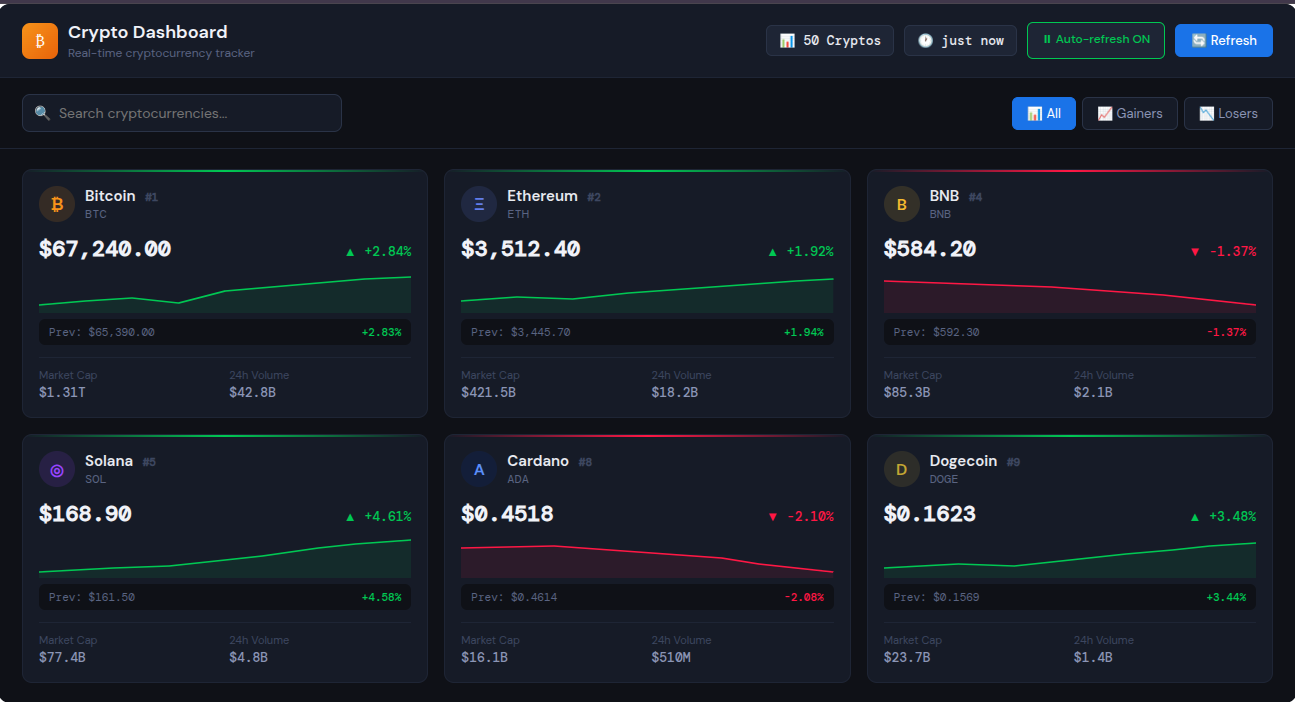
💻 PHẦN 2: IMPLEMENTATION (90 phút)
Step 1: Custom Hooks (30 phút)
useFetch.js - Generic Data Fetching Hook
// hooks/useFetch.js
import { useState, useEffect, useRef, useCallback } from 'react';

/**
 * Generic data fetching hook với advanced features
 *
 * @param {Function} fetchFn - Async function to fetch data
 * @param {Object} options - Configuration options
 * @returns {Object} { data, loading, error, refetch }
 */
export function useFetch(fetchFn, options = {}) {
  const { immediate = true, onSuccess, onError, dependencies = [] } = options;

  const [state, setState] = useState({
    data: null,
    loading: immediate,
    error: null,
  });

  const abortControllerRef = useRef(null);
  const isMountedRef = useRef(true);

  // Execute fetch function
  const execute = useCallback(async () => {
    // Cancel previous request
    if (abortControllerRef.current) {
      abortControllerRef.current.abort();
    }

    // Create new abort controller
    abortControllerRef.current = new AbortController();

    setState((prev) => ({ ...prev, loading: true, error: null }));

    try {
      const data = await fetchFn(abortControllerRef.current.signal);

      if (isMountedRef.current) {
        setState({ data, loading: false, error: null });
        onSuccess?.(data);
      }
    } catch (error) {
      if (error.name === 'AbortError') {
        // Request was cancelled - this is ok
        return;
      }

      if (isMountedRef.current) {
        setState({ data: null, loading: false, error });
        onError?.(error);
      }
    }
  }, [fetchFn, onSuccess, onError]);

  // Auto-execute on mount if immediate
  useEffect(() => {
    if (immediate) {
      execute();
    }
  }, [immediate, execute, ...dependencies]);

  // Cleanup
  useEffect(() => {
    return () => {
      isMountedRef.current = false;
      if (abortControllerRef.current) {
        abortControllerRef.current.abort();
      }
    };
  }, []);

  return {
    ...state,
    refetch: execute,
  };
}
useDebounce.js - Debounce Hook
// hooks/useDebounce.js
import { useState, useEffect } from 'react';

/**
 * Debounce a value
 *
 * @param {any} value - Value to debounce
 * @param {number} delay - Delay in milliseconds
 * @returns {any} Debounced value
 */
export function useDebounce(value, delay) {
  const [debouncedValue, setDebouncedValue] = useState(value);

  useEffect(() => {
    const handler = setTimeout(() => {
      setDebouncedValue(value);
    }, delay);

    return () => {
      clearTimeout(handler);
    };
  }, [value, delay]);

  return debouncedValue;
}
usePrevious.js - Previous Value Hook
// hooks/usePrevious.js
import { useRef, useEffect } from 'react';

/**
 * Track previous value of state/prop
 *
 * @param {any} value - Current value
 * @returns {any} Previous value
 */
export function usePrevious(value) {
  const ref = useRef();

  useEffect(() => {
    ref.current = value;
  }, [value]);

  return ref.current;
}
useAutoRefresh.js - Auto Refresh Hook
// hooks/useAutoRefresh.js
import { useEffect, useRef } from 'react';

/**
 * Auto-refresh data at specified interval
 *
 * @param {Function} callback - Function to call on refresh
 * @param {number} interval - Interval in milliseconds
 * @param {boolean} enabled - Whether auto-refresh is enabled
 */
export function useAutoRefresh(callback, interval, enabled = true) {
  const callbackRef = useRef(callback);
  const intervalRef = useRef(null);

  // Keep callback ref updated
  useEffect(() => {
    callbackRef.current = callback;
  }, [callback]);

  useEffect(() => {
    if (!enabled) return;

    // Start interval
    intervalRef.current = setInterval(() => {
      callbackRef.current();
    }, interval);

    // Cleanup
    return () => {
      if (intervalRef.current) {
        clearInterval(intervalRef.current);
      }
    };
  }, [interval, enabled]);

  // Manual cleanup on unmount
  useEffect(() => {
    return () => {
      if (intervalRef.current) {
        clearInterval(intervalRef.current);
      }
    };
  }, []);
}
Step 2: Utility Functions (15 phút)
api.js - API Integration
// utils/api.js

const API_BASE = 'https://api.coingecko.com/api/v3';

/**
 * Fetch top cryptocurrencies
 *
 * @param {AbortSignal} signal - Abort signal for cancellation
 * @returns {Promise<Array>} Array of crypto data
 */
export async function fetchCryptos(signal) {
  const response = await fetch(
    `${API_BASE}/coins/markets?vs_currency=usd&order=market_cap_desc&per_page=50&page=1&sparkline=false&price_change_percentage=24h`,
    { signal },
  );

  if (!response.ok) {
    throw new Error(`HTTP error! status: ${response.status}`);
  }

  const data = await response.json();

  // Transform API data to our format
  return data.map((coin) => ({
    id: coin.id,
    name: coin.name,
    symbol: coin.symbol.toUpperCase(),
    price: coin.current_price,
    priceChange24h: coin.price_change_percentage_24h,
    marketCap: coin.market_cap,
    volume24h: coin.total_volume,
    image: coin.image,
    rank: coin.market_cap_rank,
  }));
}
helpers.js - Helper Functions
// utils/helpers.js

/**
 * Format price to USD
 */
export function formatPrice(price) {
  if (price >= 1) {
    return new Intl.NumberFormat('en-US', {
      style: 'currency',
      currency: 'USD',
      minimumFractionDigits: 2,
      maximumFractionDigits: 2,
    }).format(price);
  } else {
    return new Intl.NumberFormat('en-US', {
      style: 'currency',
      currency: 'USD',
      minimumFractionDigits: 2,
      maximumFractionDigits: 6,
    }).format(price);
  }
}

/**
 * Format large numbers (market cap, volume)
 */
export function formatLargeNumber(num) {
  if (num >= 1e12) {
    return `$${(num / 1e12).toFixed(2)}T`;
  }
  if (num >= 1e9) {
    return `$${(num / 1e9).toFixed(2)}B`;
  }
  if (num >= 1e6) {
    return `$${(num / 1e6).toFixed(2)}M`;
  }
  return `$${num.toFixed(2)}`;
}

/**
 * Format percentage change
 */
export function formatPercentage(percentage) {
  const sign = percentage >= 0 ? '+' : '';
  return `${sign}${percentage.toFixed(2)}%`;
}

/**
 * Get color for price change
 */
export function getPriceChangeColor(change) {
  if (change > 0) return '#00C853'; // Green
  if (change < 0) return '#FF1744'; // Red
  return '#666'; // Gray
}

/**
 * Calculate percentage difference
 */
export function calculatePercentDiff(current, previous) {
  if (!previous) return 0;
  return ((current - previous) / previous) * 100;
}
Step 3: Components (45 phút)
LoadingSkeleton.jsx
// components/LoadingSkeleton.jsx
import React from 'react';

export function LoadingSkeleton() {
  return (
    <div
      style={{
        display: 'grid',
        gridTemplateColumns: 'repeat(auto-fill, minmax(300px, 1fr))',
        gap: '20px',
        padding: '20px',
      }}
    >
      {Array.from({ length: 6 }).map((_, index) => (
        <div
          key={index}
          style={{
            backgroundColor: '#f5f5f5',
            borderRadius: '12px',
            padding: '20px',
            animation: 'pulse 1.5s ease-in-out infinite',
          }}
        >
          <div
            style={{
              display: 'flex',
              alignItems: 'center',
              gap: '12px',
              marginBottom: '15px',
            }}
          >
            <div
              style={{
                width: '40px',
                height: '40px',
                backgroundColor: '#e0e0e0',
                borderRadius: '50%',
              }}
            />
            <div style={{ flex: 1 }}>
              <div
                style={{
                  height: '16px',
                  backgroundColor: '#e0e0e0',
                  borderRadius: '4px',
                  marginBottom: '8px',
                  width: '60%',
                }}
              />
              <div
                style={{
                  height: '12px',
                  backgroundColor: '#e0e0e0',
                  borderRadius: '4px',
                  width: '40%',
                }}
              />
            </div>
          </div>

          <div
            style={{
              height: '24px',
              backgroundColor: '#e0e0e0',
              borderRadius: '4px',
              marginBottom: '10px',
              width: '80%',
            }}
          />

          <div
            style={{
              height: '16px',
              backgroundColor: '#e0e0e0',
              borderRadius: '4px',
              width: '50%',
            }}
          />
        </div>
      ))}

      <style>{`
        @keyframes pulse {
          0%, 100% { opacity: 1; }
          50% { opacity: 0.5; }
        }
      `}</style>
    </div>
  );
}
ErrorMessage.jsx
// components/ErrorMessage.jsx
import React from 'react';

export function ErrorMessage({ error, onRetry }) {
  return (
    <div
      style={{
        display: 'flex',
        flexDirection: 'column',
        alignItems: 'center',
        justifyContent: 'center',
        padding: '60px 20px',
        textAlign: 'center',
      }}
    >
      <div
        style={{
          fontSize: '64px',
          marginBottom: '20px',
        }}
      >
        ⚠️
      </div>

      <h2
        style={{
          margin: '0 0 10px 0',
          color: '#FF1744',
          fontSize: '24px',
        }}
      >
        Oops! Something went wrong
      </h2>

      <p
        style={{
          margin: '0 0 20px 0',
          color: '#666',
          maxWidth: '400px',
        }}
      >
        {error?.message ||
          'Failed to fetch cryptocurrency data. Please try again.'}
      </p>

      <button
        onClick={onRetry}
        style={{
          padding: '12px 24px',
          backgroundColor: '#2196F3',
          color: 'white',
          border: 'none',
          borderRadius: '8px',
          fontSize: '16px',
          cursor: 'pointer',
          fontWeight: '600',
          transition: 'background-color 0.2s',
        }}
        onMouseEnter={(e) => (e.target.style.backgroundColor = '#1976D2')}
        onMouseLeave={(e) => (e.target.style.backgroundColor = '#2196F3')}
      >
        🔄 Try Again
      </button>
    </div>
  );
}
SearchBar.jsx
// components/SearchBar.jsx
import React from 'react';

export function SearchBar({ value, onChange, resultsCount }) {
  return (
    <div
      style={{
        position: 'relative',
        maxWidth: '400px',
        width: '100%',
      }}
    >
      <div style={{ position: 'relative' }}>
        <span
          style={{
            position: 'absolute',
            left: '15px',
            top: '50%',
            transform: 'translateY(-50%)',
            fontSize: '20px',
          }}
        >
          🔍
        </span>

        <input
          type='text'
          value={value}
          onChange={(e) => onChange(e.target.value)}
          placeholder='Search cryptocurrencies...'
          style={{
            width: '100%',
            padding: '12px 15px 12px 50px',
            fontSize: '16px',
            border: '2px solid #e0e0e0',
            borderRadius: '12px',
            outline: 'none',
            transition: 'border-color 0.2s',
            fontFamily: 'inherit',
          }}
          onFocus={(e) => (e.target.style.borderColor = '#2196F3')}
          onBlur={(e) => (e.target.style.borderColor = '#e0e0e0')}
        />
      </div>

      {value && (
        <div
          style={{
            marginTop: '8px',
            fontSize: '14px',
            color: '#666',
          }}
        >
          Found {resultsCount} {resultsCount === 1 ? 'result' : 'results'}
        </div>
      )}
    </div>
  );
}
FilterControls.jsx
// components/FilterControls.jsx
import React from 'react';

export function FilterControls({ activeFilter, onFilterChange }) {
  const filters = [
    { id: 'all', label: 'All', icon: '📊' },
    { id: 'gainers', label: 'Gainers', icon: '📈' },
    { id: 'losers', label: 'Losers', icon: '📉' },
  ];

  return (
    <div
      style={{
        display: 'flex',
        gap: '10px',
        flexWrap: 'wrap',
      }}
    >
      {filters.map((filter) => (
        <button
          key={filter.id}
          onClick={() => onFilterChange(filter.id)}
          style={{
            padding: '10px 20px',
            backgroundColor: activeFilter === filter.id ? '#2196F3' : 'white',
            color: activeFilter === filter.id ? 'white' : '#333',
            border: activeFilter === filter.id ? 'none' : '2px solid #e0e0e0',
            borderRadius: '8px',
            fontSize: '14px',
            fontWeight: '600',
            cursor: 'pointer',
            transition: 'all 0.2s',
            display: 'flex',
            alignItems: 'center',
            gap: '6px',
          }}
          onMouseEnter={(e) => {
            if (activeFilter !== filter.id) {
              e.target.style.borderColor = '#2196F3';
            }
          }}
          onMouseLeave={(e) => {
            if (activeFilter !== filter.id) {
              e.target.style.borderColor = '#e0e0e0';
            }
          }}
        >
          <span>{filter.icon}</span>
          {filter.label}
        </button>
      ))}
    </div>
  );
}
CryptoCard.jsx
// components/CryptoCard.jsx
import React from 'react';
import { usePrevious } from '../hooks/usePrevious';
import {
  formatPrice,
  formatLargeNumber,
  formatPercentage,
  getPriceChangeColor,
  calculatePercentDiff,
} from '../utils/helpers';

export function CryptoCard({ crypto }) {
  const previousPrice = usePrevious(crypto.price);
  const isPriceUp = previousPrice && crypto.price > previousPrice;
  const isPriceDown = previousPrice && crypto.price < previousPrice;
  const priceChangeColor = getPriceChangeColor(crypto.priceChange24h);

  return (
    <div
      style={{
        backgroundColor: 'white',
        borderRadius: '12px',
        padding: '20px',
        boxShadow: '0 2px 8px rgba(0,0,0,0.1)',
        transition: 'all 0.3s ease',
        position: 'relative',
        overflow: 'hidden',
      }}
      onMouseEnter={(e) => {
        e.currentTarget.style.boxShadow = '0 4px 16px rgba(0,0,0,0.15)';
        e.currentTarget.style.transform = 'translateY(-2px)';
      }}
      onMouseLeave={(e) => {
        e.currentTarget.style.boxShadow = '0 2px 8px rgba(0,0,0,0.1)';
        e.currentTarget.style.transform = 'translateY(0)';
      }}
    >
      {/* Price change flash animation */}
      {(isPriceUp || isPriceDown) && (
        <div
          style={{
            position: 'absolute',
            top: 0,
            left: 0,
            right: 0,
            bottom: 0,
            backgroundColor: isPriceUp
              ? 'rgba(0, 200, 83, 0.1)'
              : 'rgba(255, 23, 68, 0.1)',
            animation: 'flash 0.5s ease-out',
            pointerEvents: 'none',
          }}
        />
      )}

      {/* Header */}
      <div
        style={{
          display: 'flex',
          alignItems: 'center',
          gap: '12px',
          marginBottom: '15px',
        }}
      >
        <img
          src={crypto.image}
          alt={crypto.name}
          style={{
            width: '40px',
            height: '40px',
            borderRadius: '50%',
          }}
        />
        <div style={{ flex: 1 }}>
          <div
            style={{
              display: 'flex',
              alignItems: 'center',
              gap: '8px',
            }}
          >
            <h3
              style={{
                margin: 0,
                fontSize: '18px',
                fontWeight: '700',
              }}
            >
              {crypto.name}
            </h3>
            <span
              style={{
                fontSize: '12px',
                color: '#999',
                fontWeight: '600',
              }}
            >
              #{crypto.rank}
            </span>
          </div>
          <div
            style={{
              fontSize: '14px',
              color: '#666',
              fontWeight: '600',
            }}
          >
            {crypto.symbol}
          </div>
        </div>
      </div>

      {/* Price */}
      <div
        style={{
          fontSize: '28px',
          fontWeight: '700',
          marginBottom: '10px',
          display: 'flex',
          alignItems: 'center',
          gap: '8px',
        }}
      >
        {formatPrice(crypto.price)}
        {isPriceUp && <span style={{ fontSize: '20px' }}>📈</span>}
        {isPriceDown && <span style={{ fontSize: '20px' }}>📉</span>}
      </div>

      {/* 24h Change */}
      <div
        style={{
          display: 'flex',
          alignItems: 'center',
          gap: '6px',
          marginBottom: '15px',
        }}
      >
        <span
          style={{
            fontSize: '16px',
            fontWeight: '600',
            color: priceChangeColor,
          }}
        >
          {crypto.priceChange24h >= 0 ? '▲' : '▼'}
        </span>
        <span
          style={{
            fontSize: '16px',
            fontWeight: '600',
            color: priceChangeColor,
          }}
        >
          {formatPercentage(crypto.priceChange24h)}
        </span>
        <span
          style={{
            fontSize: '14px',
            color: '#999',
          }}
        >
          24h
        </span>
      </div>

      {/* Previous Price Comparison */}
      {previousPrice && previousPrice !== crypto.price && (
        <div
          style={{
            fontSize: '12px',
            color: '#666',
            marginBottom: '15px',
            padding: '8px',
            backgroundColor: '#f5f5f5',
            borderRadius: '6px',
          }}
        >
          Previous: {formatPrice(previousPrice)}
          <span
            style={{
              marginLeft: '8px',
              color: isPriceUp ? '#00C853' : '#FF1744',
              fontWeight: '600',
            }}
          >
            (
            {formatPercentage(
              calculatePercentDiff(crypto.price, previousPrice),
            )}
            )
          </span>
        </div>
      )}

      {/* Stats */}
      <div
        style={{
          display: 'grid',
          gridTemplateColumns: '1fr 1fr',
          gap: '12px',
          paddingTop: '15px',
          borderTop: '1px solid #f0f0f0',
        }}
      >
        <div>
          <div
            style={{
              fontSize: '12px',
              color: '#999',
              marginBottom: '4px',
            }}
          >
            Market Cap
          </div>
          <div
            style={{
              fontSize: '14px',
              fontWeight: '600',
            }}
          >
            {formatLargeNumber(crypto.marketCap)}
          </div>
        </div>

        <div>
          <div
            style={{
              fontSize: '12px',
              color: '#999',
              marginBottom: '4px',
            }}
          >
            24h Volume
          </div>
          <div
            style={{
              fontSize: '14px',
              fontWeight: '600',
            }}
          >
            {formatLargeNumber(crypto.volume24h)}
          </div>
        </div>
      </div>

      <style>{`
        @keyframes flash {
          0% { opacity: 1; }
          50% { opacity: 0.5; }
          100% { opacity: 0; }
        }
      `}</style>
    </div>
  );
}
CryptoList.jsx
// components/CryptoList.jsx
import React from 'react';
import { CryptoCard } from './CryptoCard';

export function CryptoList({ cryptos }) {
  if (cryptos.length === 0) {
    return (
      <div
        style={{
          textAlign: 'center',
          padding: '60px 20px',
          color: '#666',
        }}
      >
        <div style={{ fontSize: '64px', marginBottom: '20px' }}>🔍</div>
        <h3 style={{ margin: '0 0 10px 0', fontSize: '20px' }}>
          No cryptocurrencies found
        </h3>
        <p style={{ margin: 0 }}>Try adjusting your search or filters</p>
      </div>
    );
  }

  return (
    <div
      style={{
        display: 'grid',
        gridTemplateColumns: 'repeat(auto-fill, minmax(320px, 1fr))',
        gap: '20px',
        padding: '20px',
      }}
    >
      {cryptos.map((crypto) => (
        <CryptoCard
          key={crypto.id}
          crypto={crypto}
        />
      ))}
    </div>
  );
}
Header.jsx
// components/Header.jsx
import React from 'react';

export function Header({
  onRefresh,
  isRefreshing,
  lastUpdate,
  totalCryptos,
  autoRefreshEnabled,
  onToggleAutoRefresh,
}) {
  return (
    <div
      style={{
        backgroundColor: 'white',
        borderBottom: '2px solid #f0f0f0',
        padding: '20px',
        position: 'sticky',
        top: 0,
        zIndex: 100,
        boxShadow: '0 2px 8px rgba(0,0,0,0.05)',
      }}
    >
      <div
        style={{
          maxWidth: '1400px',
          margin: '0 auto',
          display: 'flex',
          justifyContent: 'space-between',
          alignItems: 'center',
          flexWrap: 'wrap',
          gap: '20px',
        }}
      >
        {/* Logo & Title */}
        <div>
          <h1
            style={{
              margin: '0 0 5px 0',
              fontSize: '28px',
              fontWeight: '700',
              display: 'flex',
              alignItems: 'center',
              gap: '10px',
            }}
          >
            <span style={{ fontSize: '32px' }}>₿</span>
            Crypto Dashboard
          </h1>
          <div
            style={{
              fontSize: '14px',
              color: '#666',
            }}
          >
            Real-time cryptocurrency tracker
          </div>
        </div>

        {/* Stats & Controls */}
        <div
          style={{
            display: 'flex',
            alignItems: 'center',
            gap: '20px',
            flexWrap: 'wrap',
          }}
        >
          {/* Total Cryptos */}
          <div
            style={{
              padding: '8px 16px',
              backgroundColor: '#f5f5f5',
              borderRadius: '8px',
              fontSize: '14px',
              fontWeight: '600',
            }}
          >
            📊 {totalCryptos} Cryptos
          </div>

          {/* Last Update */}
          {lastUpdate && (
            <div
              style={{
                fontSize: '14px',
                color: '#666',
              }}
            >
              🕐 Updated {lastUpdate}
            </div>
          )}

          {/* Auto-refresh Toggle */}
          <button
            onClick={onToggleAutoRefresh}
            style={{
              padding: '8px 16px',
              backgroundColor: autoRefreshEnabled ? '#00C853' : '#e0e0e0',
              color: autoRefreshEnabled ? 'white' : '#666',
              border: 'none',
              borderRadius: '8px',
              fontSize: '14px',
              fontWeight: '600',
              cursor: 'pointer',
              transition: 'all 0.2s',
              display: 'flex',
              alignItems: 'center',
              gap: '6px',
            }}
          >
            <span>{autoRefreshEnabled ? '⏸' : '▶'}</span>
            Auto-refresh {autoRefreshEnabled ? 'ON' : 'OFF'}
          </button>

          {/* Manual Refresh */}
          <button
            onClick={onRefresh}
            disabled={isRefreshing}
            style={{
              padding: '10px 20px',
              backgroundColor: '#2196F3',
              color: 'white',
              border: 'none',
              borderRadius: '8px',
              fontSize: '16px',
              fontWeight: '600',
              cursor: isRefreshing ? 'not-allowed' : 'pointer',
              opacity: isRefreshing ? 0.6 : 1,
              transition: 'all 0.2s',
              display: 'flex',
              alignItems: 'center',
              gap: '8px',
            }}
            onMouseEnter={(e) => {
              if (!isRefreshing) {
                e.target.style.backgroundColor = '#1976D2';
              }
            }}
            onMouseLeave={(e) => {
              e.target.style.backgroundColor = '#2196F3';
            }}
          >
            <span
              style={{
                display: 'inline-block',
                animation: isRefreshing ? 'spin 1s linear infinite' : 'none',
              }}
            >
              🔄
            </span>
            {isRefreshing ? 'Refreshing...' : 'Refresh'}
          </button>
        </div>
      </div>

      <style>{`
        @keyframes spin {
          from { transform: rotate(0deg); }
          to { transform: rotate(360deg); }
        }
      `}</style>
    </div>
  );
}
Step 4: Main Dashboard Component (30 phút)
App.jsx - Main Component
// App.jsx
import React, { useState, useMemo } from 'react';
import { useFetch } from './hooks/useFetch';
import { useDebounce } from './hooks/useDebounce';
import { useAutoRefresh } from './hooks/useAutoRefresh';
import { fetchCryptos } from './utils/api';
import { Header } from './components/Header';
import { SearchBar } from './components/SearchBar';
import { FilterControls } from './components/FilterControls';
import { CryptoList } from './components/CryptoList';
import { LoadingSkeleton } from './components/LoadingSkeleton';
import { ErrorMessage } from './components/ErrorMessage';

function App() {
  // ═══════════════════════════════════════
  // STATE MANAGEMENT
  // ═══════════════════════════════════════

  const [searchQuery, setSearchQuery] = useState('');
  const [activeFilter, setActiveFilter] = useState('all');
  const [autoRefreshEnabled, setAutoRefreshEnabled] = useState(true);
  const [lastUpdateTime, setLastUpdateTime] = useState(null);

  // Debounce search query
  const debouncedSearch = useDebounce(searchQuery, 500);

  // ═══════════════════════════════════════
  // DATA FETCHING
  // ═══════════════════════════════════════
  const handleSuccess = useCallback(() => {
    setLastUpdateTime(new Date().toLocaleTimeString());
  }, []);
  const {
    data: cryptos,
    loading,
    error,
    refetch,
  } = useFetch(fetchCryptos, {
    immediate: true,
    onSuccess: handleSuccess,
  });

  // Auto-refresh every 30 seconds
  useAutoRefresh(
    () => {
      refetch();
    },
    30000, // 30 seconds
    autoRefreshEnabled,
  );

  // ═══════════════════════════════════════
  // DATA FILTERING & PROCESSING
  // ═══════════════════════════════════════

  const filteredCryptos = useMemo(() => {
    if (!cryptos) return [];

    let filtered = cryptos;

    // Apply search filter
    if (debouncedSearch) {
      const query = debouncedSearch.toLowerCase();
      filtered = filtered.filter(
        (crypto) =>
          crypto.name.toLowerCase().includes(query) ||
          crypto.symbol.toLowerCase().includes(query),
      );
    }

    // Apply price change filter
    if (activeFilter === 'gainers') {
      filtered = filtered.filter((crypto) => crypto.priceChange24h > 0);
    } else if (activeFilter === 'losers') {
      filtered = filtered.filter((crypto) => crypto.priceChange24h < 0);
    }

    return filtered;
  }, [cryptos, debouncedSearch, activeFilter]);

  // ═══════════════════════════════════════
  // EVENT HANDLERS
  // ═══════════════════════════════════════

  const handleManualRefresh = () => {
    refetch();
  };

  const handleToggleAutoRefresh = () => {
    setAutoRefreshEnabled((prev) => !prev);
  };

  const handleSearchChange = (value) => {
    setSearchQuery(value);
  };

  const handleFilterChange = (filter) => {
    setActiveFilter(filter);
  };

  // ═══════════════════════════════════════
  // RENDER
  // ═══════════════════════════════════════

  return (
    <div
      style={{
        minHeight: '100vh',
        backgroundColor: '#f5f7fa',
        fontFamily:
          '-apple-system, BlinkMacSystemFont, "Segoe UI", Roboto, "Helvetica Neue", Arial, sans-serif',
      }}
    >
      {/* Header */}
      <Header
        onRefresh={handleManualRefresh}
        isRefreshing={loading}
        lastUpdate={lastUpdateTime}
        totalCryptos={cryptos?.length || 0}
        autoRefreshEnabled={autoRefreshEnabled}
        onToggleAutoRefresh={handleToggleAutoRefresh}
      />

      {/* Controls */}
      <div
        style={{
          maxWidth: '1400px',
          margin: '0 auto',
          padding: '20px',
        }}
      >
        <div
          style={{
            display: 'flex',
            gap: '20px',
            flexWrap: 'wrap',
            marginBottom: '20px',
            alignItems: 'center',
            justifyContent: 'space-between',
          }}
        >
          <SearchBar
            value={searchQuery}
            onChange={handleSearchChange}
            resultsCount={filteredCryptos.length}
          />

          <FilterControls
            activeFilter={activeFilter}
            onFilterChange={handleFilterChange}
          />
        </div>
      </div>

      {/* Content */}
      <div
        style={{
          maxWidth: '1400px',
          margin: '0 auto',
        }}
      >
        {loading && !cryptos && <LoadingSkeleton />}

        {error && (
          <ErrorMessage
            error={error}
            onRetry={handleManualRefresh}
          />
        )}

        {!loading && !error && cryptos && (
          <CryptoList cryptos={filteredCryptos} />
        )}
      </div>
    </div>
  );
}

// ═══════════════════════════════════════
// HELPER FUNCTIONS
// ═══════════════════════════════════════

function getRelativeTime(date) {
  const now = new Date();
  const diffInSeconds = Math.floor((now - date) / 1000);

  if (diffInSeconds < 60) {
    return 'just now';
  }

  const diffInMinutes = Math.floor(diffInSeconds / 60);
  if (diffInMinutes < 60) {
    return `${diffInMinutes} min ago`;
  }

  const diffInHours = Math.floor(diffInMinutes / 60);
  return `${diffInHours} hour${diffInHours > 1 ? 's' : ''} ago`;
}

export default App;
🔨 PHẦN 3: ENHANCEMENTS & OPTIMIZATIONS (30 phút)
Enhancement 1: Add Sorting
// Add to App.jsx

const [sortBy, setSortBy] = useState('rank'); // 'rank' | 'price' | 'change'
const [sortOrder, setSortOrder] = useState('asc'); // 'asc' | 'desc'

// Update filteredCryptos to include sorting
const filteredAndSortedCryptos = useMemo(() => {
  let result = [...filteredCryptos];

  result.sort((a, b) => {
    let aValue, bValue;

    switch (sortBy) {
      case 'price':
        aValue = a.price;
        bValue = b.price;
        break;
      case 'change':
        aValue = a.priceChange24h;
        bValue = b.priceChange24h;
        break;
      case 'rank':
      default:
        aValue = a.rank;
        bValue = b.rank;
    }

    if (sortOrder === 'asc') {
      return aValue - bValue;
    } else {
      return bValue - aValue;
    }
  });

  return result;
}, [filteredCryptos, sortBy, sortOrder]);

// Add SortControls component
function SortControls({ sortBy, sortOrder, onSortChange }) {
  const options = [
    { value: 'rank', label: 'Rank' },
    { value: 'price', label: 'Price' },
    { value: 'change', label: '24h Change' },
  ];

  return (
    <div style={{ display: 'flex', gap: '10px', alignItems: 'center' }}>
      <span style={{ fontSize: '14px', color: '#666', fontWeight: '600' }}>
        Sort by:
      </span>
      {options.map((option) => (
        <button
          key={option.value}
          onClick={() => onSortChange(option.value)}
          style={{
            padding: '8px 16px',
            backgroundColor: sortBy === option.value ? '#2196F3' : 'white',
            color: sortBy === option.value ? 'white' : '#333',
            border: sortBy === option.value ? 'none' : '2px solid #e0e0e0',
            borderRadius: '8px',
            fontSize: '14px',
            fontWeight: '600',
            cursor: 'pointer',
          }}
        >
          {option.label}
          {sortBy === option.value && (
            <span style={{ marginLeft: '4px' }}>
              {sortOrder === 'asc' ? '↑' : '↓'}
            </span>
          )}
        </button>
      ))}
    </div>
  );
}
Enhancement 2: Add Price Alerts
// hooks/usePriceAlert.js
import { useEffect, useRef } from 'react';

export function usePriceAlert(cryptos, previousCryptos) {
  const hasAlerted = useRef(new Set());

  useEffect(() => {
    if (!cryptos || !previousCryptos) return;

    cryptos.forEach((crypto) => {
      const previous = previousCryptos.find((p) => p.id === crypto.id);
      if (!previous) return;

      const percentChange = Math.abs(
        ((crypto.price - previous.price) / previous.price) * 100,
      );

      // Alert if price changed more than 5%
      if (percentChange > 5 && !hasAlerted.current.has(crypto.id)) {
        const direction =
          crypto.price > previous.price ? 'increased' : 'decreased';

        if ('Notification' in window && Notification.permission === 'granted') {
          new Notification(`${crypto.symbol} Price Alert`, {
            body: `${crypto.name} has ${direction} by ${percentChange.toFixed(2)}%`,
            icon: crypto.image,
          });
        }

        hasAlerted.current.add(crypto.id);

        // Reset after 5 minutes
        setTimeout(
          () => {
            hasAlerted.current.delete(crypto.id);
          },
          5 * 60 * 1000,
        );
      }
    });
  }, [cryptos, previousCryptos]);
}

// Request notification permission
useEffect(() => {
  if ('Notification' in window && Notification.permission === 'default') {
    Notification.requestPermission();
  }
}, []);
Enhancement 3: Add Chart Preview
// components/MiniChart.jsx
import React from 'react';

export function MiniChart({ data, color }) {
  if (!data || data.length === 0) return null;

  const max = Math.max(...data);
  const min = Math.min(...data);
  const range = max - min;

  const points = data
    .map((value, index) => {
      const x = (index / (data.length - 1)) * 100;
      const y = 100 - ((value - min) / range) * 100;
      return `${x},${y}`;
    })
    .join(' ');

  return (
    <svg
      width='100'
      height='30'
      viewBox='0 0 100 100'
      preserveAspectRatio='none'
      style={{ display: 'block' }}
    >
      <polyline
        points={points}
        fill='none'
        stroke={color}
        strokeWidth='3'
        strokeLinecap='round'
        strokeLinejoin='round'
      />
    </svg>
  );
}
📊 PHẦN 4: TESTING & DEBUGGING (15 phút)
Testing Checklist
// Manual Testing Checklist:

✅ Data Fetching:
- [ ] Initial load shows loading skeleton
- [ ] Data loads successfully
- [ ] Error shows error message with retry
- [ ] Retry button works

✅ Auto-refresh:
- [ ] Data refreshes every 30 seconds
- [ ] Toggle button works
- [ ] Manual refresh works
- [ ] No duplicate requests

✅ Search:
- [ ] Search updates results
- [ ] Debounce works (no lag)
- [ ] Result count accurate
- [ ] Clear search resets

✅ Filtering:
- [ ] All filter shows everything
- [ ] Gainers shows only positive changes
- [ ] Losers shows only negative changes
- [ ] Filters combine with search

✅ Price Comparison:
- [ ] Previous price shows after update
- [ ] Percentage change calculates correctly
- [ ] Flash animation works
- [ ] Arrows show correctly

✅ UI/UX:
- [ ] Loading states smooth
- [ ] Hover effects work
- [ ] Responsive layout
- [ ] No console errors
Common Bugs & Fixes
// Bug 1: Memory leak from interval
// ❌ Problem: Interval not cleared on unmount
useEffect(() => {
  const interval = setInterval(refetch, 30000);
  // Missing cleanup!
}, []);

// ✅ Solution:
useEffect(() => {
  const interval = setInterval(refetch, 30000);
  return () => clearInterval(interval);
}, [refetch]);

// Bug 2: Stale search results
// ❌ Problem: Search doesn't update when data changes
const filtered = cryptos.filter((c) => c.name.includes(search));

// ✅ Solution: Use useMemo
const filtered = useMemo(() => {
  return cryptos.filter((c) => c.name.includes(debouncedSearch));
}, [cryptos, debouncedSearch]);

// Bug 3: Race condition
// ❌ Problem: Old requests complete after new ones
useEffect(() => {
  fetch(url).then(setData);
}, [url]);

// ✅ Solution: AbortController
useEffect(() => {
  const controller = new AbortController();
  fetch(url, { signal: controller.signal }).then(setData);
  return () => controller.abort();
}, [url]);
✅ PHẦN 5: DEPLOYMENT & PRODUCTION (10 phút)
Production Checklist
// ✅ Performance:
- [ ] Memoize expensive calculations
- [ ] Debounce user inputs
- [ ] Cancel in-flight requests
- [ ] Lazy load images
- [ ] Minimize re-renders

// ✅ Error Handling:
- [ ] Network errors caught
- [ ] API errors handled
- [ ] User-friendly messages
- [ ] Retry mechanisms

// ✅ Accessibility:
- [ ] Keyboard navigation
- [ ] Screen reader support
- [ ] Focus management
- [ ] ARIA labels

// ✅ SEO:
- [ ] Meta tags
- [ ] Semantic HTML
- [ ] Page title
- [ ] Structured data

// ✅ Security:
- [ ] No API keys exposed
- [ ] HTTPS only
- [ ] Input validation
- [ ] XSS prevention
Environment Variables
// .env
REACT_APP_API_BASE_URL=https://api.coingecko.com/api/v3
REACT_APP_REFRESH_INTERVAL=30000
REACT_APP_ENABLE_NOTIFICATIONS=true

// Use in code:
const API_BASE = process.env.REACT_APP_API_BASE_URL;
const REFRESH_INTERVAL = parseInt(process.env.REACT_APP_REFRESH_INTERVAL);
🎯 BÀI TẬP MỞ RỘNG (Optional)
Exercise 1: Add Favorites
// Requirements:
// - Star/unstar cryptocurrencies
// - Save to localStorage
// - Filter to show only favorites
// - Persist across sessions

// Hints:
// - useLocalStorage hook
// - Toggle favorite state
// - Filter favorites in useMemo
💡 Solution
/**
 * Custom hook để quản lý danh sách favorites lưu trong localStorage
 * @returns {{
 *   favorites: string[],
 *   toggleFavorite: (coinId: string) => void,
 *   isFavorite: (coinId: string) => boolean
 * }}
 */
export function useFavorites() {
  const [favorites, setFavorites] = React.useState(() => {
    try {
      const saved = localStorage.getItem('crypto_favorites');
      return saved ? JSON.parse(saved) : [];
    } catch {
      return [];
    }
  });

  React.useEffect(() => {
    try {
      localStorage.setItem('crypto_favorites', JSON.stringify(favorites));
    } catch (err) {
      console.warn('Không thể lưu favorites vào localStorage', err);
    }
  }, [favorites]);

  const toggleFavorite = React.useCallback((coinId) => {
    setFavorites((prev) =>
      prev.includes(coinId)
        ? prev.filter((id) => id !== coinId)
        : [...prev, coinId],
    );
  }, []);

  const isFavorite = React.useCallback(
    (coinId) => {
      return favorites.includes(coinId);
    },
    [favorites],
  );

  return {
    favorites,
    toggleFavorite,
    isFavorite,
  };
}// components/FavoriteButton.jsx
/**
* Nút toggle favorite cho mỗi coin
* @param {{
* coinId: string,
* isFavorite: boolean,
* onToggle: (coinId: string) => void
* }} props
*/
export function FavoriteButton({ coinId, isFavorite, onToggle }) {
return (
<button
onClick={(e) => {
e.stopPropagation();
onToggle(coinId);
}}
title={isFavorite ? 'Remove from favorites' : 'Add to favorites'}
style={{
background: 'none',
border: 'none',
fontSize: '20px',
cursor: 'pointer',
padding: '4px',
transition: 'transform 0.2s',
}}
>
{isFavorite ? '⭐' : '☆'}
</button>
);
}// Trong CryptoCard.jsx - thêm phần favorite
// (thêm vào đầu card, ví dụ ngay sau ảnh coin)
<div
style={{
display: 'flex',
alignItems: 'center',
gap: '12px',
marginBottom: '15px',
}}
>
<img
src={crypto.image}
alt={crypto.name}
style={{ width: '40px', height: '40px', borderRadius: '50%' }}
/>
<div style={{ flex: 1 }}>{/* ... tên + symbol + rank ... */}</div>
{/* Thêm nút favorite */}
<FavoriteButton
coinId={crypto.id}
isFavorite={isFavorite(crypto.id)}
onToggle={toggleFavorite}
/>
</div>// Trong App.jsx - thêm state và filter favorites
function App() {
const [showOnlyFavorites, setShowOnlyFavorites] = useState(false);
const {
favorites,
toggleFavorite,
isFavorite
} = useFavorites();
// ... các state khác ...
const filteredCryptos = useMemo(() => {
if (!cryptos) return [];
let result = cryptos;
// Favorites filter
if (showOnlyFavorites) {
result = result.filter(crypto => favorites.includes(crypto.id));
}
// Search
if (debouncedSearch) {
const query = debouncedSearch.toLowerCase();
result = result.filter(
crypto =>
crypto.name.toLowerCase().includes(query) ||
crypto.symbol.toLowerCase().includes(query)
);
}
// Gainers/Losers filter
if (activeFilter === 'gainers') {
result = result.filter(c => c.priceChange24h > 0);
} else if (activeFilter === 'losers') {
result = result.filter(c => c.priceChange24h < 0);
}
return result;
}, [
cryptos,
debouncedSearch,
activeFilter,
showOnlyFavorites,
favorites
]);
// Thêm nút toggle favorites vào phần controls (cùng với SearchBar & FilterControls)
// Ví dụ:
<div style={{ display: 'flex', gap: '16px', alignItems: 'center', flexWrap: 'wrap' }}>
<SearchBar ... />
<FilterControls ... />
<button
onClick={() => setShowOnlyFavorites(prev => !prev)}
style={{
padding: '10px 16px',
backgroundColor: showOnlyFavorites ? '#FFD700' : '#f0f0f0',
border: 'none',
borderRadius: '8px',
fontWeight: '600',
cursor: 'pointer',
display: 'flex',
alignItems: 'center',
gap: '6px',
}}
>
⭐ Favorites {showOnlyFavorites ? 'ON' : 'OFF'}
</button>
</div>
// Truyền props xuống CryptoCard
<CryptoList
cryptos={filteredCryptos}
// Nếu bạn muốn truyền isFavorite & toggleFavorite cho từng card
// Cách 1: truyền hàm xuống CryptoList rồi xuống CryptoCard
// Cách 2 (khuyến nghị đơn giản): dùng context hoặc để CryptoCard dùng hook trực tiếp
/>
}Cách triển khai phổ biến nhất (khuyến nghị cho bài này):
Dùng useFavorites() trực tiếp trong CryptoCard thay vì truyền props xuống nhiều tầng.
// Trong CryptoCard.jsx
export function CryptoCard({ crypto }) {
  const { isFavorite, toggleFavorite } = useFavorites();

  // ... render như cũ ...

  // Thêm nút favorite vào layout
  <div style={{ position: 'absolute', top: '16px', right: '16px' }}>
    <FavoriteButton
      coinId={crypto.id}
      isFavorite={isFavorite(crypto.id)}
      onToggle={toggleFavorite}
    />
  </div>;

  // ... phần còn lại ...
}
Kết quả ví dụ:
- Ban đầu: tất cả coin có biểu tượng ngôi sao rỗng ☆
- Nhấn vào ngôi sao của Bitcoin → chuyển thành ⭐ + lưu id "bitcoin" vào localStorage
- Bật nút "Favorites ON" → chỉ còn các coin đã được đánh dấu ngôi sao
- Refresh trang → favorites vẫn được giữ nguyên
- Nhấn lại ngôi sao → bỏ khỏi danh sách favorites
Exercise 2: Add Price History Chart
// Requirements:
// - Fetch historical data
// - Display line chart
// - Multiple timeframes (24h, 7d, 30d)
// - Interactive tooltip

// Hints:
// - Use Chart.js or Recharts
// - Separate API endpoint
// - Cache historical data
💡 Solution
/**
 * Hook để lấy dữ liệu lịch sử giá của một coin từ CoinGecko
 * @param {string} coinId - ID của coin (ví dụ: "bitcoin", "ethereum")
 * @param {string} days - Số ngày lịch sử ("1", "7", "14", "30", "90", "180", "365", "max")
 * @returns {{
 *   history: Array<{time: number, price: number}>,
 *   loading: boolean,
 *   error: Error|null,
 *   refetch: () => void
 * }}
 */
export function usePriceHistory(coinId, days = '7') {
  const fetchHistory = useCallback(
    async (signal) => {
      if (!coinId) return [];

      const url = `https://api.coingecko.com/api/v3/coins/${coinId}/market_chart?vs_currency=usd&days=${days}&interval=daily&precision=2`;

      const response = await fetch(url, { signal });

      if (!response.ok) {
        throw new Error(`CoinGecko history error: ${response.status}`);
      }

      const data = await response.json();

      // prices: [[timestamp_ms, price], ...]
      return data.prices.map(([timestamp, price]) => ({
        time: timestamp / 1000, // chuyển sang unix seconds cho biểu đồ
        price: Number(price.toFixed(4)), // giữ 4 chữ số thập phân
      }));
    },
    [coinId, days],
  );

  const { data, loading, error, refetch } = useFetch(fetchHistory, {
    immediate: !!coinId,
    dependencies: [coinId, days],
  });

  return {
    history: data || [],
    loading,
    error,
    refetch,
  };
}// components/MiniPriceChart.jsx
/**
* Biểu đồ đường đơn giản hiển thị lịch sử giá (không cần thư viện bên ngoài)
* @param {{
* data: Array<{time: number, price: number}>,
* color?: string,
* height?: number,
* width?: number
* }} props
*/
export function MiniPriceChart({
data,
color = '#2196F3',
height = 80,
width = '100%',
}) {
if (!data || data.length < 2) {
return (
<div
style={{
height,
display: 'flex',
alignItems: 'center',
justifyContent: 'center',
color: '#999',
fontSize: '14px',
}}
>
Not enough data
</div>
);
}
const prices = data.map((d) => d.price);
const minPrice = Math.min(...prices);
const maxPrice = Math.max(...prices);
const range = maxPrice - minPrice || 1;
// Chuẩn hóa thành % từ 0-100
const points = data
.map((point, i) => {
const x = (i / (data.length - 1)) * 100;
const normalized = ((point.price - minPrice) / range) * 90 + 5; // margin 5%
return `${x},${100 - normalized}`;
})
.join(' ');
const latestPrice = data[data.length - 1]?.price;
const firstPrice = data[0]?.price;
const changePercent = firstPrice
? ((latestPrice - firstPrice) / firstPrice) * 100
: 0;
const isPositive = changePercent >= 0;
return (
<div style={{ position: 'relative', width, height }}>
<svg
width='100%'
height='100%'
viewBox='0 0 100 100'
preserveAspectRatio='none'
style={{ overflow: 'visible' }}
>
{/* Gradient nền dưới đường */}
<defs>
<linearGradient
id='gradient'
x1='0%'
y1='0%'
x2='0%'
y2='100%'
>
<stop
offset='0%'
stopColor={color}
stopOpacity='0.25'
/>
<stop
offset='100%'
stopColor={color}
stopOpacity='0'
/>
</linearGradient>
</defs>
{/* Đường nền gradient */}
<polyline
points={`0,100 ${points} 100,100`}
fill='url(#gradient)'
stroke='none'
/>
{/* Đường chính */}
<polyline
points={points}
fill='none'
stroke={color}
strokeWidth='2.5'
strokeLinecap='round'
strokeLinejoin='round'
/>
</svg>
{/* Thay đổi % ở góc */}
<div
style={{
position: 'absolute',
top: 4,
right: 8,
fontSize: '12px',
fontWeight: 'bold',
color: isPositive ? '#00C853' : '#FF1744',
background: 'rgba(255,255,255,0.85)',
padding: '2px 6px',
borderRadius: '4px',
}}
>
{changePercent >= 0 ? '+' : ''}
{changePercent.toFixed(1)}%
</div>
</div>
);
}// Trong CryptoCard.jsx - thêm biểu đồ nhỏ
export function CryptoCard({ crypto }) {
const { history, loading: chartLoading } = usePriceHistory(crypto.id, '7');
// ... phần render hiện tại ...
// Thêm vào phần dưới stats hoặc thay thế một phần
<div
style={{
marginTop: '16px',
borderTop: '1px solid #f0f0f0',
paddingTop: '12px',
}}
>
<div
style={{
fontSize: '13px',
color: '#666',
marginBottom: '6px',
display: 'flex',
justifyContent: 'space-between',
}}
>
<span>7-day price history</span>
{chartLoading && <span style={{ color: '#999' }}>Loading...</span>}
</div>
<MiniPriceChart
data={history}
color={crypto.priceChange24h >= 0 ? '#00C853' : '#FF1744'}
height={70}
/>
</div>;
// ... phần còn lại của card ...
}// Bonus: Cách thêm nút chọn timeframe (trong CryptoCard hoặc component riêng)
function TimeframeSelector({ value, onChange }) {
const options = [
{ label: '24h', value: '1' },
{ label: '7d', value: '7' },
{ label: '14d', value: '14' },
{ label: '30d', value: '30' },
{ label: '90d', value: '90' },
];
return (
<div
style={{
display: 'flex',
gap: '6px',
marginBottom: '8px',
flexWrap: 'wrap',
}}
>
{options.map((opt) => (
<button
key={opt.value}
onClick={() => onChange(opt.value)}
style={{
padding: '4px 10px',
fontSize: '12px',
background: value === opt.value ? '#2196F3' : '#f0f0f0',
color: value === opt.value ? 'white' : '#333',
border: 'none',
borderRadius: '6px',
cursor: 'pointer',
}}
>
{opt.label}
</button>
))}
</div>
);
}
// Sử dụng trong CryptoCard:
const [timeframe, setTimeframe] = React.useState('7');
const { history } = usePriceHistory(crypto.id, timeframe);
// <TimeframeSelector value={timeframe} onChange={setTimeframe} />Kết quả ví dụ:
- Mỗi CryptoCard hiển thị biểu đồ đường nhỏ gọn thể hiện 7 ngày giá gần nhất
- Màu đường biểu đồ khớp với xu hướng 24h (xanh nếu tăng, đỏ nếu giảm)
- Có hiển thị % thay đổi trong khoảng thời gian được chọn
- Không phụ thuộc thư viện chart bên ngoài → nhẹ, nhanh
- Khi hover card → có thể thấy animation nhẹ (nếu thêm CSS transition)
- Khi thay đổi timeframe (nếu thêm selector) → biểu đồ tự động cập nhật
Exercise 3: Add Portfolio Tracker
// Requirements:
// - Add holdings (coin + amount)
// - Calculate total value
// - Show profit/loss
// - Persist in localStorage

// Hints:
// - Array of holdings
// - Calculate value based on current prices
// - Update on price changes
💡 Solution
/**
 * Custom hook để quản lý portfolio (danh sách coin đang sở hữu)
 * Lưu trữ trong localStorage
 * @returns {{
 *   holdings: Array<{coinId: string, amount: number, note?: string}>,
 *   addHolding: (coinId: string, amount: number, note?: string) => void,
 *   updateHolding: (coinId: string, amount: number) => void,
 *   removeHolding: (coinId: string) => void,
 *   hasHolding: (coinId: string) => boolean,
 *   getHoldingAmount: (coinId: string) => number
 * }}
 */
export function usePortfolio() {
  const [holdings, setHoldings] = React.useState(() => {
    try {
      const saved = localStorage.getItem('crypto_portfolio');
      return saved ? JSON.parse(saved) : [];
    } catch {
      return [];
    }
  });

  React.useEffect(() => {
    try {
      localStorage.setItem('crypto_portfolio', JSON.stringify(holdings));
    } catch (err) {
      console.warn('Failed to save portfolio', err);
    }
  }, [holdings]);

  const addHolding = React.useCallback((coinId, amount, note = '') => {
    if (amount <= 0) return;

    setHoldings((prev) => {
      const exists = prev.find((h) => h.coinId === coinId);
      if (exists) {
        return prev.map((h) =>
          h.coinId === coinId
            ? { ...h, amount: h.amount + amount, note: note || h.note }
            : h,
        );
      }
      return [...prev, { coinId, amount, note }];
    });
  }, []);

  const updateHolding = React.useCallback((coinId, amount) => {
    if (amount <= 0) {
      setHoldings((prev) => prev.filter((h) => h.coinId !== coinId));
      return;
    }

    setHoldings((prev) =>
      prev.map((h) => (h.coinId === coinId ? { ...h, amount } : h)),
    );
  }, []);

  const removeHolding = React.useCallback((coinId) => {
    setHoldings((prev) => prev.filter((h) => h.coinId !== coinId));
  }, []);

  const hasHolding = React.useCallback(
    (coinId) => {
      return holdings.some((h) => h.coinId === coinId);
    },
    [holdings],
  );

  const getHoldingAmount = React.useCallback(
    (coinId) => {
      const holding = holdings.find((h) => h.coinId === coinId);
      return holding ? holding.amount : 0;
    },
    [holdings],
  );

  return {
    holdings,
    addHolding,
    updateHolding,
    removeHolding,
    hasHolding,
    getHoldingAmount,
  };
}/**
* Component hiển thị tổng quan portfolio ở Header hoặc phần riêng
*/
export function PortfolioSummary({ cryptos, holdings }) {
if (holdings.length === 0) {
return (
<div
style={{
padding: '12px 16px',
background: '#f8f9fa',
borderRadius: '8px',
fontSize: '14px',
color: '#666',
}}
>
Portfolio: No holdings yet
</div>
);
}
const totalValue = holdings.reduce((sum, h) => {
const coin = cryptos?.find((c) => c.id === h.coinId);
return sum + (coin ? coin.price * h.amount : 0);
}, 0);
const formatValue = (val) =>
new Intl.NumberFormat('en-US', {
style: 'currency',
currency: 'USD',
minimumFractionDigits: 0,
maximumFractionDigits: 0,
}).format(val);
return (
<div
style={{
padding: '12px 16px',
background: '#e3f2fd',
borderRadius: '8px',
fontWeight: '600',
}}
>
Portfolio Value: {formatValue(totalValue)}
<span style={{ marginLeft: '12px', fontSize: '13px', color: '#555' }}>
({holdings.length} coin{holdings.length > 1 ? 's' : ''})
</span>
</div>
);
}// Trong CryptoCard.jsx - thêm phần portfolio control
export function CryptoCard({ crypto }) {
const {
hasHolding,
getHoldingAmount,
addHolding,
updateHolding,
removeHolding,
} = usePortfolio();
const currentAmount = getHoldingAmount(crypto.id);
const [inputAmount, setInputAmount] = React.useState(currentAmount || '');
const handleAddOrUpdate = () => {
const amount = Number(inputAmount);
if (isNaN(amount) || amount <= 0) return;
if (currentAmount > 0) {
updateHolding(crypto.id, amount);
} else {
addHolding(crypto.id, amount);
}
setInputAmount(amount);
};
const handleRemove = () => {
removeHolding(crypto.id);
setInputAmount('');
};
// ... render chính của card ...
// Thêm phần Portfolio ở dưới cùng card
<div
style={{
marginTop: '16px',
paddingTop: '12px',
borderTop: '1px solid #eee',
fontSize: '14px',
}}
>
<div
style={{
fontWeight: '600',
marginBottom: '8px',
color: currentAmount > 0 ? '#1976d2' : '#666',
}}
>
{currentAmount > 0
? `You own: ${currentAmount} ${crypto.symbol}`
: 'Add to your portfolio'}
</div>
<div style={{ display: 'flex', gap: '8px', alignItems: 'center' }}>
<input
type='number'
min='0'
step='any'
value={inputAmount}
onChange={(e) => setInputAmount(e.target.value)}
placeholder='Amount'
style={{
width: '110px',
padding: '6px 8px',
border: '1px solid #ccc',
borderRadius: '6px',
}}
/>
<button
onClick={handleAddOrUpdate}
disabled={!inputAmount || Number(inputAmount) <= 0}
style={{
padding: '6px 12px',
background: currentAmount > 0 ? '#1976d2' : '#4caf50',
color: 'white',
border: 'none',
borderRadius: '6px',
cursor: 'pointer',
}}
>
{currentAmount > 0 ? 'Update' : 'Add'}
</button>
{currentAmount > 0 && (
<button
onClick={handleRemove}
style={{
padding: '6px 10px',
background: '#f44336',
color: 'white',
border: 'none',
borderRadius: '6px',
cursor: 'pointer',
}}
>
Remove
</button>
)}
</div>
{currentAmount > 0 && crypto.price && (
<div
style={{
marginTop: '8px',
fontSize: '13px',
color: '#555',
}}
>
Current value: {formatPrice(currentAmount * crypto.price)}
</div>
)}
</div>;
}// Trong App.jsx - thêm PortfolioSummary vào Header hoặc phần trên cùng
function App() {
const { holdings } = usePortfolio();
// ... các state và logic khác ...
return (
<>
<Header
// ... props hiện có ...
extraContent={
<PortfolioSummary
cryptos={cryptos}
holdings={holdings}
/>
}
/>
{/* ... phần còn lại ... */}
</>
);
}
// Trong Header.jsx - nhận prop extraContent
// Ví dụ đặt ở bên phải hoặc dưới title
<div
style={{
display: 'flex',
gap: '24px',
alignItems: 'center',
flexWrap: 'wrap',
}}
>
{/* các nút hiện có */}
{extraContent}
</div>;Kết quả ví dụ:
- Mở app → chưa có coin nào trong portfolio
- Vào card Bitcoin → nhập 0.5 → nhấn Add → thấy "You own: 0.5 BTC" + giá trị hiện tại
- Refresh trang → vẫn giữ 0.5 BTC (localStorage)
- Cập nhật giá real-time → giá trị portfolio tự động thay đổi
- Trong Header thấy tổng giá trị portfolio (ví dụ: $42,150)
- Nhấn Remove → xóa coin khỏi portfolio
- Nhập số lượng mới → update thay vì add trùng
📚 TÀI LIỆU THAM KHẢO
API Documentation
- CoinGecko API: https://www.coingecko.com/en/api/documentation
- Fetch API: https://developer.mozilla.org/en-US/docs/Web/API/Fetch_API
React Patterns
- React Docs: https://react.dev
- Hooks Best Practices: https://react.dev/reference/rules
- Performance Optimization: https://react.dev/learn/render-and-commit
🔗 KẾT NỐI KIẾN THỨC
Kiến thức đã sử dụng:
- ✅ useState - UI state management
- ✅ useEffect - Data fetching, auto-refresh
- ✅ useRef - Previous values, timers
- ✅ useLayoutEffect - Animations (optional)
- ✅ Custom Hooks - Code organization
Hướng tới:
- Ngày 26-28: Performance optimization
- Ngày 29-35: Advanced patterns
- Production apps: Real-world projects
💡 SENIOR INSIGHTS
Best Practices Applied
// 1. Separation of Concerns
// ✅ Custom hooks cho logic
// ✅ Components cho UI
// ✅ Utils cho helpers

// 2. Performance
// ✅ useMemo cho filtering
// ✅ Debouncing cho search
// ✅ Request cancellation

// 3. User Experience
// ✅ Loading states
// ✅ Error handling
// ✅ Smooth animations
// ✅ Responsive design

// 4. Maintainability
// ✅ Clear naming
// ✅ Comments
// ✅ Modular structure
// ✅ Reusable hooks
Production Considerations
// ✅ Rate Limiting
// API có rate limits - implement caching

// ✅ Error Boundaries
// Wrap app trong ErrorBoundary

// ✅ Analytics
// Track user interactions

// ✅ Monitoring
// Log errors to service (Sentry)

// ✅ Testing
// Unit tests cho hooks
// Integration tests cho components
✅ CHECKLIST HOÀN THÀNH
- [ ] Project structure clear
- [ ] All custom hooks implemented
- [ ] All components working
- [ ] Data fetching successful
- [ ] Auto-refresh working
- [ ] Search & filter working
- [ ] Previous value comparison working
- [ ] Error handling complete
- [ ] UI polished
- [ ] Code organized
🎉 Congratulations! Bạn đã hoàn thành Project 3!
Bạn đã học được: ✅ Build complete React application ✅ Integrate multiple hooks ✅ Handle real-time data ✅ Advanced state management ✅ Production-ready patterns ✅ Performance optimization ✅ Error handling strategies
🚀 Next Steps:
- Review code
- Add more features
- Deploy to production
- Share with community!
Tomorrow: Performance Optimization Deep Dive! 💪
Ngày 25 — Tổng hợp Concepts & Patterns: Real-time Dashboard
I. BỨC TRANH TỔNG THỂ: Cách Senior tư duy về một feature-rich app
Trước khi viết một dòng code, senior hỏi 3 câu:
"Ai sở hữu state này?" → Quyết định đặt state ở đâu (local, lifted, custom hook, context).
"Cái gì thay đổi độc lập với cái gì?" → Quyết định cách tách component và hook.
"Cái gì có thể fail, và fail thì user thấy gì?" → Quyết định error handling strategy.
Toàn bộ project này là bài tập trả lời 3 câu đó.
II. CÁC CUSTOM HOOK PATTERNS — Concept Map
Pattern 1: Generic Async Resource Hook (useFetch)
Vấn đề cốt lõi nó giải quyết: Mọi data-fetching component đều lặp lại cùng một vòng lặp: loading → success/error → cleanup. Thay vì lặp, ta trừu tượng hóa vòng lặp đó thành một hook nhận vào hàm fetch và trả ra kết quả chuẩn hóa.
Mental model: Hook này là một "máy trạng thái" với 3 state: { data: null, loading: true, error: null } → chỉ có thể ở một trong ba trạng thái có nghĩa.
Các quyết định thiết kế quan trọng:
AbortController — không phải để cancel network request (browser vẫn gửi), mà để bỏ qua kết quả cũ khi request mới được kích hoạt. Đây là cách xử lý race condition chuẩn.
isMountedRef — guard để tránh setState sau khi component đã unmount. Nếu không có guard này, React sẽ báo memory leak warning.
useCallback bọc execute — vì execute là dependency của useEffect, nếu không memoize thì mỗi render tạo ra một execute mới, gây vòng lặp vô tận.
onSuccess / onError callbacks — cho phép component cha phản ứng với kết quả mà không cần poll state. Pattern này tránh việc phải đặt side-effect logic (như setLastUpdateTime) vào bên trong hook.
Pattern 2: Debounce Hook (useDebounce)
Vấn đề cốt lõi: User gõ phím → re-render mỗi keystroke → filter/search chạy mỗi keystroke → lãng phí. Cần tách "giá trị đang gõ" khỏi "giá trị dùng để tính toán".
Mental model: Hook này là một "bộ trễ có tự hủy". Mỗi lần value thay đổi, nó hủy timer cũ và đặt timer mới. Chỉ khi user dừng gõ đủ lâu thì giá trị mới được "cam kết".
Tại sao cần cleanup: clearTimeout trong return của useEffect là bắt buộc. Nếu component unmount trong khi timer đang chờ, timer sẽ cố gọi setState trên component đã chết.
Ứng dụng rộng hơn: Pattern này áp dụng cho bất kỳ input nào mà action downstream tốn kém — search, autocomplete, resize handler, window scroll.
Pattern 3: Previous Value Hook (usePrevious)
Vấn đề cốt lõi: React không cung cấp built-in cách để so sánh "giá trị vừa rồi" với "giá trị hiện tại". Nhưng đây là nhu cầu thực tế — animate khi giá thay đổi, detect direction của thay đổi, trigger notification khi vượt threshold.
Mental model: useRef lưu giá trị ngoài render cycle. useEffect chạy sau render và cập nhật ref. Vì vậy trong suốt một render, ref.current vẫn là giá trị của render trước — đúng thứ ta cần.
Thứ tự thực thi quan trọng:
- Render xảy ra với
valuemới - Component đọc
ref.current→ lấy được giá trị cũ (previous) - React commit DOM
useEffectchạy → cập nhậtref.current = value- Render tiếp theo: ref đã là giá trị "cũ" của render này
Pattern 4: Stable Interval Hook (useAutoRefresh)
Vấn đề cốt lõi: setInterval với callback bị capture bởi closure cũ sẽ gọi phiên bản cũ của callback — đây là "stale closure" bug kinh điển. Nếu pass callback vào dependency array của useEffect, interval sẽ bị reset mỗi lần callback thay đổi.
Mental model: Tách "cái chạy interval" khỏi "cái interval gọi". Interval luôn gọi callbackRef.current. Ref được cập nhật sync mỗi lần callback thay đổi. Kết quả: interval ổn định, callback luôn mới.
Đây là "Ref as escape hatch" pattern — dùng ref để giữ reference đến hàm mới nhất mà không tạo ra re-render hay reset interval.
III. ARCHITECTURAL PATTERNS — Cách tổ chức app
Separation of Concerns (3 lớp)
Custom Hooks  →  "What" (logic, data, side effects)
Components    →  "How it looks" (UI, layout, interaction)
Utils         →  "How to transform" (pure functions, formatters)
Senior không để business logic trong component. Nếu một component có nhiều hơn 1-2 useState và useEffect, đó là dấu hiệu cần extract ra custom hook.
State Ownership Strategy
State sống ở tầng thấp nhất có thể, nhưng không thấp hơn mức cần thiết để share.
Trong project này:
searchQuery,activeFilter,autoRefreshEnabled→ App level vì nhiều component cần đọc/writepreviousPrice→ CryptoCard level vì chỉ card đó cầnfavorites,holdings→ Custom hook + localStorage vì cần persist
Derived State vs Stored State
filteredCryptos không phải là state — nó là kết quả tính toán từ cryptos, debouncedSearch, activeFilter. Dùng useMemo thay vì useState + sync logic.
Rule: Nếu một giá trị có thể được tính từ các state/props khác, đừng store nó — derive nó.
IV. BÀI TẬP & DẠNG BÀI — Phân tích theo Patterns
Dạng 1: Persistent User Preference (Favorites Exercise)
Core concept: "Làm sao sync state với localStorage mà không bị stale, không bị corrupt?"
Pattern — useLocalStorage hook:
- Lazy init state từ localStorage (tránh đọc storage mỗi render)
- useEffect watch state → write to localStorage (one-way sync: state → storage)
- Không bao giờ đọc localStorage bên trong render — chỉ đọc một lần khi init
Toggle pattern:
setFavorites(prev =>
  prev.includes(id) ? prev.filter(x => x !== id) : [...prev, id]
)
Đây là immutable toggle — không mutate array cũ, luôn tạo array mới.
Prop drilling vs Hook sharing: Khi nhiều component cùng level cần cùng hook, có hai lựa chọn: truyền props xuống (prop drilling — xấu khi sâu nhiều tầng) hoặc gọi hook trực tiếp trong mỗi component (OK vì hooks share instance qua state). Solution ở đây là để CryptoCard tự gọi useFavorites() — vì mỗi card cần đọc state favorites riêng lẻ.
Lỗi phổ biến: Không handle JSON.parse lỗi (localStorage bị corrupt) → dùng try/catch với fallback value.
Dạng 2: Nested Async Data (Price History Chart Exercise)
Core concept: "Làm sao fetch data phụ thuộc vào data chính mà không tạo waterfall tệ?"
Pattern — Dependent fetch:
- Hook
usePriceHistory(coinId, days)nhận coinId từ parent immediate: !!coinId— chỉ fetch khi có coinIddependencies: [coinId, days]— re-fetch khi timeframe thay đổi
Vấn đề N+1 requests: Nếu list có 50 coin và mỗi card fetch history riêng, đó là 50 requests đồng thời. Production solution: fetch on-demand (chỉ khi card được click/hover), hoặc lazy load với Intersection Observer.
SVG chart không cần library: Normalize data về 0-100 range, map sang tọa độ SVG. Đây là bài tập tư duy "biến data thành tọa độ" — kỹ năng cốt lõi của data viz.
Timeframe selector pattern: Local state trong component, truyền xuống hook. Khi timeframe thay đổi, hook tự re-fetch vì days nằm trong dependency array.
Dạng 3: Complex State Management (Portfolio Tracker Exercise)
Core concept: "Làm sao quản lý collection of items với CRUD operations mà vẫn immutable?"
Pattern — Immutable CRUD trên array:
- Add:
[...prev, newItem]— không push - Update:
prev.map(item => item.id === id ? {...item, ...changes} : item) - Remove:
prev.filter(item => item.id !== id) - Upsert (add or update): check exists trước, branch sang map hoặc spread
Derived portfolio value: Tổng giá trị không phải là state — nó được tính từ holdings (stored) và cryptos (fetched). Khi giá crypto update, tổng portfolio tự động update vì nó là derived. Đây là sức mạnh của "single source of truth".
Component vs Hook usage: usePortfolio() được gọi ở cả CryptoCard (để mutate) và App (để derive total value). Đây là lợi thế của custom hook so với prop drilling — bất kỳ component nào cũng có thể "subscribe" vào state đó.
Dạng 4: Sorting với Multi-key (Enhancement)
Core concept: "Làm sao sort data mà không mutate original, và làm sao toggle asc/desc?"
Pattern:
sort state: { sortBy: 'rank', sortOrder: 'asc' }Khi click cùng column → toggle order. Khi click column khác → reset về asc.
useMemo chain: cryptos → filteredCryptos → filteredAndSortedCryptos. Mỗi bước là một transformation độc lập. Senior sẽ tách ra như vậy thay vì một useMemo làm tất cả.
[...filteredCryptos] — spread trước khi sort vì Array.sort() mutates in-place.
Dạng 5: Browser API Integration (Price Alerts Enhancement)
Core concept: "Làm sao wrap browser API (Notification) theo React pattern mà không tạo side effects ngoài tầm kiểm soát?"
Pattern:
- Request permission một lần duy nhất trong
useEffectvới[]dependency - Dùng
useRef(hasAlerted) để track state không cần re-render — đây là "ephemeral state" pattern setTimeoutđể reset "đã alert" sau một khoảng thời gian — cleanup nếu component unmount
Tại sao dùng ref cho hasAlerted thay vì state: Set này không ảnh hưởng UI. Nếu dùng state, mỗi lần add/delete sẽ trigger re-render không cần thiết.
V. BUG PATTERNS — Và cách Senior phòng tránh
Bug 1: Memory Leak từ Interval/Timeout
Nguyên nhân: Component unmount nhưng interval/timeout vẫn chạy, vẫn gọi setState.
Dấu hiệu: Console warning "Can't perform React state update on unmounted component".
Giải pháp pattern: Mọi setInterval, setTimeout, addEventListener trong useEffect đều phải có cleanup function. Không có ngoại lệ.
Bug 2: Race Condition trong Fetching
Nguyên nhân: Request A đi trước, Request B đi sau, nhưng Response A về sau Response B. UI hiện data của A (cũ) thay vì B (mới).
Giải pháp pattern: AbortController — cancel request cũ khi request mới bắt đầu. Hoặc dùng flag let isCurrent = true trong closure, set false trong cleanup.
Bug 3: Stale Closure trong Interval
Nguyên nhân: Callback truyền vào setInterval capture biến theo giá trị tại thời điểm tạo, không phải giá trị hiện tại.
Dấu hiệu: Interval chạy nhưng dùng data cũ.
Giải pháp pattern: Ref pattern — store callback trong ref, interval luôn gọi ref.current().
Bug 4: Stale useMemo Dependencies
Nguyên nhân: Quên thêm dependency vào array của useMemo/useCallback.
Dấu hiệu: Computed value không update dù source data đã thay đổi.
Rule: ESLint exhaustive-deps rule bắt lỗi này. Không disable rule đó trừ khi hiểu rõ lý do.
VI. PRODUCTION MINDSET — Những thứ không có trong tutorial
Rate Limiting & Caching
CoinGecko free tier có rate limit. Production solution: cache response trong memory hoặc localStorage với TTL (time-to-live). Nếu data chưa expire, serve từ cache thay vì fetch. Pattern này gọi là "stale-while-revalidate".
Error Boundaries
try/catch trong async code không bắt được render errors. Cần ErrorBoundary component (class component) wrap toàn app để prevent white screen khi có uncaught exception.
Request Deduplication
Nếu user click Refresh nhiều lần nhanh, sẽ có nhiều request đồng thời. Solution: disable button khi loading === true, và dùng AbortController để cancel request trước.
Optimistic UI
Khi user toggle favorite, đừng chờ response mới update UI. Update UI ngay lập tức (optimistic), nếu fail thì rollback. Tạo cảm giác app nhanh hơn thực tế.
Security
- API keys không bao giờ trong client-side code — dùng backend proxy
- Validate và sanitize mọi input trước khi dùng trong query string
- Content Security Policy để chặn XSS
VII. INTERVIEW MENTAL MODELS
"Tại sao cần debounce search?" Tránh tính toán/request tốn kém mỗi keystroke. 500ms debounce nghĩa là chờ user "dừng gõ" 0.5 giây mới xử lý — đủ nhanh với UX, đủ chậm để giảm load.
"Giải thích stale closure trong hooks?" Mỗi render tạo ra một "snapshot" của closure với giá trị biến tại thời điểm đó. setInterval giữ reference đến snapshot cũ. Giải pháp: dùng useRef làm "cổng thông tin" giữa các snapshots.
"Khi nào dùng useRef thay vì useState?" Khi giá trị cần thay đổi nhưng không cần trigger re-render. Ví dụ: timer IDs, abort controllers, previous values, mutable flags như isMounted, hasAlerted.
"Tại sao useMemo cho filtering thay vì tính trực tiếp trong render?" Tính trực tiếp trong render = tính lại mỗi re-render, kể cả khi data và search query không thay đổi. useMemo cache kết quả và chỉ tính lại khi dependencies thay đổi. Với list 50 items không quan trọng lắm — với 10,000 items hoặc sorting phức tạp thì quan trọng.
"Làm sao handle concurrent requests?" AbortController pattern: mỗi lần execute, abort request trước và tạo controller mới. Chỉ request cuối cùng có controller "sống" — response của nó mới được xử lý.
"Tại sao không store derived state?" Vì tạo ra "two sources of truth" — phải manually sync chúng, dễ bug. Một value nên có đúng một chỗ để sửa. Derived state tự sync vì nó được tính lại từ source mỗi render.
VIII. CHECKLIST TƯ DUY KHI BUILD FEATURE MỚI
Trước khi code một feature, hỏi:
- State: Giá trị nào cần theo dõi? Stored hay derived? Tầng nào sở hữu nó?
- Side effects: Feature này có async không? Có cleanup không? Race condition không?
- Performance: Tính toán có tốn không? Cần memoize không? Cần debounce/throttle không?
- Persistence: Data có cần survive reload không? localStorage? API?
- Error states: Gì có thể fail? User thấy gì khi fail? Retry được không?
- Accessibility: User có thể dùng bằng keyboard không? Screen reader đọc được không?
Senior không cần nhớ API — họ nhớ các câu hỏi cần hỏi. Code là câu trả lời; tư duy là câu hỏi.