📅 NGÀY 15: ⚡ Project 2 - Interactive Todo App
🎯 Mục tiêu học tập (5 phút)
Sau bài học này, bạn sẽ:
- [ ] Áp dụng tất cả useState patterns từ Ngày 11-14 vào 1 project hoàn chỉnh
- [ ] Thiết kế component architecture với state lifting hợp lý
- [ ] Implement CRUD operations với immutable updates
- [ ] Handle complex interactions (edit mode, filters, validation)
- [ ] Write production-ready code với error handling và edge cases
🤔 Kiểm tra đầu vào (5 phút)
Review kiến thức từ Ngày 11-14:
Câu 1: Khi nào dùng functional updates
setState(prev => ...)?Câu 2: TodoList và TodoFilters cần share filter state. State nên ở đâu?
Câu 3: Completed todos count có nên store in state không? Tại sao?
💡 Xem đáp án
- Khi update dựa trên previous value, trong async operations, hoặc multiple updates
- Lift state lên parent chung (TodoApp)
- KHÔNG! Đó là derived state - compute từ todos array. Storing = duplication bug risk
📖 PHẦN 1: PROJECT OVERVIEW (30 phút)
1.1 Product Requirements
User Story:
"Là user, tôi muốn manage todo list với khả năng add, edit, delete, và filter todos để organize công việc hàng ngày"
Features:
- ✅ Add new todos
- ✅ Mark todos as complete/incomplete
- ✅ Edit existing todos
- ✅ Delete todos
- ✅ Filter: All / Active / Completed
- ✅ Clear all completed
- ✅ Statistics display
NOT in scope (yet):
- ❌ Persistence (useEffect - Ngày 17)
- ❌ Categories/tags
- ❌ Due dates
- ❌ Drag & drop reordering
1.2 Component Architecture
TodoApp (state owner)
├── Header
│   └── Stats (derived state)
├── AddTodoForm (local input state)
├── FilterButtons (controlled)
├── TodoList
│   └── TodoItem × N
│       ├── View mode
│       └── Edit mode (local input state)
└── Footer
    └── ClearCompleted button
State Structure Decision:
// ✅ State in TodoApp
const [todos, setTodos] = useState([
  {
    id: number,
    text: string,
    completed: boolean,
    createdAt: timestamp
  }
]);

const [filter, setFilter] = useState('all'); // 'all' | 'active' | 'completed'

// ✅ Derived states (computed, not stored)
const filteredTodos = todos.filter(...);
const stats = { total, active, completed };
1.3 Key Patterns We'll Use
| Pattern | Where | Why |
|---|---|---|
| Functional Updates | All todo operations | Avoid stale closure bugs |
| Immutability | Add/Edit/Delete | React requires new references |
| Lifting State Up | Filter shared by FilterButtons + TodoList | Siblings need same data |
| Derived State | Filtered todos, stats | Always in sync, no duplication |
| Controlled Components | AddTodoForm, EditMode | React controls inputs |
| Local State | Input buffers | Don't need sharing |
1.4 Implementation Plan
Phase 1: Basic Structure (30 min)
- Static layout
- Dummy data
- Component skeleton
Phase 2: Core CRUD (45 min)
- Add todos
- Delete todos
- Toggle complete
- Edit todos
Phase 3: Filtering (30 min)
- Filter buttons
- Filtered display
- Clear completed
Phase 4: Polish (30 min)
- Validation
- Empty states
- Statistics
- Edge cases
Phase 5: Refactoring (15 min)
- Code review
- Extract components
- Optimize
💻 PHẦN 2: IMPLEMENTATION - STEP BY STEP (90 phút)
Step 1: Project Setup & Static Layout (15 phút)
/**
 * 🎯 Goal: Create basic structure with dummy data
 * ⏱️ Time: 15 min
 *
 * Tasks:
 * 1. Create TodoApp component
 * 2. Add dummy todos array
 * 3. Render static list
 * 4. Basic styling
 */

// ✅ COMPLETE STARTER CODE

function TodoApp() {
  // Dummy data for now
  const dummyTodos = [
    {
      id: 1,
      text: 'Learn React useState',
      completed: true,
      createdAt: Date.now() - 86400000,
    },
    {
      id: 2,
      text: 'Build Todo App',
      completed: false,
      createdAt: Date.now() - 3600000,
    },
    {
      id: 3,
      text: 'Master state management',
      completed: false,
      createdAt: Date.now(),
    },
  ];

  return (
    <div
      style={{
        maxWidth: '600px',
        margin: '40px auto',
        padding: '20px',
        fontFamily: 'system-ui, -apple-system, sans-serif',
        background: '#f5f5f5',
        borderRadius: '12px',
        boxShadow: '0 4px 6px rgba(0,0,0,0.1)',
      }}
    >
      {/* Header */}
      <div
        style={{
          textAlign: 'center',
          marginBottom: '30px',
        }}
      >
        <h1
          style={{
            fontSize: '2.5em',
            margin: '0 0 10px 0',
            background: 'linear-gradient(135deg, #667eea 0%, #764ba2 100%)',
            WebkitBackgroundClip: 'text',
            WebkitTextFillColor: 'transparent',
            backgroundClip: 'text',
          }}
        >
          📝 Todo Master
        </h1>
        <p style={{ color: '#666', margin: 0 }}>
          Get things done, one task at a time
        </p>
      </div>

      {/* Stats */}
      <div
        style={{
          display: 'grid',
          gridTemplateColumns: 'repeat(3, 1fr)',
          gap: '10px',
          marginBottom: '20px',
        }}
      >
        <div
          style={{
            background: 'white',
            padding: '15px',
            borderRadius: '8px',
            textAlign: 'center',
          }}
        >
          <div
            style={{ fontSize: '1.5em', fontWeight: 'bold', color: '#667eea' }}
          >
            3
          </div>
          <div style={{ fontSize: '0.85em', color: '#666' }}>Total</div>
        </div>
        <div
          style={{
            background: 'white',
            padding: '15px',
            borderRadius: '8px',
            textAlign: 'center',
          }}
        >
          <div
            style={{ fontSize: '1.5em', fontWeight: 'bold', color: '#f59e0b' }}
          >
            2
          </div>
          <div style={{ fontSize: '0.85em', color: '#666' }}>Active</div>
        </div>
        <div
          style={{
            background: 'white',
            padding: '15px',
            borderRadius: '8px',
            textAlign: 'center',
          }}
        >
          <div
            style={{ fontSize: '1.5em', fontWeight: 'bold', color: '#10b981' }}
          >
            1
          </div>
          <div style={{ fontSize: '0.85em', color: '#666' }}>Done</div>
        </div>
      </div>

      {/* Add Form - placeholder */}
      <div
        style={{
          background: 'white',
          padding: '20px',
          borderRadius: '8px',
          marginBottom: '20px',
          boxShadow: '0 2px 4px rgba(0,0,0,0.05)',
        }}
      >
        <input
          type='text'
          placeholder='What needs to be done?'
          style={{
            width: '100%',
            padding: '12px',
            fontSize: '16px',
            border: '2px solid #e5e7eb',
            borderRadius: '6px',
            outline: 'none',
            boxSizing: 'border-box',
          }}
        />
      </div>

      {/* Filter Buttons - placeholder */}
      <div
        style={{
          display: 'flex',
          gap: '10px',
          marginBottom: '20px',
        }}
      >
        {['All', 'Active', 'Completed'].map((filter) => (
          <button
            key={filter}
            style={{
              flex: 1,
              padding: '10px',
              border: 'none',
              borderRadius: '6px',
              background: filter === 'All' ? '#667eea' : '#e5e7eb',
              color: filter === 'All' ? 'white' : '#374151',
              cursor: 'pointer',
              fontWeight: '500',
              fontSize: '14px',
            }}
          >
            {filter}
          </button>
        ))}
      </div>

      {/* Todo List */}
      <div style={{ marginBottom: '20px' }}>
        {dummyTodos.map((todo) => (
          <div
            key={todo.id}
            style={{
              background: 'white',
              padding: '15px',
              borderRadius: '8px',
              marginBottom: '10px',
              display: 'flex',
              alignItems: 'center',
              gap: '12px',
              boxShadow: '0 1px 3px rgba(0,0,0,0.1)',
            }}
          >
            <input
              type='checkbox'
              checked={todo.completed}
              style={{
                width: '20px',
                height: '20px',
                cursor: 'pointer',
              }}
            />
            <span
              style={{
                flex: 1,
                textDecoration: todo.completed ? 'line-through' : 'none',
                color: todo.completed ? '#9ca3af' : '#1f2937',
                fontSize: '16px',
              }}
            >
              {todo.text}
            </span>
            <button
              style={{
                padding: '6px 12px',
                background: '#3b82f6',
                color: 'white',
                border: 'none',
                borderRadius: '4px',
                cursor: 'pointer',
                fontSize: '13px',
              }}
            >
              Edit
            </button>
            <button
              style={{
                padding: '6px 12px',
                background: '#ef4444',
                color: 'white',
                border: 'none',
                borderRadius: '4px',
                cursor: 'pointer',
                fontSize: '13px',
              }}
            >
              Delete
            </button>
          </div>
        ))}
      </div>

      {/* Footer */}
      <div
        style={{
          textAlign: 'center',
          paddingTop: '20px',
          borderTop: '1px solid #e5e7eb',
        }}
      >
        <button
          style={{
            padding: '8px 16px',
            background: '#6b7280',
            color: 'white',
            border: 'none',
            borderRadius: '6px',
            cursor: 'pointer',
            fontSize: '14px',
          }}
        >
          Clear Completed
        </button>
      </div>
    </div>
  );
}
✅ Checkpoint:
- Static UI renders với dummy data
- All elements có styling cơ bản
- Layout responsive và đẹp mắt
Step 2: Add State & Add Todo Feature (20 phút)
/**
 * 🎯 Goal: Implement add todo functionality
 * ⏱️ Time: 20 min
 *
 * Tasks:
 * 1. Convert dummy data to state
 * 2. Create AddTodoForm component với local state
 * 3. Implement handleAddTodo
 * 4. Validation (empty, whitespace)
 */

// ✅ AddTodoForm Component
function AddTodoForm({ onAddTodo }) {
  const [input, setInput] = useState('');

  const handleSubmit = (e) => {
    e.preventDefault();

    const trimmed = input.trim();
    if (!trimmed) {
      // Could show error message (for now just return)
      return;
    }

    onAddTodo(trimmed);
    setInput(''); // Clear input after adding
  };

  return (
    <form
      onSubmit={handleSubmit}
      style={{
        background: 'white',
        padding: '20px',
        borderRadius: '8px',
        marginBottom: '20px',
        boxShadow: '0 2px 4px rgba(0,0,0,0.05)',
      }}
    >
      <div style={{ display: 'flex', gap: '10px' }}>
        <input
          type='text'
          value={input}
          onChange={(e) => setInput(e.target.value)}
          placeholder='What needs to be done?'
          style={{
            flex: 1,
            padding: '12px',
            fontSize: '16px',
            border: '2px solid #e5e7eb',
            borderRadius: '6px',
            outline: 'none',
          }}
          onFocus={(e) => (e.target.style.borderColor = '#667eea')}
          onBlur={(e) => (e.target.style.borderColor = '#e5e7eb')}
        />
        <button
          type='submit'
          style={{
            padding: '12px 24px',
            background: 'linear-gradient(135deg, #667eea 0%, #764ba2 100%)',
            color: 'white',
            border: 'none',
            borderRadius: '6px',
            cursor: 'pointer',
            fontWeight: '600',
            fontSize: '16px',
            whiteSpace: 'nowrap',
          }}
        >
          Add Todo
        </button>
      </div>

      {/* Optional: Character counter */}
      {input.length > 0 && (
        <div
          style={{
            marginTop: '8px',
            fontSize: '12px',
            color: input.length > 100 ? '#ef4444' : '#6b7280',
          }}
        >
          {input.length}/100 characters
        </div>
      )}
    </form>
  );
}

// ✅ Update TodoApp
function TodoApp() {
  // ✅ Replace dummy data with state
  const [todos, setTodos] = useState([
    {
      id: 1,
      text: 'Learn React useState',
      completed: true,
      createdAt: Date.now() - 86400000,
    },
    {
      id: 2,
      text: 'Build Todo App',
      completed: false,
      createdAt: Date.now() - 3600000,
    },
    {
      id: 3,
      text: 'Master state management',
      completed: false,
      createdAt: Date.now(),
    },
  ]);

  const [filter, setFilter] = useState('all');

  // ✅ Handler: Add todo
  const handleAddTodo = (text) => {
    const newTodo = {
      id: Date.now(), // Simple ID generation
      text: text,
      completed: false,
      createdAt: Date.now(),
    };

    // ✅ Immutable update with functional setState
    setTodos((prev) => [...prev, newTodo]);
  };

  // ✅ Derived: Stats
  const stats = {
    total: todos.length,
    active: todos.filter((t) => !t.completed).length,
    completed: todos.filter((t) => t.completed).length,
  };

  return (
    <div
      style={
        {
          /* ... same styles ... */
        }
      }
    >
      {/* Header */}
      <div style={{ textAlign: 'center', marginBottom: '30px' }}>
        <h1
          style={{
            fontSize: '2.5em',
            margin: '0 0 10px 0',
            background: 'linear-gradient(135deg, #667eea 0%, #764ba2 100%)',
            WebkitBackgroundClip: 'text',
            WebkitTextFillColor: 'transparent',
          }}
        >
          📝 Todo Master
        </h1>
        <p style={{ color: '#666', margin: 0 }}>
          Get things done, one task at a time
        </p>
      </div>

      {/* ✅ Stats with real data */}
      <div
        style={{
          display: 'grid',
          gridTemplateColumns: 'repeat(3, 1fr)',
          gap: '10px',
          marginBottom: '20px',
        }}
      >
        <div
          style={{
            background: 'white',
            padding: '15px',
            borderRadius: '8px',
            textAlign: 'center',
          }}
        >
          <div
            style={{ fontSize: '1.5em', fontWeight: 'bold', color: '#667eea' }}
          >
            {stats.total}
          </div>
          <div style={{ fontSize: '0.85em', color: '#666' }}>Total</div>
        </div>
        <div
          style={{
            background: 'white',
            padding: '15px',
            borderRadius: '8px',
            textAlign: 'center',
          }}
        >
          <div
            style={{ fontSize: '1.5em', fontWeight: 'bold', color: '#f59e0b' }}
          >
            {stats.active}
          </div>
          <div style={{ fontSize: '0.85em', color: '#666' }}>Active</div>
        </div>
        <div
          style={{
            background: 'white',
            padding: '15px',
            borderRadius: '8px',
            textAlign: 'center',
          }}
        >
          <div
            style={{ fontSize: '1.5em', fontWeight: 'bold', color: '#10b981' }}
          >
            {stats.completed}
          </div>
          <div style={{ fontSize: '0.85em', color: '#666' }}>Done</div>
        </div>
      </div>

      {/* ✅ Add Form with handler */}
      <AddTodoForm onAddTodo={handleAddTodo} />

      {/* Rest of the component... */}
      {/* (Filter buttons and todo list will be implemented in next steps) */}
    </div>
  );
}
✅ Checkpoint:
- Can add new todos
- Input clears after submit
- Stats update automatically
- Empty input is rejected
Step 3: Toggle Complete & Delete (20 phút)
/**
 * 🎯 Goal: Implement toggle and delete
 * ⏱️ Time: 20 min
 *
 * Tasks:
 * 1. Implement handleToggleTodo
 * 2. Implement handleDeleteTodo
 * 3. Wire up checkbox and delete button
 */

// ✅ TodoItem Component
function TodoItem({ todo, onToggle, onDelete, onEdit }) {
  return (
    <div
      style={{
        background: 'white',
        padding: '15px',
        borderRadius: '8px',
        marginBottom: '10px',
        display: 'flex',
        alignItems: 'center',
        gap: '12px',
        boxShadow: '0 1px 3px rgba(0,0,0,0.1)',
        transition: 'all 0.2s',
      }}
    >
      {/* Checkbox */}
      <input
        type='checkbox'
        checked={todo.completed}
        onChange={() => onToggle(todo.id)}
        style={{
          width: '20px',
          height: '20px',
          cursor: 'pointer',
          accentColor: '#10b981',
        }}
      />

      {/* Todo Text */}
      <span
        style={{
          flex: 1,
          textDecoration: todo.completed ? 'line-through' : 'none',
          color: todo.completed ? '#9ca3af' : '#1f2937',
          fontSize: '16px',
          wordBreak: 'break-word',
        }}
      >
        {todo.text}
      </span>

      {/* Timestamp */}
      <span
        style={{
          fontSize: '11px',
          color: '#9ca3af',
          whiteSpace: 'nowrap',
        }}
      >
        {new Date(todo.createdAt).toLocaleDateString('en-US', {
          month: 'short',
          day: 'numeric',
        })}
      </span>

      {/* Action Buttons */}
      <div style={{ display: 'flex', gap: '6px' }}>
        <button
          onClick={() => onEdit(todo.id)}
          style={{
            padding: '6px 12px',
            background: '#3b82f6',
            color: 'white',
            border: 'none',
            borderRadius: '4px',
            cursor: 'pointer',
            fontSize: '13px',
            fontWeight: '500',
          }}
          onMouseOver={(e) => (e.target.style.background = '#2563eb')}
          onMouseOut={(e) => (e.target.style.background = '#3b82f6')}
        >
          Edit
        </button>
        <button
          onClick={() => onDelete(todo.id)}
          style={{
            padding: '6px 12px',
            background: '#ef4444',
            color: 'white',
            border: 'none',
            borderRadius: '4px',
            cursor: 'pointer',
            fontSize: '13px',
            fontWeight: '500',
          }}
          onMouseOver={(e) => (e.target.style.background = '#dc2626')}
          onMouseOut={(e) => (e.target.style.background = '#ef4444')}
        >
          Delete
        </button>
      </div>
    </div>
  );
}

// ✅ TodoList Component
function TodoList({ todos, onToggle, onDelete, onEdit }) {
  if (todos.length === 0) {
    return (
      <div
        style={{
          textAlign: 'center',
          padding: '60px 20px',
          color: '#9ca3af',
        }}
      >
        <div style={{ fontSize: '4em', marginBottom: '10px' }}>📭</div>
        <p style={{ fontSize: '1.1em', margin: 0 }}>No todos yet!</p>
        <p style={{ fontSize: '0.9em', margin: '5px 0 0 0' }}>
          Add one above to get started
        </p>
      </div>
    );
  }

  return (
    <div style={{ marginBottom: '20px' }}>
      {todos.map((todo) => (
        <TodoItem
          key={todo.id}
          todo={todo}
          onToggle={onToggle}
          onDelete={onDelete}
          onEdit={onEdit}
        />
      ))}
    </div>
  );
}

// ✅ Update TodoApp with handlers
function TodoApp() {
  const [todos, setTodos] = useState([
    {
      id: 1,
      text: 'Learn React useState',
      completed: true,
      createdAt: Date.now() - 86400000,
    },
    {
      id: 2,
      text: 'Build Todo App',
      completed: false,
      createdAt: Date.now() - 3600000,
    },
    {
      id: 3,
      text: 'Master state management',
      completed: false,
      createdAt: Date.now(),
    },
  ]);

  const [filter, setFilter] = useState('all');

  // Add todo
  const handleAddTodo = (text) => {
    const newTodo = {
      id: Date.now(),
      text: text,
      completed: false,
      createdAt: Date.now(),
    };

    setTodos((prev) => [...prev, newTodo]);
  };

  // ✅ Toggle complete
  const handleToggleTodo = (id) => {
    setTodos((prev) =>
      prev.map((todo) =>
        todo.id === id ? { ...todo, completed: !todo.completed } : todo,
      ),
    );
  };

  // ✅ Delete todo
  const handleDeleteTodo = (id) => {
    setTodos((prev) => prev.filter((todo) => todo.id !== id));
  };

  // Placeholder for edit (will implement next)
  const handleEditTodo = (id) => {
    console.log('Edit todo:', id);
  };

  // Stats
  const stats = {
    total: todos.length,
    active: todos.filter((t) => !t.completed).length,
    completed: todos.filter((t) => t.completed).length,
  };

  return (
    <div
      style={{
        maxWidth: '600px',
        margin: '40px auto',
        padding: '20px',
        fontFamily: 'system-ui, -apple-system, sans-serif',
        background: '#f5f5f5',
        borderRadius: '12px',
        boxShadow: '0 4px 6px rgba(0,0,0,0.1)',
      }}
    >
      {/* Header - same as before */}
      <div style={{ textAlign: 'center', marginBottom: '30px' }}>
        <h1
          style={{
            fontSize: '2.5em',
            margin: '0 0 10px 0',
            background: 'linear-gradient(135deg, #667eea 0%, #764ba2 100%)',
            WebkitBackgroundClip: 'text',
            WebkitTextFillColor: 'transparent',
          }}
        >
          📝 Todo Master
        </h1>
        <p style={{ color: '#666', margin: 0 }}>
          Get things done, one task at a time
        </p>
      </div>

      {/* Stats - same as before */}
      <div
        style={{
          display: 'grid',
          gridTemplateColumns: 'repeat(3, 1fr)',
          gap: '10px',
          marginBottom: '20px',
        }}
      >
        <div
          style={{
            background: 'white',
            padding: '15px',
            borderRadius: '8px',
            textAlign: 'center',
          }}
        >
          <div
            style={{ fontSize: '1.5em', fontWeight: 'bold', color: '#667eea' }}
          >
            {stats.total}
          </div>
          <div style={{ fontSize: '0.85em', color: '#666' }}>Total</div>
        </div>
        <div
          style={{
            background: 'white',
            padding: '15px',
            borderRadius: '8px',
            textAlign: 'center',
          }}
        >
          <div
            style={{ fontSize: '1.5em', fontWeight: 'bold', color: '#f59e0b' }}
          >
            {stats.active}
          </div>
          <div style={{ fontSize: '0.85em', color: '#666' }}>Active</div>
        </div>
        <div
          style={{
            background: 'white',
            padding: '15px',
            borderRadius: '8px',
            textAlign: 'center',
          }}
        >
          <div
            style={{ fontSize: '1.5em', fontWeight: 'bold', color: '#10b981' }}
          >
            {stats.completed}
          </div>
          <div style={{ fontSize: '0.85em', color: '#666' }}>Done</div>
        </div>
      </div>

      {/* Add Form */}
      <AddTodoForm onAddTodo={handleAddTodo} />

      {/* Filter Buttons - placeholder for now */}
      <div
        style={{
          display: 'flex',
          gap: '10px',
          marginBottom: '20px',
        }}
      >
        {['all', 'active', 'completed'].map((f) => (
          <button
            key={f}
            onClick={() => setFilter(f)}
            style={{
              flex: 1,
              padding: '10px',
              border: 'none',
              borderRadius: '6px',
              background: filter === f ? '#667eea' : '#e5e7eb',
              color: filter === f ? 'white' : '#374151',
              cursor: 'pointer',
              fontWeight: '500',
              fontSize: '14px',
              textTransform: 'capitalize',
            }}
          >
            {f}
          </button>
        ))}
      </div>

      {/* ✅ Todo List with handlers */}
      <TodoList
        todos={todos}
        onToggle={handleToggleTodo}
        onDelete={handleDeleteTodo}
        onEdit={handleEditTodo}
      />

      {/* Footer - placeholder */}
      <div
        style={{
          textAlign: 'center',
          paddingTop: '20px',
          borderTop: '1px solid #e5e7eb',
        }}
      >
        <button
          style={{
            padding: '8px 16px',
            background: '#6b7280',
            color: 'white',
            border: 'none',
            borderRadius: '6px',
            cursor: 'pointer',
            fontSize: '14px',
          }}
        >
          Clear Completed ({stats.completed})
        </button>
      </div>
    </div>
  );
}
✅ Checkpoint:
- Can toggle todos complete/incomplete
- Can delete todos
- Stats update automatically
- Empty state shows when no todos
Step 4: Edit Todo Feature (25 phút)
/**
 * 🎯 Goal: Implement inline editing
 * ⏱️ Time: 25 min
 *
 * Tasks:
 * 1. Track editing state (which todo is being edited)
 * 2. Create edit mode UI
 * 3. Save/cancel edit handlers
 * 4. Validation
 */

// ✅ TodoItem with Edit Mode
function TodoItem({
  todo,
  isEditing,
  onToggle,
  onDelete,
  onStartEdit,
  onSaveEdit,
  onCancelEdit,
}) {
  const [editText, setEditText] = useState(todo.text);

  // Reset edit text when entering edit mode
  React.useEffect(() => {
    if (isEditing) {
      setEditText(todo.text);
    }
  }, [isEditing, todo.text]);

  const handleSave = () => {
    const trimmed = editText.trim();
    if (!trimmed) {
      // Don't save empty
      return;
    }
    onSaveEdit(todo.id, trimmed);
  };

  const handleKeyPress = (e) => {
    if (e.key === 'Enter') {
      handleSave();
    } else if (e.key === 'Escape') {
      onCancelEdit();
    }
  };

  // ✅ Edit Mode
  if (isEditing) {
    return (
      <div
        style={{
          background: '#fffbeb',
          padding: '15px',
          borderRadius: '8px',
          marginBottom: '10px',
          border: '2px solid #f59e0b',
          boxShadow: '0 2px 4px rgba(0,0,0,0.1)',
        }}
      >
        <input
          type='text'
          value={editText}
          onChange={(e) => setEditText(e.target.value)}
          onKeyDown={handleKeyPress}
          autoFocus
          style={{
            width: '100%',
            padding: '10px',
            fontSize: '16px',
            border: '1px solid #d1d5db',
            borderRadius: '4px',
            marginBottom: '10px',
            boxSizing: 'border-box',
          }}
        />
        <div
          style={{ display: 'flex', gap: '8px', justifyContent: 'flex-end' }}
        >
          <button
            onClick={onCancelEdit}
            style={{
              padding: '8px 16px',
              background: '#6b7280',
              color: 'white',
              border: 'none',
              borderRadius: '4px',
              cursor: 'pointer',
              fontSize: '14px',
            }}
          >
            Cancel
          </button>
          <button
            onClick={handleSave}
            disabled={!editText.trim()}
            style={{
              padding: '8px 16px',
              background: editText.trim() ? '#10b981' : '#9ca3af',
              color: 'white',
              border: 'none',
              borderRadius: '4px',
              cursor: editText.trim() ? 'pointer' : 'not-allowed',
              fontSize: '14px',
            }}
          >
            Save
          </button>
        </div>
        <div style={{ fontSize: '12px', color: '#6b7280', marginTop: '8px' }}>
          Press Enter to save, Escape to cancel
        </div>
      </div>
    );
  }

  // ✅ View Mode (same as before)
  return (
    <div
      style={{
        background: 'white',
        padding: '15px',
        borderRadius: '8px',
        marginBottom: '10px',
        display: 'flex',
        alignItems: 'center',
        gap: '12px',
        boxShadow: '0 1px 3px rgba(0,0,0,0.1)',
        transition: 'all 0.2s',
      }}
    >
      <input
        type='checkbox'
        checked={todo.completed}
        onChange={() => onToggle(todo.id)}
        style={{
          width: '20px',
          height: '20px',
          cursor: 'pointer',
          accentColor: '#10b981',
        }}
      />

      <span
        style={{
          flex: 1,
          textDecoration: todo.completed ? 'line-through' : 'none',
          color: todo.completed ? '#9ca3af' : '#1f2937',
          fontSize: '16px',
          wordBreak: 'break-word',
        }}
      >
        {todo.text}
      </span>

      <span
        style={{
          fontSize: '11px',
          color: '#9ca3af',
          whiteSpace: 'nowrap',
        }}
      >
        {new Date(todo.createdAt).toLocaleDateString('en-US', {
          month: 'short',
          day: 'numeric',
        })}
      </span>

      <div style={{ display: 'flex', gap: '6px' }}>
        <button
          onClick={() => onStartEdit(todo.id)}
          disabled={todo.completed}
          style={{
            padding: '6px 12px',
            background: todo.completed ? '#d1d5db' : '#3b82f6',
            color: 'white',
            border: 'none',
            borderRadius: '4px',
            cursor: todo.completed ? 'not-allowed' : 'pointer',
            fontSize: '13px',
            fontWeight: '500',
          }}
        >
          Edit
        </button>
        <button
          onClick={() => onDelete(todo.id)}
          style={{
            padding: '6px 12px',
            background: '#ef4444',
            color: 'white',
            border: 'none',
            borderRadius: '4px',
            cursor: 'pointer',
            fontSize: '13px',
            fontWeight: '500',
          }}
        >
          Delete
        </button>
      </div>
    </div>
  );
}

// ✅ Update TodoList
function TodoList({
  todos,
  editingId,
  onToggle,
  onDelete,
  onStartEdit,
  onSaveEdit,
  onCancelEdit,
}) {
  if (todos.length === 0) {
    return (
      <div
        style={{
          textAlign: 'center',
          padding: '60px 20px',
          color: '#9ca3af',
        }}
      >
        <div style={{ fontSize: '4em', marginBottom: '10px' }}>📭</div>
        <p style={{ fontSize: '1.1em', margin: 0 }}>No todos yet!</p>
        <p style={{ fontSize: '0.9em', margin: '5px 0 0 0' }}>
          Add one above to get started
        </p>
      </div>
    );
  }

  return (
    <div style={{ marginBottom: '20px' }}>
      {todos.map((todo) => (
        <TodoItem
          key={todo.id}
          todo={todo}
          isEditing={editingId === todo.id}
          onToggle={onToggle}
          onDelete={onDelete}
          onStartEdit={onStartEdit}
          onSaveEdit={onSaveEdit}
          onCancelEdit={onCancelEdit}
        />
      ))}
    </div>
  );
}

// ✅ Update TodoApp with edit handlers
function TodoApp() {
  const [todos, setTodos] = useState([
    {
      id: 1,
      text: 'Learn React useState',
      completed: true,
      createdAt: Date.now() - 86400000,
    },
    {
      id: 2,
      text: 'Build Todo App',
      completed: false,
      createdAt: Date.now() - 3600000,
    },
    {
      id: 3,
      text: 'Master state management',
      completed: false,
      createdAt: Date.now(),
    },
  ]);

  const [filter, setFilter] = useState('all');
  const [editingId, setEditingId] = useState(null); // ✅ Track which todo is being edited

  // ... previous handlers ...

  const handleAddTodo = (text) => {
    const newTodo = {
      id: Date.now(),
      text: text,
      completed: false,
      createdAt: Date.now(),
    };
    setTodos((prev) => [...prev, newTodo]);
  };

  const handleToggleTodo = (id) => {
    setTodos((prev) =>
      prev.map((todo) =>
        todo.id === id ? { ...todo, completed: !todo.completed } : todo,
      ),
    );
  };

  const handleDeleteTodo = (id) => {
    setTodos((prev) => prev.filter((todo) => todo.id !== id));
  };

  // ✅ Edit handlers
  const handleStartEdit = (id) => {
    setEditingId(id);
  };

  const handleSaveEdit = (id, newText) => {
    setTodos((prev) =>
      prev.map((todo) => (todo.id === id ? { ...todo, text: newText } : todo)),
    );
    setEditingId(null);
  };

  const handleCancelEdit = () => {
    setEditingId(null);
  };

  const stats = {
    total: todos.length,
    active: todos.filter((t) => !t.completed).length,
    completed: todos.filter((t) => t.completed).length,
  };

  return (
    <div
      style={{
        maxWidth: '600px',
        margin: '40px auto',
        padding: '20px',
        fontFamily: 'system-ui, -apple-system, sans-serif',
        background: '#f5f5f5',
        borderRadius: '12px',
        boxShadow: '0 4px 6px rgba(0,0,0,0.1)',
      }}
    >
      {/* Header, Stats, AddForm - same as before */}

      {/* Filter Buttons */}
      <div
        style={{
          display: 'flex',
          gap: '10px',
          marginBottom: '20px',
        }}
      >
        {['all', 'active', 'completed'].map((f) => (
          <button
            key={f}
            onClick={() => setFilter(f)}
            style={{
              flex: 1,
              padding: '10px',
              border: 'none',
              borderRadius: '6px',
              background: filter === f ? '#667eea' : '#e5e7eb',
              color: filter === f ? 'white' : '#374151',
              cursor: 'pointer',
              fontWeight: '500',
              fontSize: '14px',
              textTransform: 'capitalize',
              transition: 'all 0.2s',
            }}
          >
            {f}
          </button>
        ))}
      </div>

      {/* ✅ TodoList with edit props */}
      <TodoList
        todos={todos}
        editingId={editingId}
        onToggle={handleToggleTodo}
        onDelete={handleDeleteTodo}
        onStartEdit={handleStartEdit}
        onSaveEdit={handleSaveEdit}
        onCancelEdit={handleCancelEdit}
      />

      {/* Footer - will implement next */}
    </div>
  );
}
✅ Checkpoint:
- Can edit todos inline
- Edit mode with input and save/cancel buttons
- Enter to save, Escape to cancel
- Can't edit completed todos
- Validation prevents empty save
Step 5: Filtering & Clear Completed (20 phút)
/**
 * 🎯 Goal: Implement filtering and clear completed
 * ⏱️ Time: 20 min
 *
 * Tasks:
 * 1. Filter todos based on filter state
 * 2. Implement clear completed
 * 3. Update filter counts
 */

// ✅ COMPLETE TodoApp with Filtering

function TodoApp() {
  const [todos, setTodos] = useState([
    {
      id: 1,
      text: 'Learn React useState',
      completed: true,
      createdAt: Date.now() - 86400000,
    },
    {
      id: 2,
      text: 'Build Todo App',
      completed: false,
      createdAt: Date.now() - 3600000,
    },
    {
      id: 3,
      text: 'Master state management',
      completed: false,
      createdAt: Date.now(),
    },
  ]);

  const [filter, setFilter] = useState('all');
  const [editingId, setEditingId] = useState(null);

  // Handlers
  const handleAddTodo = (text) => {
    const newTodo = {
      id: Date.now(),
      text: text,
      completed: false,
      createdAt: Date.now(),
    };
    setTodos((prev) => [...prev, newTodo]);
  };

  const handleToggleTodo = (id) => {
    setTodos((prev) =>
      prev.map((todo) =>
        todo.id === id ? { ...todo, completed: !todo.completed } : todo,
      ),
    );
  };

  const handleDeleteTodo = (id) => {
    // Cancel editing if deleting the todo being edited
    if (editingId === id) {
      setEditingId(null);
    }
    setTodos((prev) => prev.filter((todo) => todo.id !== id));
  };

  const handleStartEdit = (id) => {
    setEditingId(id);
  };

  const handleSaveEdit = (id, newText) => {
    setTodos((prev) =>
      prev.map((todo) => (todo.id === id ? { ...todo, text: newText } : todo)),
    );
    setEditingId(null);
  };

  const handleCancelEdit = () => {
    setEditingId(null);
  };

  // ✅ Clear completed
  const handleClearCompleted = () => {
    setTodos((prev) => prev.filter((todo) => !todo.completed));
  };

  // ✅ Derived state: Filtered todos
  const filteredTodos = todos.filter((todo) => {
    if (filter === 'active') return !todo.completed;
    if (filter === 'completed') return todo.completed;
    return true; // 'all'
  });

  // ✅ Derived state: Stats
  const stats = {
    total: todos.length,
    active: todos.filter((t) => !t.completed).length,
    completed: todos.filter((t) => t.completed).length,
  };

  return (
    <div
      style={{
        maxWidth: '600px',
        margin: '40px auto',
        padding: '20px',
        fontFamily: 'system-ui, -apple-system, sans-serif',
        background: '#f5f5f5',
        borderRadius: '12px',
        boxShadow: '0 4px 6px rgba(0,0,0,0.1)',
      }}
    >
      {/* Header */}
      <div style={{ textAlign: 'center', marginBottom: '30px' }}>
        <h1
          style={{
            fontSize: '2.5em',
            margin: '0 0 10px 0',
            background: 'linear-gradient(135deg, #667eea 0%, #764ba2 100%)',
            WebkitBackgroundClip: 'text',
            WebkitTextFillColor: 'transparent',
            backgroundClip: 'text',
          }}
        >
          📝 Todo Master
        </h1>
        <p style={{ color: '#666', margin: 0 }}>
          Get things done, one task at a time
        </p>
      </div>

      {/* Stats */}
      <div
        style={{
          display: 'grid',
          gridTemplateColumns: 'repeat(3, 1fr)',
          gap: '10px',
          marginBottom: '20px',
        }}
      >
        <div
          style={{
            background: 'white',
            padding: '15px',
            borderRadius: '8px',
            textAlign: 'center',
            cursor: 'pointer',
            transition: 'transform 0.2s',
            border:
              filter === 'all' ? '2px solid #667eea' : '2px solid transparent',
          }}
          onClick={() => setFilter('all')}
        >
          <div
            style={{ fontSize: '1.5em', fontWeight: 'bold', color: '#667eea' }}
          >
            {stats.total}
          </div>
          <div style={{ fontSize: '0.85em', color: '#666' }}>Total</div>
        </div>
        <div
          style={{
            background: 'white',
            padding: '15px',
            borderRadius: '8px',
            textAlign: 'center',
            cursor: 'pointer',
            transition: 'transform 0.2s',
            border:
              filter === 'active'
                ? '2px solid #f59e0b'
                : '2px solid transparent',
          }}
          onClick={() => setFilter('active')}
        >
          <div
            style={{ fontSize: '1.5em', fontWeight: 'bold', color: '#f59e0b' }}
          >
            {stats.active}
          </div>
          <div style={{ fontSize: '0.85em', color: '#666' }}>Active</div>
        </div>
        <div
          style={{
            background: 'white',
            padding: '15px',
            borderRadius: '8px',
            textAlign: 'center',
            cursor: 'pointer',
            transition: 'transform 0.2s',
            border:
              filter === 'completed'
                ? '2px solid #10b981'
                : '2px solid transparent',
          }}
          onClick={() => setFilter('completed')}
        >
          <div
            style={{ fontSize: '1.5em', fontWeight: 'bold', color: '#10b981' }}
          >
            {stats.completed}
          </div>
          <div style={{ fontSize: '0.85em', color: '#666' }}>Done</div>
        </div>
      </div>

      {/* Add Form */}
      <AddTodoForm onAddTodo={handleAddTodo} />

      {/* Filter Buttons */}
      <div
        style={{
          display: 'flex',
          gap: '10px',
          marginBottom: '20px',
        }}
      >
        {[
          { key: 'all', label: `All (${stats.total})` },
          { key: 'active', label: `Active (${stats.active})` },
          { key: 'completed', label: `Completed (${stats.completed})` },
        ].map(({ key, label }) => (
          <button
            key={key}
            onClick={() => setFilter(key)}
            style={{
              flex: 1,
              padding: '10px',
              border: 'none',
              borderRadius: '6px',
              background: filter === key ? '#667eea' : '#e5e7eb',
              color: filter === key ? 'white' : '#374151',
              cursor: 'pointer',
              fontWeight: '500',
              fontSize: '14px',
              transition: 'all 0.2s',
            }}
            onMouseOver={(e) => {
              if (filter !== key) e.target.style.background = '#d1d5db';
            }}
            onMouseOut={(e) => {
              if (filter !== key) e.target.style.background = '#e5e7eb';
            }}
          >
            {label}
          </button>
        ))}
      </div>

      {/* ✅ Filtered Todo List */}
      <TodoList
        todos={filteredTodos}
        editingId={editingId}
        onToggle={handleToggleTodo}
        onDelete={handleDeleteTodo}
        onStartEdit={handleStartEdit}
        onSaveEdit={handleSaveEdit}
        onCancelEdit={handleCancelEdit}
      />

      {/* Footer with Clear Completed */}
      <div
        style={{
          display: 'flex',
          justifyContent: 'space-between',
          alignItems: 'center',
          paddingTop: '20px',
          borderTop: '1px solid #e5e7eb',
        }}
      >
        <div style={{ fontSize: '14px', color: '#6b7280' }}>
          {filteredTodos.length} {filteredTodos.length === 1 ? 'item' : 'items'}{' '}
          shown
        </div>

        <button
          onClick={handleClearCompleted}
          disabled={stats.completed === 0}
          style={{
            padding: '8px 16px',
            background: stats.completed > 0 ? '#ef4444' : '#d1d5db',
            color: 'white',
            border: 'none',
            borderRadius: '6px',
            cursor: stats.completed > 0 ? 'pointer' : 'not-allowed',
            fontSize: '14px',
            fontWeight: '500',
          }}
        >
          Clear Completed ({stats.completed})
        </button>
      </div>
    </div>
  );
}
✅ Checkpoint:
- Filtering works (All/Active/Completed)
- Filter counts update dynamically
- Clear completed button works
- Can't clear when no completed todos
- Stats cards are clickable filters
🔨 PHẦN 3: ENHANCEMENT EXERCISES (60 phút)
⭐⭐ Exercise 1: Sort Todos (20 phút)
/**
 * 🎯 Goal: Add sorting functionality
 * ⏱️ Time: 20 min
 *
 * Requirements:
 * - Sort by: Date (newest/oldest), Alphabetical (A-Z/Z-A)
 * - Dropdown selector
 * - Apply to filtered todos
 * - Remember sort preference
 *
 * Hint: Add sortBy state, create sorting logic, apply after filter
 */

// TODO: Add SortDropdown component
function SortDropdown({ sortBy, onSortChange }) {
  // Implement dropdown
}

// TODO: Update TodoApp with sorting
// const sorted Todos = [...filteredTodos].sort(...)
💡 Solution
function SortDropdown({ sortBy, onSortChange }) {
  return (
    <div style={{ marginBottom: '20px' }}>
      <label
        style={{ marginRight: '10px', fontSize: '14px', color: '#6b7280' }}
      >
        Sort by:
      </label>
      <select
        value={sortBy}
        onChange={(e) => onSortChange(e.target.value)}
        style={{
          padding: '8px 12px',
          border: '2px solid #e5e7eb',
          borderRadius: '6px',
          fontSize: '14px',
          cursor: 'pointer',
          background: 'white',
        }}
      >
        <option value='date-desc'>Newest First</option>
        <option value='date-asc'>Oldest First</option>
        <option value='alpha-asc'>A → Z</option>
        <option value='alpha-desc'>Z → A</option>
      </select>
    </div>
  );
}

// In TodoApp:
const [sortBy, setSortBy] = useState('date-desc');

// After filtering, apply sorting
const sortedTodos = [...filteredTodos].sort((a, b) => {
  switch (sortBy) {
    case 'date-desc':
      return b.createdAt - a.createdAt;
    case 'date-asc':
      return a.createdAt - b.createdAt;
    case 'alpha-asc':
      return a.text.localeCompare(b.text);
    case 'alpha-desc':
      return b.text.localeCompare(a.text);
    default:
      return 0;
  }
});

// Render sortedTodos instead of filteredTodos
⭐⭐⭐ Exercise 2: Bulk Actions (30 phút)
/**
 * 🎯 Goal: Multi-select with bulk actions
 * ⏱️ Time: 30 min
 *
 * Requirements:
 * - Checkbox to select multiple todos
 * - "Select All" option
 * - Bulk Delete
 * - Bulk Mark as Complete/Incomplete
 * - Show selected count
 * - Disable edit when in selection mode
 */

// TODO: Add selectedIds state
// TODO: Update TodoItem với selection checkbox
// TODO: Add BulkActions component
💡 Solution
/**
 * TodoItem component updated to support bulk selection mode
 * @param {object} todo - Todo object
 * @param {boolean} isEditing - Whether this todo is being edited
 * @param {boolean} selectionMode - Whether bulk selection is active
 * @param {boolean} isSelected - Whether this todo is currently selected
 * @param {function} onToggle - Toggle complete status
 * @param {function} onDelete - Delete single todo
 * @param {function} onStartEdit - Start editing this todo
 * @param {function} onSaveEdit - Save edited text
 * @param {function} onCancelEdit - Cancel editing
 * @param {function} onSelectToggle - Toggle selection for bulk actions
 */
function TodoItem({
  todo,
  isEditing,
  selectionMode,
  isSelected,
  onToggle,
  onDelete,
  onStartEdit,
  onSaveEdit,
  onCancelEdit,
  onSelectToggle
}) {
  const [editText, setEditText] = useState(todo.text);

  React.useEffect(() => {
    if (isEditing) setEditText(todo.text);
  }, [isEditing, todo.text]);

  const handleSave = () => {
    const trimmed = editText.trim();
    if (!trimmed) return;
    onSaveEdit(todo.id, trimmed);
  };

  const handleKeyPress = (e) => {
    if (e.key === 'Enter') handleSave();
    else if (e.key === 'Escape') onCancelEdit();
  };

  if (isEditing) {
    return (
      <div style={{ background: '#fffbeb', padding: '15px', borderRadius: '8px', marginBottom: '10px', border: '2px solid #f59e0b' }}>
        <input
          type="text"
          value={editText}
          onChange={(e) => setEditText(e.target.value)}
          onKeyDown={handleKeyPress}
          autoFocus
          style={{ width: '100%', padding: '10px', fontSize: '16px', border: '1px solid #d1d5db', borderRadius: '4px', marginBottom: '10px' }}
        />
        <div style={{ display: 'flex', gap: '8px', justifyContent: 'flex-end' }}>
          <button onClick={onCancelEdit} style={{ padding: '8px 16px', background: '#6b7280', color: 'white', border: 'none', borderRadius: '4px' }}>
            Cancel
          </button>
          <button
            onClick={handleSave}
            disabled={!editText.trim()}
            style={{ padding: '8px 16px', background: editText.trim() ? '#10b981' : '#9ca3af', color: 'white', border: 'none', borderRadius: '4px' }}
          >
            Save
          </button>
        </div>
      </div>
    );
  }

  return (
    <div style={{
      background: 'white',
      padding: '15px',
      borderRadius: '8px',
      marginBottom: '10px',
      display: 'flex',
      alignItems: 'center',
      gap: '12px',
      boxShadow: '0 1px 3px rgba(0,0,0,0.1)'
    }}>
      {selectionMode ? (
        <input
          type="checkbox"
          checked={isSelected}
          onChange={() => onSelectToggle(todo.id)}
          style={{ width: '20px', height: '20px', cursor: 'pointer' }}
        />
      ) : (
        <input
          type="checkbox"
          checked={todo.completed}
          onChange={() => onToggle(todo.id)}
          style={{ width: '20px', height: '20px', cursor: 'pointer', accentColor: '#10b981' }}
        />
      )}

      <span style={{
        flex: 1,
        textDecoration: todo.completed ? 'line-through' : 'none',
        color: todo.completed ? '#9ca3af' : '#1f2937',
        fontSize: '16px'
      }}>
        {todo.text}
      </span>

      {!selectionMode && (
        <>
          <span style={{ fontSize: '11px', color: '#9ca3af' }}>
            {new Date(todo.createdAt).toLocaleDateString('en-US', { month: 'short', day: 'numeric' })}
          </span>

          <div style={{ display: 'flex', gap: '6px' }}>
            <button
              onClick={() => onStartEdit(todo.id)}
              disabled={todo.completed}
              style={{ padding: '6px 12px', background: todo.completed ? '#d1d5db' : '#3b82f6', color: 'white', border: 'none', borderRadius: '4px' }}
            >
              Edit
            </button>
            <button
              onClick={() => onDelete(todo.id)}
              style={{ padding: '6px 12px', background: '#ef4444', color: 'white', border: 'none', borderRadius: '4px' }}
            >
              Delete
            </button>
          </div>
        </>
      )}
    </div>
  );
}

/**
 * BulkActions component - shown when selectionMode is active
 * @param {number} selectedCount - Number of currently selected todos
 * @param {function} onClearSelection - Deselect all
 * @param {function} onBulkDelete - Delete all selected
 * @param {function} onBulkComplete - Mark all selected as complete
 * @param {function} onBulkIncomplete - Mark all selected as incomplete
 */
function BulkActions({ selectedCount, onClearSelection, onBulkDelete, onBulkComplete, onBulkIncomplete }) {
  if (selectedCount === 0) return null;

  return (
    <div style={{
      background: '#fef3c7',
      padding: '12px 16px',
      borderRadius: '8px',
      margin: '16px 0',
      display: 'flex',
      alignItems: 'center',
      gap: '16px',
      flexWrap: 'wrap'
    }}>
      <div style={{ fontWeight: '500' }}>
        {selectedCount} selected
      </div>

      <div style={{ display: 'flex', gap: '8px', flexWrap: 'wrap' }}>
        <button
          onClick={onBulkComplete}
          style={{ padding: '8px 16px', background: '#10b981', color: 'white', border: 'none', borderRadius: '6px', cursor: 'pointer' }}
        >
          Mark Complete
        </button>
        <button
          onClick={onBulkIncomplete}
          style={{ padding: '8px 16px', background: '#3b82f6', color: 'white', border: 'none', borderRadius: '6px', cursor: 'pointer' }}
        >
          Mark Incomplete
        </button>
        <button
          onClick={onBulkDelete}
          style={{ padding: '8px 16px', background: '#ef4444', color: 'white', border: 'none', borderRadius: '6px', cursor: 'pointer' }}
        >
          Delete Selected
        </button>
      </div>

      <button
        onClick={onClearSelection}
        style={{ padding: '8px 16px', background: '#6b7280', color: 'white', border: 'none', borderRadius: '6px', cursor: 'pointer', marginLeft: 'auto' }}
      >
        Cancel
      </button>
    </div>
  );
}

// In TodoApp component - add these states and handlers:

const [selectionMode, setSelectionMode] = useState(false);
const [selectedIds, setSelectedIds] = useState(new Set());

// Toggle selection mode (e.g. long-press or dedicated button - here we use a simple toggle for demo)
const toggleSelectionMode = () => {
  setSelectionMode(prev => !prev);
  if (selectionMode) {
    setSelectedIds(new Set()); // clear selection when exiting mode
  }
};

// Toggle individual selection
const handleSelectToggle = (id) => {
  setSelectedIds(prev => {
    const newSet = new Set(prev);
    if (newSet.has(id)) {
      newSet.delete(id);
    } else {
      newSet.add(id);
    }
    return newSet;
  });
};

// Select / deselect all visible (filtered) todos
const handleSelectAll = () => {
  if (selectedIds.size === filteredTodos.length) {
    setSelectedIds(new Set());
  } else {
    setSelectedIds(new Set(filteredTodos.map(t => t.id)));
  }
};

// Bulk operations
const handleBulkDelete = () => {
  setTodos(prev => prev.filter(todo => !selectedIds.has(todo.id)));
  setSelectedIds(new Set());
  setSelectionMode(false);
};

const handleBulkComplete = (completed = true) => {
  setTodos(prev => prev.map(todo =>
    selectedIds.has(todo.id)
      ? { ...todo, completed }
      : todo
  ));
  setSelectedIds(new Set());
  setSelectionMode(false);
};

// In render - add toggle button somewhere (example: near filters)
<button
  onClick={toggleSelectionMode}
  style={{
    padding: '8px 16px',
    background: selectionMode ? '#f59e0b' : '#6b7280',
    color: 'white',
    border: 'none',
    borderRadius: '6px',
    marginBottom: '16px'
  }}
>
  {selectionMode ? 'Exit Selection' : 'Select Multiple'}
</button>

// Show select all checkbox when in selection mode
{selectionMode && (
  <div style={{ marginBottom: '12px', fontSize: '14px' }}>
    <label style={{ display: 'flex', alignItems: 'center', gap: '8px' }}>
      <input
        type="checkbox"
        checked={selectedIds.size === filteredTodos.length && filteredTodos.length > 0}
        onChange={handleSelectAll}
      />
      Select All ({filteredTodos.length})
    </label>
  </div>
)}

// Show BulkActions panel
<BulkActions
  selectedCount={selectedIds.size}
  onClearSelection={() => { setSelectedIds(new Set()); setSelectionMode(false); }}
  onBulkDelete={handleBulkDelete}
  onBulkComplete={() => handleBulkComplete(true)}
  onBulkIncomplete={() => handleBulkComplete(false)}
/>

// Pass new props to TodoList → TodoItem
<TodoList
  todos={sortedTodos} // or filteredTodos
  editingId={editingId}
  selectionMode={selectionMode}
  selectedIds={selectedIds}
  onToggle={handleToggleTodo}
  onDelete={handleDeleteTodo}
  onStartEdit={handleStartEdit}
  onSaveEdit={handleSaveEdit}
  onCancelEdit={handleCancelEdit}
  onSelectToggle={handleSelectToggle}
/>

// In TodoList - pass selection props down
{todos.map(todo => (
  <TodoItem
    key={todo.id}
    todo={todo}
    isEditing={editingId === todo.id}
    selectionMode={selectionMode}
    isSelected={selectedIds.has(todo.id)}
    onToggle={onToggle}
    onDelete={onDelete}
    onStartEdit={onStartEdit}
    onSaveEdit={onSaveEdit}
    onCancelEdit={onCancelEdit}
    onSelectToggle={onSelectToggle}
  />
))}

// Result example:
// → Enter selection mode → check 3 todos → click "Mark Complete" → those 3 become completed & selection clears
// → Check 4 todos → click "Delete Selected" → those 4 are removed from list
⭐⭐⭐⭐ Exercise 3: Undo/Redo (40 phút)
/**
 * 🎯 Goal: Implement undo/redo functionality
 * ⏱️ Time: 40 min
 *
 * Requirements:
 * - Track history of todo states
 * - Undo button (Ctrl+Z)
 * - Redo button (Ctrl+Y)
 * - Limit history to last 10 actions
 * - Show undo/redo buttons with counts
 *
 * Hint: Maintain historyStack and currentIndex
 */
💡 Solution
/**
 * Undo/Redo implementation using history stack
 * Limits history to last 10 actions to prevent memory issues
 * Supports Ctrl+Z (undo) and Ctrl+Y (redo)
 */

// Add these states in TodoApp
const [todos, setTodos] = useState(initialTodos);
const [history, setHistory] = useState([initialTodos]); // array of todo arrays
const [currentIndex, setCurrentIndex] = useState(0);
const MAX_HISTORY = 10;

// Helper to save current state to history
const saveToHistory = (newTodos) => {
  setHistory((prev) => {
    // Keep up to currentIndex + new state, discard future if any
    const newHistory = [...prev.slice(0, currentIndex + 1), newTodos];
    // Limit size
    return newHistory.length > MAX_HISTORY
      ? newHistory.slice(newHistory.length - MAX_HISTORY)
      : newHistory;
  });
  setCurrentIndex((prev) => Math.min(prev + 1, MAX_HISTORY - 1));
};

// Wrap every state-changing function with history saving
const handleAddTodo = (text) => {
  const newTodo = {
    id: Date.now(),
    text,
    completed: false,
    createdAt: Date.now(),
  };
  setTodos((prev) => {
    const updated = [...prev, newTodo];
    saveToHistory(updated);
    return updated;
  });
};

const handleToggleTodo = (id) => {
  setTodos((prev) => {
    const updated = prev.map((todo) =>
      todo.id === id ? { ...todo, completed: !todo.completed } : todo,
    );
    saveToHistory(updated);
    return updated;
  });
};

const handleDeleteTodo = (id) => {
  setTodos((prev) => {
    const updated = prev.filter((todo) => todo.id !== id);
    saveToHistory(updated);
    // Also cancel editing if needed
    if (editingId === id) setEditingId(null);
    return updated;
  });
};

const handleSaveEdit = (id, newText) => {
  setTodos((prev) => {
    const updated = prev.map((todo) =>
      todo.id === id ? { ...todo, text: newText } : todo,
    );
    saveToHistory(updated);
    setEditingId(null);
    return updated;
  });
};

const handleClearCompleted = () => {
  setTodos((prev) => {
    const updated = prev.filter((todo) => !todo.completed);
    saveToHistory(updated);
    return updated;
  });
};

// Bulk actions should also save to history (example for bulk delete)
const handleBulkDelete = () => {
  setTodos((prev) => {
    const updated = prev.filter((todo) => !selectedIds.has(todo.id));
    saveToHistory(updated);
    setSelectedIds(new Set());
    setSelectionMode(false);
    return updated;
  });
};

// Undo / Redo handlers
const handleUndo = () => {
  if (currentIndex <= 0) return;
  const previousIndex = currentIndex - 1;
  setCurrentIndex(previousIndex);
  setTodos(history[previousIndex]);
};

const handleRedo = () => {
  if (currentIndex >= history.length - 1) return;
  const nextIndex = currentIndex + 1;
  setCurrentIndex(nextIndex);
  setTodos(history[nextIndex]);
};

// Keyboard shortcuts (add in useEffect)
React.useEffect(() => {
  const handleKeyDown = (e) => {
    if (e.ctrlKey || e.metaKey) {
      if (e.key.toLowerCase() === 'z') {
        e.preventDefault();
        handleUndo();
      } else if (e.key.toLowerCase() === 'y') {
        e.preventDefault();
        handleRedo();
      }
    }
  };

  window.addEventListener('keydown', handleKeyDown);
  return () => window.removeEventListener('keydown', handleKeyDown);
}, [currentIndex, history]);

// Optional: Undo/Redo buttons in UI (e.g. in footer or header)
<div
  style={{
    display: 'flex',
    gap: '12px',
    marginTop: '16px',
    justifyContent: 'center',
  }}
>
  <button
    onClick={handleUndo}
    disabled={currentIndex <= 0}
    title='Undo (Ctrl+Z)'
    style={{
      padding: '8px 16px',
      background: currentIndex <= 0 ? '#d1d5db' : '#3b82f6',
      color: 'white',
      border: 'none',
      borderRadius: '6px',
      cursor: currentIndex <= 0 ? 'not-allowed' : 'pointer',
    }}
  >
    Undo
  </button>

  <button
    onClick={handleRedo}
    disabled={currentIndex >= history.length - 1}
    title='Redo (Ctrl+Y)'
    style={{
      padding: '8px 16px',
      background: currentIndex >= history.length - 1 ? '#d1d5db' : '#10b981',
      color: 'white',
      border: 'none',
      borderRadius: '6px',
      cursor: currentIndex >= history.length - 1 ? 'not-allowed' : 'pointer',
    }}
  >
    Redo
  </button>
</div>;

// Result example:
// → Add 3 todos → toggle one → delete one → click Undo → last delete is reverted
// → Click Undo again → toggle is reverted
// → Click Redo twice → delete and toggle are re-applied
// → After 10+ actions, oldest ones are dropped from history
📊 PHẦN 4: CODE REVIEW & REFACTORING (30 phút)
Checklist Tự Review Code
Review code của bạn theo các tiêu chí sau:
Quản lý State:
- [ ] Cấu trúc state hợp lý (mảng todos, chuỗi filter)
- [ ] Không có state trùng lặp (stats được suy ra)
- [ ] Cập nhật bất biến (immutable) xuyên suốt
- [ ] Sử dụng functional updates khi cần
Kiến trúc Component:
- [ ] Phân tách trách nhiệm rõ ràng
- [ ] Interface props được định nghĩa rõ
- [ ] Phân biệt hợp lý state cục bộ và state được nâng lên
- [ ] Component có thể tái sử dụng
Chất lượng Code:
- [ ] Không dùng magic numbers/strings (sử dụng hằng số)
- [ ] Tên biến có ý nghĩa
- [ ] Format nhất quán
- [ ] Không có code không sử dụng
Các Trường Hợp Biên:
- [ ] Xử lý danh sách todo rỗng
- [ ] Validate input rỗng
- [ ] Các trường hợp biên khi ở chế độ chỉnh sửa
- [ ] Xử lý xóa trong khi đang chỉnh sửa
UX:
- [ ] Phản hồi trực quan cho mọi hành động
- [ ] Trạng thái loading (hiện chưa cần)
- [ ] Thông báo lỗi
- [ ] Phím tắt bàn phím
Cơ Hội Refactor
// ❌ TRƯỚC: Magic strings - không kiểm soát được
const [filter, setFilter] = useState('all');

if (filter === 'active') { ... }
if (filter === 'completed') { ... }

// ✅ SAU: Constant Hằng số
const FILTERS = {
  ALL: 'all',
  ACTIVE: 'active',
  COMPLETED: 'completed'
};

const [filter, setFilter] = useState(FILTERS.ALL);

if (filter === FILTERS.ACTIVE) { ... }// ❌ TRƯỚC: Style lặp lại
<div style={{ background: '#667eea', padding: '10px', borderRadius: '6px' }}>
<div style={{ background: '#667eea', padding: '10px', borderRadius: '6px' }}>
// ✅ SAU: constant style
const STYLES = {
primaryButton: {
background: '#667eea',
padding: '10px',
borderRadius: '6px'
}
};
<div style={STYLES.primaryButton}>✅ PHẦN 5: TỰ ĐÁNH GIÁ (15 phút)
Checklist Hoàn Thành Dự Án
Tính Năng Cốt Lõi:
- [ ] Thêm todo ✅
- [ ] Chỉnh sửa todo ✅
- [ ] Xóa todo ✅
- [ ] Đánh dấu hoàn thành ✅
- [ ] Lọc (Tất cả / Đang làm / Hoàn thành) ✅
- [ ] Xóa các todo đã hoàn thành ✅
- [ ] Hiển thị thống kê ✅
Chất Lượng Code:
- [ ] Không có bug trong luồng chính (happy path)
- [ ] Đã xử lý các trường hợp biên
- [ ] Cập nhật state bất biến (immutable)
- [ ] Không lưu state suy ra (derived state)
- [ ] Cấu trúc component gọn gàng
Các Pattern Đã Áp Dụng:
- [ ] Nâng state lên (filter dùng chung)
- [ ] Controlled components (form, input)
- [ ] Functional updates
- [ ] Props truyền xuống, callback truyền lên
- [ ] State cục bộ khi phù hợp
Những Gì Đã Học Được
Ghi lại 3 bài học chính:
🏠 BÀI TẬP VỀ NHÀ
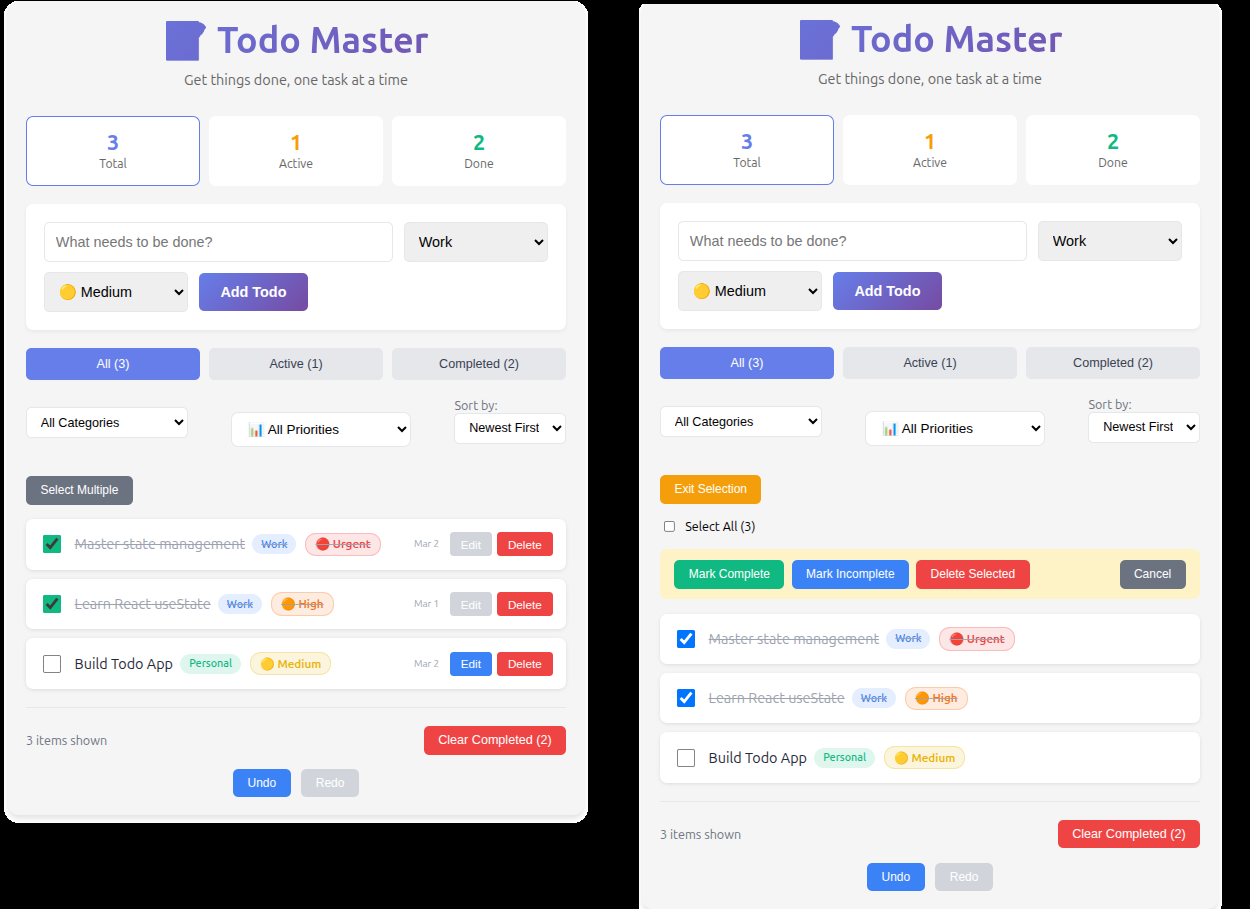
Bắt buộc (30 phút)
Bài Tập: Thêm Categories
Mở rộng ứng dụng todo với categories:
- Mỗi todo có category tùy chọn (Công việc, Cá nhân, Mua sắm, v.v.)
- Dropdown để chọn category khi thêm todo
- Lọc theo category
- Hiển thị badge category trên mỗi todo item
💡 Solution
/**
 * BÀI TẬP VỀ NHÀ 1: Add Categories
 *
 * Thêm category cho mỗi todo:
 * - Khi add: chọn category từ dropdown
 * - Hiển thị badge category trên mỗi todo item
 * - Thêm filter theo category (bao gồm "All Categories")
 */

// Thêm constants cho categories
const CATEGORIES = [
  { value: 'all', label: 'All Categories' },
  { value: 'work', label: 'Work', color: '#3b82f6' },
  { value: 'personal', label: 'Personal', color: '#10b981' },
  { value: 'shopping', label: 'Shopping', color: '#f59e0b' },
  { value: 'health', label: 'Health', color: '#ef4444' },
  { value: 'other', label: 'Other', color: '#8b5cf6' }
];

/**
 * CategoryBadge component
 * @param {string} category - category value ('work', 'personal', ...)
 */
function CategoryBadge({ category }) {
  if (category === 'all' || !category) return null;

  const cat = CATEGORIES.find(c => c.value === category);
  if (!cat) return null;

  return (
    <span style={{
      padding: '4px 10px',
      backgroundColor: cat.color + '22', // opacity 13%
      color: cat.color,
      borderRadius: '12px',
      fontSize: '12px',
      fontWeight: '500',
      marginLeft: '8px'
    }}>
      {cat.label}
    </span>
  );
}

/**
 * CategoryFilter component
 * @param {string} selectedCategory
 * @param {function} onCategoryChange
 */
function CategoryFilter({ selectedCategory, onCategoryChange }) {
  return (
    <div style={{ marginBottom: '16px' }}>
      <select
        value={selectedCategory}
        onChange={(e) => onCategoryChange(e.target.value)}
        style={{
          padding: '8px 12px',
          border: '2px solid #e5e7eb',
          borderRadius: '6px',
          fontSize: '14px',
          background: 'white',
          minWidth: '180px'
        }}
      >
        {CATEGORIES.map(cat => (
          <option key={cat.value} value={cat.value}>
            {cat.label}
          </option>
        ))}
      </select>
    </div>
  );
}

/**
 * AddTodoForm updated with category selection
 */
function AddTodoForm({ onAddTodo }) {
  const [input, setInput] = useState('');
  const [category, setCategory] = useState('work'); // default category

  const handleSubmit = (e) => {
    e.preventDefault();
    const trimmed = input.trim();
    if (!trimmed) return;

    onAddTodo(trimmed, category);
    setInput('');
    // category giữ nguyên hoặc reset về default nếu muốn
  };

  return (
    <form
      onSubmit={handleSubmit}
      style={{
        background: 'white',
        padding: '20px',
        borderRadius: '8px',
        marginBottom: '20px',
        boxShadow: '0 2px 4px rgba(0,0,0,0.05)'
      }}
    >
      <div style={{ display: 'flex', gap: '12px', flexWrap: 'wrap' }}>
        <input
          type="text"
          value={input}
          onChange={(e) => setInput(e.target.value)}
          placeholder="What needs to be done?"
          style={{ flex: 1, minWidth: '200px' }}
        />

        <select
          value={category}
          onChange={(e) => setCategory(e.target.value)}
          style={{
            padding: '12px',
            border: '2px solid #e5e7eb',
            borderRadius: '6px',
            fontSize: '16px'
          }}
        >
          {CATEGORIES.slice(1).map(cat => ( // bỏ "All Categories"
            <option key={cat.value} value={cat.value}>
              {cat.label}
            </option>
          ))}
        </select>

        <button
          type="submit"
          style={{
            padding: '12px 24px',
            background: 'linear-gradient(135deg, #667eea 0%, #764ba2 100%)',
            color: 'white',
            border: 'none',
            borderRadius: '6px',
            cursor: 'pointer',
            fontWeight: '600'
          }}
        >
          Add Todo
        </button>
      </div>
    </form>
  );
}

// Trong TodoApp - thêm state và logic
const [categoryFilter, setCategoryFilter] = useState('all');

// Khi add todo
const handleAddTodo = (text, category) => {
  const newTodo = {
    id: Date.now(),
    text,
    completed: false,
    createdAt: Date.now(),
    category // thêm field category
  };
  setTodos(prev => [...prev, newTodo]);
};

// Filtered todos - thêm điều kiện category
const filteredTodos = todos.filter(todo => {
  const matchStatus =
    filter === 'all' ? true :
    filter === 'active' ? !todo.completed :
    filter === 'completed' ? todo.completed : true;

  const matchCategory =
    categoryFilter === 'all' ? true :
    todo.category === categoryFilter;

  return matchStatus && matchCategory;
});

// Trong TodoItem - hiển thị badge
// Trong phần view mode, sau span text:
<span style={{
  flex: 1,
  textDecoration: todo.completed ? 'line-through' : 'none',
  color: todo.completed ? '#9ca3af' : '#1f2937',
  fontSize: '16px',
  display: 'flex',
  alignItems: 'center'
}}>
  {todo.text}
  <CategoryBadge category={todo.category} />
</span>

// Trong phần render filter UI - thêm CategoryFilter
// Ví dụ: ngay sau FilterButtons (All/Active/Completed)
<CategoryFilter
  selectedCategory={categoryFilter}
  onCategoryChange={setCategoryFilter}
/>

// Optional: Hiển thị số lượng trong filter category (nâng cao)
const categoryCounts = CATEGORIES.reduce((acc, cat) => {
  if (cat.value === 'all') {
    acc[cat.value] = todos.length;
  } else {
    acc[cat.value] = todos.filter(t => t.category === cat.value).length;
  }
  return acc;
}, {});

// Có thể hiển thị trong select hoặc label riêng

// Result example:
// → Add "Meeting with client" → category "Work"
// → Add "Buy groceries" → category "Shopping"
// → Chọn filter "Work" → chỉ thấy todos có category "work"
// → Badge màu xanh dương hiện bên cạnh text "Meeting with client"
// → Chọn "All Categories" → thấy toàn bộ todos bất kể category
Nâng cao (60 phút)
Bài Tập: Mức Độ Ưu Tiên
Thêm hệ thống mức độ ưu tiên:
- Mức độ ưu tiên: Thấp, Trung bình, Cao, Khẩn cấp
- Mã màu theo mức độ
- Sắp xếp theo mức độ ưu tiên
- Lọc theo mức độ ưu tiên
- Chỉ báo trực quan (🔴 🟡 🟢)
💡 Solution
/**
 * BÀI TẬP VỀ NHÀ NÂNG CAO: Priority Levels
 *
 * Thêm hệ thống priority cho mỗi todo:
 * - Priority: low, medium, high, urgent
 * - Color coding: 🔴 Urgent (red), 🟠 High (orange), 🟡 Medium (yellow), 🟢 Low (green)
 * - Visual indicators (emoji + colored badge)
 * - Sort by priority (urgent → high → medium → low)
 * - Filter by priority (bao gồm "All Priorities")
 */

// Constants cho priority
const PRIORITIES = [
  { value: 'all', label: 'All Priorities', color: '#6b7280', emoji: '📊' },
  { value: 'urgent', label: 'Urgent', color: '#ef4444', emoji: '🔴' },
  { value: 'high', label: 'High', color: '#f97316', emoji: '🟠' },
  { value: 'medium', label: 'Medium', color: '#eab308', emoji: '🟡' },
  { value: 'low', label: 'Low', color: '#10b981', emoji: '🟢' }
];

/**
 * PriorityBadge component
 * @param {string} priority - 'urgent' | 'high' | 'medium' | 'low'
 */
function PriorityBadge({ priority }) {
  if (priority === 'all' || !priority) return null;

  const pri = PRIORITIES.find(p => p.value === priority);
  if (!pri) return null;

  return (
    <span style={{
      display: 'inline-flex',
      alignItems: 'center',
      gap: '6px',
      padding: '4px 10px',
      backgroundColor: pri.color + '22',
      color: pri.color,
      borderRadius: '12px',
      fontSize: '13px',
      fontWeight: '600',
      marginLeft: '10px',
      border: `1px solid ${pri.color}44`
    }}>
      {pri.emoji} {pri.label}
    </span>
  );
}

/**
 * PriorityFilter component (dropdown)
 * @param {string} selectedPriority
 * @param {function} onPriorityChange
 */
function PriorityFilter({ selectedPriority, onPriorityChange }) {
  return (
    <div style={{ margin: '16px 0' }}>
      <select
        value={selectedPriority}
        onChange={(e) => onPriorityChange(e.target.value)}
        style={{
          padding: '10px 14px',
          border: '2px solid #e5e7eb',
          borderRadius: '8px',
          fontSize: '15px',
          background: 'white',
          minWidth: '200px',
          cursor: 'pointer'
        }}
      >
        {PRIORITIES.map(p => (
          <option key={p.value} value={p.value}>
            {p.emoji} {p.label}
          </option>
        ))}
      </select>
    </div>
  );
}

/**
 * AddTodoForm updated với priority selection
 */
function AddTodoForm({ onAddTodo }) {
  const [input, setInput] = useState('');
  const [priority, setPriority] = useState('medium'); // default medium

  const handleSubmit = (e) => {
    e.preventDefault();
    const trimmed = input.trim();
    if (!trimmed) return;

    onAddTodo(trimmed, priority);
    setInput('');
  };

  return (
    <form onSubmit={handleSubmit} style={{ /* giữ style cũ */ }}>
      <div style={{ display: 'flex', gap: '12px', flexWrap: 'wrap', alignItems: 'center' }}>
        <input
          type="text"
          value={input}
          onChange={(e) => setInput(e.target.value)}
          placeholder="What needs to be done?"
          style={{ flex: 1, minWidth: '220px' }}
        />

        <select
          value={priority}
          onChange={(e) => setPriority(e.target.value)}
          style={{
            padding: '12px',
            border: '2px solid #e5e7eb',
            borderRadius: '8px',
            fontSize: '16px',
            minWidth: '160px'
          }}
        >
          {PRIORITIES.slice(1).map(p => ( // bỏ All
            <option key={p.value} value={p.value}>
              {p.emoji} {p.label}
            </option>
          ))}
        </select>

        <button type="submit" style={{ /* giữ style nút Add */ }}>
          Add Todo
        </button>
      </div>
    </form>
  );
}

// Trong TodoApp - thêm state và logic
const [priorityFilter, setPriorityFilter] = useState('all');

// Khi add todo
const handleAddTodo = (text, priority) => {
  const newTodo = {
    id: Date.now(),
    text,
    completed: false,
    createdAt: Date.now(),
    category: 'work', // nếu đã có category từ bài trước
    priority        // thêm field priority
  };
  setTodos(prev => [...prev, newTodo]);
};

// Filtered todos - thêm điều kiện priority
const filteredTodos = todos.filter(todo => {
  const matchStatus = /* logic filter All/Active/Completed như cũ */;
  const matchCategory = /* logic category nếu có */;

  const matchPriority =
    priorityFilter === 'all' ? true :
    todo.priority === priorityFilter;

  return matchStatus && matchCategory && matchPriority;
});

// Sort by priority (sau khi filter, trước khi render)
const priorityOrder = {
  urgent: 4,
  high: 3,
  medium: 2,
  low: 1
};

const sortedTodos = [...filteredTodos].sort((a, b) => {
  const priA = priorityOrder[a.priority] || 0;
  const priB = priorityOrder[b.priority] || 0;
  return priB - priA; // cao hơn trước (urgent → low)
});

// Trong TodoItem - hiển thị priority badge
// Trong phần view mode, sau text:
<span style={{
  flex: 1,
  display: 'flex',
  alignItems: 'center',
  flexWrap: 'wrap'
}}>
  {todo.text}
  <PriorityBadge priority={todo.priority} />
  {/* nếu có category thì thêm CategoryBadge */}
</span>

// Trong render UI - thêm PriorityFilter
// Ví dụ: sau CategoryFilter (nếu có) hoặc sau FilterButtons
<PriorityFilter
  selectedPriority={priorityFilter}
  onPriorityChange={setPriorityFilter}
/>

// Optional: Hiển thị count trong filter
const priorityCounts = PRIORITIES.reduce((acc, p) => {
  acc[p.value] = p.value === 'all'
    ? todos.length
    : todos.filter(t => t.priority === p.value).length;
  return acc;
}, {});

// Có thể hiển thị trong option hoặc label riêng: {p.emoji} {p.label} ({priorityCounts[p.value]})

// Result example:
// → Add "Fix critical bug" → priority "urgent" → badge 🔴 Urgent (đỏ)
// → Add "Read article" → priority "low" → badge 🟢 Low (xanh)
// → Chọn filter "High" → chỉ thấy todos priority high
// → Todos được sắp xếp: Urgent đầu tiên → High → Medium → Low
// → Màu sắc badge giúp nhận biết nhanh mức độ quan trọng
FULL CODE TODO APP
💡 Xem Full Code
import { useEffect, useMemo, useState } from 'react';
// Constants for Filters
const FILTERS = {
ALL: 'all',
ACTIVE: 'active',
COMPLETED: 'completed',
};
// Constants for Categories
const CATEGORIES = [
{ value: 'all', label: 'All Categories' },
{ value: 'work', label: 'Work', color: '#3b82f6' },
{ value: 'personal', label: 'Personal', color: '#10b981' },
{ value: 'shopping', label: 'Shopping', color: '#f59e0b' },
{ value: 'health', label: 'Health', color: '#ef4444' },
{ value: 'other', label: 'Other', color: '#8b5cf6' },
];
// Constants for Priorities
const PRIORITIES = [
{ value: 'all', label: 'All Priorities', color: '#6b7280', emoji: '📊' },
{ value: 'urgent', label: 'Urgent', color: '#ef4444', emoji: '🔴' },
{ value: 'high', label: 'High', color: '#f97316', emoji: '🟠' },
{ value: 'medium', label: 'Medium', color: '#eab308', emoji: '🟡' },
{ value: 'low', label: 'Low', color: '#10b981', emoji: '🟢' },
];
const priorityOrder = {
urgent: 4,
high: 3,
medium: 2,
low: 1,
};
// Component: CategoryBadge
function CategoryBadge({ category }) {
if (category === 'all' || !category) return null;
const cat = CATEGORIES.find((c) => c.value === category);
if (!cat) return null;
return (
<span
style={{
padding: '4px 10px',
backgroundColor: cat.color + '22',
color: cat.color,
borderRadius: '12px',
fontSize: '12px',
fontWeight: '500',
marginLeft: '8px',
}}
>
{cat.label}
</span>
);
}
// Component: PriorityBadge
function PriorityBadge({ priority }) {
if (priority === 'all' || !priority) return null;
const pri = PRIORITIES.find((p) => p.value === priority);
if (!pri) return null;
return (
<span
style={{
display: 'inline-flex',
alignItems: 'center',
gap: '6px',
padding: '4px 10px',
backgroundColor: pri.color + '22',
color: pri.color,
borderRadius: '12px',
fontSize: '13px',
fontWeight: '600',
marginLeft: '10px',
border: `1px solid ${pri.color}44`,
}}
>
{pri.emoji} {pri.label}
</span>
);
}
// Component: AddTodoForm (with category and priority)
function AddTodoForm({ onAddTodo }) {
const [input, setInput] = useState('');
const [category, setCategory] = useState('work');
const [priority, setPriority] = useState('medium');
const handleSubmit = (e) => {
e.preventDefault();
const trimmed = input.trim();
if (!trimmed) return;
onAddTodo(trimmed, category, priority);
setInput('');
};
return (
<form
onSubmit={handleSubmit}
style={{
background: 'white',
padding: '20px',
borderRadius: '8px',
marginBottom: '20px',
boxShadow: '0 2px 4px rgba(0,0,0,0.05)',
}}
>
<div
style={{
display: 'flex',
gap: '12px',
flexWrap: 'wrap',
alignItems: 'center',
}}
>
<input
type='text'
value={input}
onChange={(e) => setInput(e.target.value)}
placeholder='What needs to be done?'
style={{
flex: 1,
padding: '12px',
fontSize: '16px',
border: '2px solid #e5e7eb',
borderRadius: '6px',
outline: 'none',
minWidth: '220px',
}}
onFocus={(e) => (e.target.style.borderColor = '#667eea')}
onBlur={(e) => (e.target.style.borderColor = '#e5e7eb')}
/>
<select
value={category}
onChange={(e) => setCategory(e.target.value)}
style={{
padding: '12px',
border: '2px solid #e5e7eb',
borderRadius: '6px',
fontSize: '16px',
minWidth: '160px',
}}
>
{CATEGORIES.slice(1).map((cat) => (
<option
key={cat.value}
value={cat.value}
>
{cat.label}
</option>
))}
</select>
<select
value={priority}
onChange={(e) => setPriority(e.target.value)}
style={{
padding: '12px',
border: '2px solid #e5e7eb',
borderRadius: '6px',
fontSize: '16px',
minWidth: '160px',
}}
>
{PRIORITIES.slice(1).map((p) => (
<option
key={p.value}
value={p.value}
>
{p.emoji} {p.label}
</option>
))}
</select>
<button
type='submit'
style={{
padding: '12px 24px',
background: 'linear-gradient(135deg, #667eea 0%, #764ba2 100%)',
color: 'white',
border: 'none',
borderRadius: '6px',
cursor: 'pointer',
fontWeight: '600',
fontSize: '16px',
whiteSpace: 'nowrap',
}}
>
Add Todo
</button>
</div>
</form>
);
}
// Component: SortDropdown
function SortDropdown({ sortBy, onSortChange }) {
return (
<div
style={{
marginBottom: '20px',
display: 'flex',
flexDirection: 'column',
alignItems: 'flex-start',
}}
>
<label
style={{ marginRight: '10px', fontSize: '14px', color: '#6b7280' }}
>
Sort by:
</label>
<select
value={sortBy}
onChange={(e) => onSortChange(e.target.value)}
style={{
padding: '8px 12px',
border: '2px solid #e5e7eb',
borderRadius: '6px',
fontSize: '14px',
cursor: 'pointer',
background: 'white',
}}
>
<option value='date-desc'>Newest First</option>
<option value='date-asc'>Oldest First</option>
<option value='alpha-asc'>A → Z</option>
<option value='alpha-desc'>Z → A</option>
</select>
</div>
);
}
// Component: CategoryFilter
function CategoryFilter({ selectedCategory, onCategoryChange }) {
return (
<div style={{ marginBottom: '16px' }}>
<select
value={selectedCategory}
onChange={(e) => onCategoryChange(e.target.value)}
style={{
padding: '8px 12px',
border: '2px solid #e5e7eb',
borderRadius: '6px',
fontSize: '14px',
background: 'white',
minWidth: '180px',
}}
>
{CATEGORIES.map((cat) => (
<option
key={cat.value}
value={cat.value}
>
{cat.label}
</option>
))}
</select>
</div>
);
}
// Component: PriorityFilter
function PriorityFilter({ selectedPriority, onPriorityChange }) {
return (
<div style={{ margin: '16px 0' }}>
<select
value={selectedPriority}
onChange={(e) => onPriorityChange(e.target.value)}
style={{
padding: '10px 14px',
border: '2px solid #e5e7eb',
borderRadius: '8px',
fontSize: '15px',
background: 'white',
minWidth: '200px',
cursor: 'pointer',
}}
>
{PRIORITIES.map((p) => (
<option
key={p.value}
value={p.value}
>
{p.emoji} {p.label}
</option>
))}
</select>
</div>
);
}
// Component: BulkActions
function BulkActions({
selectedCount,
onClearSelection,
onBulkDelete,
onBulkComplete,
onBulkIncomplete,
}) {
if (selectedCount === 0) return null;
return (
<div
style={{
background: '#fef3c7',
padding: '12px 16px',
borderRadius: '8px',
margin: '16px 0',
display: 'flex',
alignItems: 'center',
gap: '16px',
flexWrap: 'wrap',
}}
>
<div style={{ display: 'flex', gap: '8px', flexWrap: 'wrap' }}>
<button
onClick={onBulkComplete}
style={{
padding: '8px 16px',
background: '#10b981',
color: 'white',
border: 'none',
borderRadius: '6px',
cursor: 'pointer',
}}
>
Mark Complete
</button>
<button
onClick={onBulkIncomplete}
style={{
padding: '8px 16px',
background: '#3b82f6',
color: 'white',
border: 'none',
borderRadius: '6px',
cursor: 'pointer',
}}
>
Mark Incomplete
</button>
<button
onClick={onBulkDelete}
style={{
padding: '8px 16px',
background: '#ef4444',
color: 'white',
border: 'none',
borderRadius: '6px',
cursor: 'pointer',
}}
>
Delete Selected
</button>
</div>
<button
onClick={onClearSelection}
style={{
padding: '8px 16px',
background: '#6b7280',
color: 'white',
border: 'none',
borderRadius: '6px',
cursor: 'pointer',
marginLeft: 'auto',
}}
>
Cancel
</button>
</div>
);
}
// Component: TodoItem (with edit mode, selection, category, priority)
function TodoItem({
todo,
isEditing,
selectionMode,
isSelected,
onToggle,
onDelete,
onStartEdit,
onSaveEdit,
onCancelEdit,
onSelectToggle,
}) {
const [editText, setEditText] = useState(todo.text);
useEffect(() => {
if (isEditing) setEditText(todo.text);
}, [isEditing, todo.text]);
const handleSave = () => {
const trimmed = editText.trim();
if (!trimmed) return;
onSaveEdit(todo.id, trimmed);
};
const handleKeyPress = (e) => {
if (e.key === 'Enter') handleSave();
else if (e.key === 'Escape') onCancelEdit();
};
if (isEditing) {
return (
<div
style={{
background: '#fffbeb',
padding: '15px',
borderRadius: '8px',
marginBottom: '10px',
border: '2px solid #f59e0b',
boxShadow: '0 2px 4px rgba(0,0,0,0.1)',
}}
>
<input
type='text'
value={editText}
onChange={(e) => setEditText(e.target.value)}
onKeyDown={handleKeyPress}
autoFocus
style={{
width: '100%',
padding: '10px',
fontSize: '16px',
border: '1px solid #d1d5db',
borderRadius: '4px',
marginBottom: '10px',
boxSizing: 'border-box',
}}
/>
<div
style={{ display: 'flex', gap: '8px', justifyContent: 'flex-end' }}
>
<button
onClick={onCancelEdit}
style={{
padding: '8px 16px',
background: '#6b7280',
color: 'white',
border: 'none',
borderRadius: '4px',
cursor: 'pointer',
fontSize: '14px',
}}
>
Cancel
</button>
<button
onClick={handleSave}
disabled={!editText.trim()}
style={{
padding: '8px 16px',
background: editText.trim() ? '#10b981' : '#9ca3af',
color: 'white',
border: 'none',
borderRadius: '4px',
cursor: editText.trim() ? 'pointer' : 'not-allowed',
fontSize: '14px',
}}
>
Save
</button>
</div>
<div style={{ fontSize: '12px', color: '#6b7280', marginTop: '8px' }}>
Press Enter to save, Escape to cancel
</div>
</div>
);
}
return (
<div
style={{
background: 'white',
padding: '15px',
borderRadius: '8px',
marginBottom: '10px',
display: 'flex',
alignItems: 'center',
gap: '12px',
boxShadow: '0 1px 3px rgba(0,0,0,0.1)',
transition: 'all 0.2s',
}}
>
{selectionMode ? (
<input
type='checkbox'
checked={isSelected}
onChange={() => onSelectToggle(todo.id)}
style={{ width: '20px', height: '20px', cursor: 'pointer' }}
/>
) : (
<input
type='checkbox'
checked={todo.completed}
onChange={() => onToggle(todo.id)}
style={{
width: '20px',
height: '20px',
cursor: 'pointer',
accentColor: '#10b981',
}}
/>
)}
<span
style={{
flex: 1,
textDecoration: todo.completed ? 'line-through' : 'none',
color: todo.completed ? '#9ca3af' : '#1f2937',
fontSize: '16px',
wordBreak: 'break-word',
display: 'flex',
alignItems: 'center',
flexWrap: 'wrap',
}}
>
{todo.text}
<CategoryBadge category={todo.category} />
<PriorityBadge priority={todo.priority} />
</span>
{!selectionMode && (
<>
<span
style={{
fontSize: '11px',
color: '#9ca3af',
whiteSpace: 'nowrap',
}}
>
{new Date(todo.createdAt).toLocaleDateString('en-US', {
month: 'short',
day: 'numeric',
})}
</span>
<div style={{ display: 'flex', gap: '6px' }}>
<button
onClick={() => onStartEdit(todo.id)}
disabled={todo.completed}
style={{
padding: '6px 12px',
background: todo.completed ? '#d1d5db' : '#3b82f6',
color: 'white',
border: 'none',
borderRadius: '4px',
cursor: todo.completed ? 'not-allowed' : 'pointer',
fontSize: '13px',
fontWeight: '500',
}}
>
Edit
</button>
<button
onClick={() => onDelete(todo.id)}
style={{
padding: '6px 12px',
background: '#ef4444',
color: 'white',
border: 'none',
borderRadius: '4px',
cursor: 'pointer',
fontSize: '13px',
fontWeight: '500',
}}
>
Delete
</button>
</div>
</>
)}
</div>
);
}
// Component: TodoList (with empty state)
function TodoList({
todos,
editingId,
selectionMode,
selectedIds,
onToggle,
onDelete,
onStartEdit,
onSaveEdit,
onCancelEdit,
onSelectToggle,
}) {
if (todos.length === 0) {
return (
<div
style={{
textAlign: 'center',
padding: '60px 20px',
color: '#9ca3af',
}}
>
<div style={{ fontSize: '4em', marginBottom: '10px' }}>📭</div>
<p style={{ fontSize: '1.1em', margin: 0 }}>No todos yet!</p>
<p style={{ fontSize: '0.9em', margin: '5px 0 0 0' }}>
Add one above to get started
</p>
</div>
);
}
return (
<div style={{ marginBottom: '20px' }}>
{todos.map((todo) => (
<TodoItem
key={todo.id}
todo={todo}
isEditing={editingId === todo.id}
selectionMode={selectionMode}
isSelected={selectedIds.has(todo.id)}
onToggle={onToggle}
onDelete={onDelete}
onStartEdit={onStartEdit}
onSaveEdit={onSaveEdit}
onCancelEdit={onCancelEdit}
onSelectToggle={onSelectToggle}
/>
))}
</div>
);
}
// Main Component: TodoApp (full integration)
function TodoApp() {
const initialTodos = [
{
id: 1,
text: 'Learn React useState',
completed: true,
createdAt: Date.now() - 86400000,
category: 'work',
priority: 'high',
},
{
id: 2,
text: 'Build Todo App',
completed: false,
createdAt: Date.now() - 3600000,
category: 'personal',
priority: 'medium',
},
{
id: 3,
text: 'Master state management',
completed: false,
createdAt: Date.now(),
category: 'work',
priority: 'urgent',
},
];
const [todos, setTodos] = useState(initialTodos);
const [filter, setFilter] = useState(FILTERS.ALL);
const [categoryFilter, setCategoryFilter] = useState('all');
const [priorityFilter, setPriorityFilter] = useState('all');
const [sortBy, setSortBy] = useState('date-desc');
const [editingId, setEditingId] = useState(null);
const [selectionMode, setSelectionMode] = useState(false);
const [selectedIds, setSelectedIds] = useState(new Set());
const [history, setHistory] = useState([initialTodos]);
const [currentIndex, setCurrentIndex] = useState(0);
const MAX_HISTORY = 10;
// Save to history helper
const saveToHistory = (newTodos) => {
setHistory((prev) => {
const newHistory = [...prev.slice(0, currentIndex + 1), newTodos];
return newHistory.length > MAX_HISTORY
? newHistory.slice(newHistory.length - MAX_HISTORY)
: newHistory;
});
setCurrentIndex((prev) => Math.min(prev + 1, MAX_HISTORY - 1));
};
// Handlers with history
const handleAddTodo = (text, category, priority) => {
const newTodo = {
id: Date.now(),
text,
completed: false,
createdAt: Date.now(),
category,
priority,
};
setTodos((prev) => {
const updated = [...prev, newTodo];
saveToHistory(updated);
return updated;
});
};
const handleToggleTodo = (id) => {
setTodos((prev) => {
const updated = prev.map((todo) =>
todo.id === id ? { ...todo, completed: !todo.completed } : todo,
);
saveToHistory(updated);
return updated;
});
};
const handleDeleteTodo = (id) => {
setTodos((prev) => {
const updated = prev.filter((todo) => todo.id !== id);
saveToHistory(updated);
return updated;
});
if (editingId === id) setEditingId(null);
};
const handleStartEdit = (id) => {
setEditingId(id);
};
const handleSaveEdit = (id, newText) => {
setTodos((prev) => {
const updated = prev.map((todo) =>
todo.id === id ? { ...todo, text: newText } : todo,
);
saveToHistory(updated);
return updated;
});
setEditingId(null);
};
const handleCancelEdit = () => {
setEditingId(null);
};
const handleClearCompleted = () => {
setTodos((prev) => {
const updated = prev.filter((todo) => !todo.completed);
saveToHistory(updated);
return updated;
});
};
const toggleSelectionMode = () => {
setSelectionMode((prev) => !prev);
if (selectionMode) setSelectedIds(new Set());
};
const handleSelectToggle = (id) => {
setSelectedIds((prev) => {
const newSet = new Set(prev);
if (newSet.has(id)) newSet.delete(id);
else newSet.add(id);
return newSet;
});
};
const handleSelectAll = () => {
if (selectedIds.size === filteredTodos.length) {
setSelectedIds(new Set());
} else {
setSelectedIds(new Set(filteredTodos.map((t) => t.id)));
}
};
const handleBulkDelete = () => {
setTodos((prev) => {
const updated = prev.filter((todo) => !selectedIds.has(todo.id));
saveToHistory(updated);
return updated;
});
setSelectedIds(new Set());
setSelectionMode(false);
};
const handleBulkComplete = (completed = true) => {
setTodos((prev) => {
const updated = prev.map((todo) =>
selectedIds.has(todo.id) ? { ...todo, completed } : todo,
);
saveToHistory(updated);
return updated;
});
setSelectedIds(new Set());
setSelectionMode(false);
};
const handleUndo = () => {
if (currentIndex <= 0) return;
const previousIndex = currentIndex - 1;
setCurrentIndex(previousIndex);
setTodos(history[previousIndex]);
};
const handleRedo = () => {
if (currentIndex >= history.length - 1) return;
const nextIndex = currentIndex + 1;
setCurrentIndex(nextIndex);
setTodos(history[nextIndex]);
};
// Keyboard shortcuts for undo/redo
useEffect(() => {
const handleKeyDown = (e) => {
if (e.ctrlKey || e.metaKey) {
if (e.key.toLowerCase() === 'z') {
e.preventDefault();
handleUndo();
} else if (e.key.toLowerCase() === 'y') {
e.preventDefault();
handleRedo();
}
}
};
window.addEventListener('keydown', handleKeyDown);
return () => window.removeEventListener('keydown', handleKeyDown);
}, [currentIndex, history]);
// Derived stats
const stats = useMemo(
() => ({
total: todos.length,
active: todos.filter((t) => !t.completed).length,
completed: todos.filter((t) => t.completed).length,
}),
[todos],
);
// Filtered todos (with category and priority)
const filteredTodos = todos.filter((todo) => {
const matchStatus =
filter === FILTERS.ALL
? true
: filter === FILTERS.ACTIVE
? !todo.completed
: filter === FILTERS.COMPLETED
? todo.completed
: true;
const matchCategory =
categoryFilter === 'all' ? true : todo.category === categoryFilter;
const matchPriority =
priorityFilter === 'all' ? true : todo.priority === priorityFilter;
return matchStatus && matchCategory && matchPriority;
});
// Sorted todos (after filter)
const sortedTodos = [...filteredTodos].sort((a, b) => {
const priA = priorityOrder[a.priority] || 0;
const priB = priorityOrder[b.priority] || 0;
const priDiff = priB - priA;
if (priDiff !== 0) return priDiff; // Sort by priority first
switch (sortBy) {
case 'date-desc':
return b.createdAt - a.createdAt;
case 'date-asc':
return a.createdAt - b.createdAt;
case 'alpha-asc':
return a.text.localeCompare(b.text);
case 'alpha-desc':
return b.text.localeCompare(a.text);
default:
return 0;
}
});
return (
<div
style={{
maxWidth: '600px',
margin: '40px auto',
padding: '20px',
fontFamily: 'system-ui, -apple-system, sans-serif',
background: '#f5f5f5',
borderRadius: '12px',
boxShadow: '0 4px 6px rgba(0,0,0,0.1)',
}}
>
{/* Header */}
<div style={{ textAlign: 'center', marginBottom: '30px' }}>
<h1
style={{
fontSize: '2.5em',
margin: '0 0 10px 0',
background: 'linear-gradient(135deg, #667eea 0%, #764ba2 100%)',
WebkitBackgroundClip: 'text',
WebkitTextFillColor: 'transparent',
backgroundClip: 'text',
}}
>
📝 Todo Master
</h1>
<p style={{ color: '#666', margin: 0 }}>
Get things done, one task at a time
</p>
</div>
{/* Stats */}
<div
style={{
display: 'grid',
gridTemplateColumns: 'repeat(3, 1fr)',
gap: '10px',
marginBottom: '20px',
}}
>
<div
style={{
background: 'white',
padding: '15px',
borderRadius: '8px',
textAlign: 'center',
cursor: 'pointer',
transition: 'transform 0.2s',
border:
filter === 'all' ? '2px solid #667eea' : '2px solid transparent',
}}
onClick={() => setFilter(FILTERS.ALL)}
>
<div
style={{ fontSize: '1.5em', fontWeight: 'bold', color: '#667eea' }}
>
{stats.total}
</div>
<div style={{ fontSize: '0.85em', color: '#666' }}>Total</div>
</div>
<div
style={{
background: 'white',
padding: '15px',
borderRadius: '8px',
textAlign: 'center',
cursor: 'pointer',
transition: 'transform 0.2s',
border:
filter === 'active'
? '2px solid #f59e0b'
: '2px solid transparent',
}}
onClick={() => setFilter(FILTERS.ACTIVE)}
>
<div
style={{ fontSize: '1.5em', fontWeight: 'bold', color: '#f59e0b' }}
>
{stats.active}
</div>
<div style={{ fontSize: '0.85em', color: '#666' }}>Active</div>
</div>
<div
style={{
background: 'white',
padding: '15px',
borderRadius: '8px',
textAlign: 'center',
cursor: 'pointer',
transition: 'transform 0.2s',
border:
filter === 'completed'
? '2px solid #10b981'
: '2px solid transparent',
}}
onClick={() => setFilter(FILTERS.COMPLETED)}
>
<div
style={{ fontSize: '1.5em', fontWeight: 'bold', color: '#10b981' }}
>
{stats.completed}
</div>
<div style={{ fontSize: '0.85em', color: '#666' }}>Done</div>
</div>
</div>
{/* Add Form */}
<AddTodoForm onAddTodo={handleAddTodo} />
{/* Filter Buttons */}
<div
style={{
display: 'flex',
gap: '10px',
marginBottom: '20px',
}}
>
{[
{ key: FILTERS.ALL, label: `All (${stats.total})` },
{ key: FILTERS.ACTIVE, label: `Active (${stats.active})` },
{ key: FILTERS.COMPLETED, label: `Completed (${stats.completed})` },
].map(({ key, label }) => (
<button
key={key}
onClick={() => setFilter(key)}
style={{
flex: 1,
padding: '10px',
border: 'none',
borderRadius: '6px',
background: filter === key ? '#667eea' : '#e5e7eb',
color: filter === key ? 'white' : '#374151',
cursor: 'pointer',
fontWeight: '500',
fontSize: '14px',
transition: 'all 0.2s',
}}
>
{label}
</button>
))}
</div>
<div
style={{
display: 'flex',
alignItems: 'center',
gap: '1rem',
flexWrap: 'wrap',
justifyContent: 'space-between',
}}
>
{/* Category Filter */}
<CategoryFilter
selectedCategory={categoryFilter}
onCategoryChange={setCategoryFilter}
/>
{/* Priority Filter */}
<PriorityFilter
selectedPriority={priorityFilter}
onPriorityChange={setPriorityFilter}
/>
{/* Sort Dropdown */}
<SortDropdown
sortBy={sortBy}
onSortChange={setSortBy}
/>
{/* Selection Mode Toggle */}
<button
onClick={toggleSelectionMode}
style={{
padding: '8px 16px',
background: selectionMode ? '#f59e0b' : '#6b7280',
color: 'white',
border: 'none',
borderRadius: '6px',
marginBottom: '16px',
cursor: 'pointer',
}}
>
{selectionMode ? 'Exit Selection' : 'Select Multiple'}
</button>
</div>
{/* Select All Checkbox */}
{selectionMode && (
<div style={{ marginBottom: '12px', fontSize: '14px' }}>
<label style={{ display: 'flex', alignItems: 'center', gap: '8px' }}>
<input
type='checkbox'
checked={
selectedIds.size === sortedTodos.length &&
sortedTodos.length > 0
}
onChange={handleSelectAll}
/>
Select All ({sortedTodos.length})
</label>
</div>
)}
{/* Bulk Actions */}
<BulkActions
selectedCount={selectedIds.size}
onClearSelection={() => {
setSelectedIds(new Set());
setSelectionMode(false);
}}
onBulkDelete={handleBulkDelete}
onBulkComplete={() => handleBulkComplete(true)}
onBulkIncomplete={() => handleBulkComplete(false)}
/>
{/* Todo List */}
<TodoList
todos={sortedTodos}
editingId={editingId}
selectionMode={selectionMode}
selectedIds={selectedIds}
onToggle={handleToggleTodo}
onDelete={handleDeleteTodo}
onStartEdit={handleStartEdit}
onSaveEdit={handleSaveEdit}
onCancelEdit={handleCancelEdit}
onSelectToggle={handleSelectToggle}
/>
{/* Footer */}
<div
style={{
display: 'flex',
justifyContent: 'space-between',
alignItems: 'center',
paddingTop: '20px',
borderTop: '1px solid #e5e7eb',
}}
>
<div style={{ fontSize: '14px', color: '#6b7280' }}>
{sortedTodos.length} {sortedTodos.length === 1 ? 'item' : 'items'}{' '}
shown
</div>
<button
onClick={handleClearCompleted}
disabled={stats.completed === 0}
style={{
padding: '8px 16px',
background: stats.completed > 0 ? '#ef4444' : '#d1d5db',
color: 'white',
border: 'none',
borderRadius: '6px',
cursor: stats.completed > 0 ? 'pointer' : 'not-allowed',
fontSize: '14px',
fontWeight: '500',
}}
>
Clear Completed ({stats.completed})
</button>
</div>
{/* Undo/Redo Buttons */}
<div
style={{
display: 'flex',
gap: '12px',
marginTop: '16px',
justifyContent: 'center',
}}
>
<button
onClick={handleUndo}
disabled={currentIndex <= 0}
title='Undo (Ctrl+Z)'
style={{
padding: '8px 16px',
background: currentIndex <= 0 ? '#d1d5db' : '#3b82f6',
color: 'white',
border: 'none',
borderRadius: '6px',
cursor: currentIndex <= 0 ? 'not-allowed' : 'pointer',
}}
>
Undo
</button>
<button
onClick={handleRedo}
disabled={currentIndex >= history.length - 1}
title='Redo (Ctrl+Y)'
style={{
padding: '8px 16px',
background:
currentIndex >= history.length - 1 ? '#d1d5db' : '#10b981',
color: 'white',
border: 'none',
borderRadius: '6px',
cursor:
currentIndex >= history.length - 1 ? 'not-allowed' : 'pointer',
}}
>
Redo
</button>
</div>
</div>
);
}
export default TodoApp;📚 TÀI LIỆU THAM KHẢO
Bắt buộc đọc
React Docs - Thinking in React
- https://react.dev/learn/thinking-in-react
- How to approach building apps
Review Ngày 11-14
- useState patterns
- Lifting state up
- Forms
- All concepts used today
Đọc thêm
- Component Design Patterns
- Presentational vs Container components
- Composition patterns
🔗 KẾT NỐI KIẾN THỨC
Kiến thức đã áp dụng (Ngày 11-14)
- Ngày 11: useState basics
- Ngày 12: Functional updates, immutability, state structure
- Ngày 13: Forms, controlled components, validation
- Ngày 14: Lifting state up, props drilling
Hướng tới (sẽ học)
- Ngày 17-21: useEffect - Add localStorage persistence
- Ngày 23-28: Performance - Optimize re-renders
- Ngày 30: useReducer - Alternative state management
💡 SENIOR INSIGHTS
Production Considerations
Accessibility:
// ✅ Add ARIA labels
<button aria-label="Delete todo">Delete</button>
<input aria-describedby="todo-help" />
Performance:
// ⚠️ Hiện tại: Lọc lại mỗi lần render
const filteredTodos = todos.filter(...);

// ✅ Sau này: Memoize bằng useMemo (Ngày 23)
const filteredTodos = useMemo(() => todos.filter(...), [todos, filter]);
Testing Considerations:
- Hàm thuần (pure functions) dễ kiểm thử (validator, filter)
- Kiểm thử component (sẽ học sau)
- Kiểm thử tích hợp
🎯 TIẾP THEO LÀ GÌ
Ngày 16: Review Tuần 1–2
Ngày mai chúng ta sẽ:
- Review tất cả các khái niệm từ Ngày 11–15
- Các lỗi thường gặp & cách tránh
- Tổng hợp best practices
- Phiên Hỏi & Đáp
- Chuẩn bị cho Tuần 3
🎊 CHÚC MỪNG! Bạn đã hoàn thành Project 2!
Hôm nay bạn đã build một production-ready todo app sử dụng:
- ✅ useState với tất cả patterns
- ✅ State lifting và component architecture
- ✅ Forms và controlled components
- ✅ CRUD operations
- ✅ Filtering và derived state
- ✅ Edit mode và complex interactions
This is a real app! Bạn có thể deploy nó, show portfolio, hoặc extend thêm features!
💪 Great job! Tomorrow: Review & consolidate!
React State Management — Tham chiếu tư duy cho Senior
Ngày 11–15 | useState → Patterns → Forms → Lifting State → Project
Senior không nhớ code, họ nhớ concepts, trade-offs và khi nào dùng gì.
MỤC LỤC
- Bản đồ tổng thể — Big Picture
- Dạng bài tập & nhận dạng vấn đề
- 5 Core Patterns — Bản chất & khi nào dùng
- Form Patterns — Chiến lược validation
- Lifting State Up — Nguyên tắc đặt state
- Architecture Project — Checklist thiết kế
- Anti-patterns cần tránh
- Interview Questions — Theo level
- War Stories — Bài học thực tế
- Decision Framework nhanh
1. Bản đồ tổng thể
useState Basics (N11)
    ↓
useState Patterns (N12)         ← 5 patterns nâng cao
    ↓
Forms với State (N13)           ← Áp dụng patterns vào forms
    ↓
Lifting State Up (N14)          ← Chia sẻ state giữa components
    ↓
Project: Todo App (N15)         ← Kết hợp tất cả
Triết lý xuyên suốt:
- State = nguồn sự thật duy nhất (single source of truth)
- UI là hàm của state:
UI = f(state) - Đừng lưu những gì có thể tính được (no derived state)
- Đặt state càng gần nơi dùng càng tốt
2. Dạng bài tập & nhận dạng vấn đề
DẠNG 1 — Counter / Toggle đơn giản
Nhận dạng: Click để tăng/giảm, bật/tắt
Bẫy thường gặp: Dùng biến thường thay vì state → không re-render
Hướng giải: useState với setter, nhớ dùng functional update nếu update nhiều lần trong 1 handler
DẠNG 2 — Multiple setState trong cùng handler
Nhận dạng: "Tại sao click 3 lần mà chỉ tăng 1?"
Bẫy: Dùng setState(state + 1) nhiều lần → tất cả đọc cùng snapshot
Hướng giải: setState(prev => prev + 1) — functional update đảm bảo dùng giá trị mới nhất
DẠNG 3 — Async update (setTimeout, fetch)
Nhận dạng: Giá trị state bị "cũ" sau 1-2 giây
Bẫy: Closure capture state tại thời điểm tạo hàm, không phải lúc chạy
Hướng giải: Luôn dùng functional update trong async operations
DẠNG 4 — State nặng / khởi tạo đắt
Nhận dạng: useState(readFromLocalStorage()) — hàm chạy mỗi render dù chỉ cần 1 lần
Bẫy: Truyền giá trị vào useState thay vì truyền hàm
Hướng giải: Lazy initialization — truyền function: useState(() => readFromLocalStorage())
DẠNG 5 — Update object/array trong state
Nhận dạng: Sửa trực tiếp user.age = 26 → React không nhận ra thay đổi
Bẫy: Mutation trực tiếp → same reference → no re-render
Hướng giải: Luôn tạo object/array mới: spread operator, map, filter, slice
DẠNG 6 — Derived state được store riêng
Nhận dạng: completedCount, fullName, isValid được lưu song song với source data
Bẫy: Update source → quên update derived → bug out-of-sync
Hướng giải: Tính toán trực tiếp từ state, không store
DẠNG 7 — Form nhiều field
Nhận dạng: Form có 5+ inputs, mỗi cái 1 state riêng
Bẫy: Code dài, khó reset, khó submit
Hướng giải: Object state + generic handler dùng e.target.name
DẠNG 8 — Validation timing
Nhận dạng: "Validate khi nào? onChange, onBlur, hay onSubmit?"
Bẫy: Validate ngay onChange → lỗi hiện khi user chưa kịp gõ xong
Hướng giải: 3 lớp: onBlur (hiện lỗi) + onChange (xóa lỗi) + onSubmit (kiểm tra tổng)
DẠNG 9 — Siblings cần share state
Nhận dạng: Component A và B ngang hàng, cả 2 cần cùng 1 data
Bẫy: Đặt state trong A → B không đọc được
Hướng giải: Lift state lên parent chung gần nhất
DẠNG 10 — Props drilling quá sâu
Nhận dạng: Props đi qua 3+ lớp component, nhiều component chỉ "chuyển hàng"
Bẫy: Lift quá cao → mọi thứ re-render khi state thay đổi
Hướng giải: Dưới 3 lớp thì dùng lifting; từ 3 lớp trở lên → cân nhắc Context
DẠNG 11 — Edit mode trong list item
Nhận dạng: Click "Edit" vào 1 item, item đó chuyển sang input field
Bẫy: Lưu editingId trong từng item thay vì ở parent
Hướng giải: editingId ở parent (chỉ 1 item được edit tại 1 thời điểm), input value là local state của item
DẠNG 12 — CRUD với array state
Nhận dạng: Add, delete, edit items trong danh sách
Bẫy: Mutation trực tiếp array
Hướng giải:
- Add:
[...prev, newItem] - Delete:
prev.filter(item => item.id !== id) - Edit:
prev.map(item => item.id === id ? {...item, ...changes} : item)
3. 5 Core Patterns
PATTERN 1 — Functional Updates
Bản chất: Thay vì đọc state hiện tại (có thể stale), truyền hàm nhận giá trị mới nhất
Khi nào dùng:
- Nhiều lần update trong cùng 1 event handler
- Update trong setTimeout/setInterval/fetch callback
- Update phụ thuộc vào giá trị trước đó
Mental model: "Gửi lệnh tăng lương 10%" thay vì "đặt lương = 5.5 triệu" (vì có thể đã thay đổi rồi)
PATTERN 2 — Lazy Initialization
Bản chất: useState nhận function, React chỉ gọi 1 lần lúc mount, không gọi lại mỗi render
Khi nào dùng:
- Đọc từ localStorage/sessionStorage
- Parse JSON lớn
- Heavy computation để tạo initial data
Mental model: "Nấu cơm 1 lần, không nấu lại mỗi lần ăn"
Dấu hiệu cần dùng: Thấy mình gọi hàm nặng làm tham số useState → thêm arrow function bọc lại
PATTERN 3 — State Structure Design
Bản chất: Quyết định nên chia nhiều state nhỏ hay gộp vào 1 object
Khi gộp vào object:
- Các field luôn update cùng nhau (form data)
- Liên quan về mặt ngữ nghĩa
Khi chia nhỏ:
- Các giá trị update độc lập nhau
- Cần tối ưu re-render từng phần
Rule of thumb: Related data → group; Independent data → separate
Tuyệt đối không: Store derived values (đếm, tổng, computed flags)
PATTERN 4 — Immutability
Bản chất: React so sánh reference, không so sánh deep. Cùng reference = bỏ qua, không re-render
Object: Tạo object mới với spread, chỉ override field cần thay đổi
Array thêm: Spread kết hợp item mới
Array xóa: filter trả về array mới
Array sửa: map, nếu đúng id thì trả object mới, không thì giữ nguyên
Nested: Phải tạo mới từng lớp chứa thay đổi (immer.js giải quyết vấn đề này)
Mental model: "Viết email mới thay vì sửa email đã gửi"
PATTERN 5 — Derived State (No-store)
Bản chất: Bất cứ giá trị nào có thể tính được từ state hiện có thì KHÔNG store, chỉ tính
Luôn tính, không store:
- Count, total, average từ array
- fullName từ firstName + lastName
- isValid từ form fields
- filteredList từ list + filter criteria
Trade-off: Re-compute mỗi render (dùng useMemo khi danh sách quá lớn, học Ngày 23)
Ưu tiên: Luôn đúng > tối ưu sớm
4. Form Patterns
Controlled vs Uncontrolled
| Controlled | Uncontrolled | |
|---|---|---|
| State ở đâu | React state | DOM |
| Cách lấy value | Từ state | ref hoặc e.target.elements |
| Realtime validation | ✅ | ❌ |
| Dynamic UI | ✅ | ❌ |
| Khi nào dùng | 95% cases | File input, tích hợp thư viện cũ |
Controlled = Single Source of Truth. Input có value={state} và onChange cập nhật state.
Multiple Inputs — Generic Handler Pattern
Ý tưởng: Thay vì viết handler riêng cho từng field, dùng name attribute để map vào object state
Yêu cầu: Mỗi input có name trùng với key trong state object
Cú pháp: { ...prev, [e.target.name]: e.target.value }
Lợi ích: Reset form chỉ cần 1 dòng, submit chỉ cần gửi object
Validation Strategy — 3 Lớp
onChange → Xóa lỗi (UX: đang sửa không nên bị la)
onBlur  → Validate field, show lỗi nếu có (UX: đã rời field thì check)
onSubmit → Validate tất cả + mark all touched (UX: chặn submit cuối cùng)
Touched Pattern: Chỉ hiện lỗi của field đã được tương tác (touched = true). Không hiện lỗi ngay khi form mới load.
Cross-field Validation: Khi password thay đổi, phải re-validate confirmPassword. Khi field A thay đổi mà field B phụ thuộc A → re-validate B.
Security Rule: Client validation chỉ là UX. Server PHẢI validate lại. Không bao giờ tin tưởng client.
Form State Structure
formData: { field1, field2, ... }    ← giá trị inputs
errors: { field1, field2, ... }      ← lỗi validation
touched: { field1, field2, ... }     ← đã tương tác chưa
isSubmitting: boolean                ← đang gửi không
isValid: Derived — tính từ errors object, không store riêng
5. Lifting State Up
Nguyên tắc vàng
Đặt state tại closest common ancestor — cha chung gần nhất của tất cả components cần dùng state đó
Không phải: Lift lên App hoặc lên cao nhất có thể
Đúng là: Lift vừa đủ để các components cần thiết đều access được
Khi nào Lift, khi nào không
Lift khi:
- Hai sibling cần cùng data
- Parent cần biết/kiểm soát state của child
Không Lift khi:
- Chỉ 1 component dùng
- UI state thuần (hover, focus, animation)
- Component-specific logic
Inverse Data Flow (Child → Parent)
Bản chất: React chỉ có data flow 1 chiều (top-down). Child muốn báo cho parent thì gọi callback được truyền xuống qua props.
Pattern: Parent định nghĩa handler, truyền xuống qua props, child gọi khi cần
Ví dụ tiêu biểu: AddTodoForm nhận onAddTodo prop, khi submit thì gọi onAddTodo(newTodo). State todos nằm ở TodoApp.
Props Drilling — Khi nào là vấn đề
| Depth | Giải pháp |
|---|---|
| 1–2 lớp | Props bình thường, chấp nhận được |
| 3+ lớp | Bắt đầu cân nhắc Context API |
| Global (auth, theme, lang) | Context / State management library |
Dấu hiệu cần refactor: Component nhận prop chỉ để truyền tiếp, không dùng.
Performance với Lifting
Rủi ro: Lift quá cao → state thay đổi → tất cả children re-render kể cả không liên quan
Giải pháp: Giữ state local khi có thể. Ví dụ: search bar nên có state local thay vì lift lên App.
Tương lai: React.memo, useMemo, useCallback (Ngày 23)
6. Architecture Project
Checklist thiết kế component tree
Trước khi code, tự hỏi:
- State ở đâu? → Ai cần đọc? Ai cần write? Closest common ancestor là ai?
- Cái gì là derived? → Filter list, count, stats → KHÔNG store, chỉ tính
- Local hay shared? → Input buffer khi gõ → local; filter dùng bởi nhiều component → shared
- Callback đi đâu? → Define ở nơi có state, pass xuống cho component cần trigger
Phân loại state trong Todo App (ví dụ kinh điển)
| State | Loại | Đặt ở |
|---|---|---|
todos[] | Shared source data | TodoApp |
filter | Shared UI state | TodoApp |
inputText | Local (chỉ AddForm dùng) | AddTodoForm |
editText | Local (chỉ TodoItem dùng khi edit) | TodoItem |
editingId | Shared (parent cần biết item nào đang edit) | TodoApp |
filteredTodos | Derived | Tính tại TodoApp |
stats (total/active/completed) | Derived | Tính tại TodoApp |
CRUD — Mental Model Immutable
- Add: Tạo item mới với id unique (Date.now() hoặc crypto.randomUUID()), append vào array
- Delete: Filter bỏ item theo id
- Toggle: Map, tìm đúng id thì flip
completed, còn lại giữ nguyên - Edit: Map, tìm đúng id thì merge object mới vào, còn lại giữ nguyên
- Clear Completed: Filter chỉ giữ
completed === false
7. Anti-patterns cần tránh
❌ Mutate state trực tiếp
Triệu chứng: UI không update dù code "đúng"
Nguyên nhân: Same reference → React skip re-render
Fix: Luôn tạo object/array mới
❌ Store derived state
Triệu chứng: Thống kê không đồng bộ với data, bug "lúc đúng lúc sai"
Nguyên nhân: Update source quên update derived
Fix: Tính toán, đừng lưu
❌ Dùng setState(value) thay vì setState(prev => ...) trong async
Triệu chứng: Click nhanh → state bị "nhảy" về giá trị cũ
Nguyên nhân: Stale closure — closure capture snapshot cũ
Fix: Functional update
❌ Lift state quá cao
Triệu chứng: Gõ input → toàn bộ app bị lag
Nguyên nhân: State ở App → mọi component re-render
Fix: Đặt state gần nhất có thể, chỉ lift khi cần share
❌ Lazy initialization thiếu
Triệu chứng: App lag mỗi keystroke dù chỉ đang đọc localStorage
Nguyên nhân: Heavy function chạy mỗi render
Fix: Lazy initialization — truyền function vào useState
❌ Props drilling quá sâu
Triệu chứng: Refactor 1 prop phải sửa 5 files
Nguyên nhân: State quá cao, data phải đi qua nhiều tầng không cần thiết
Fix: Context API (Ngày 29) hoặc restructure component tree
❌ Mỗi input 1 state riêng (form lớn)
Triệu chứng: 10 useState cho 1 form, reset = 10 dòng code
Nguyên nhân: Không biết object state pattern
Fix: Object state + generic handler
❌ Validate chỉ onSubmit
Triệu chứng: User điền xong 10 field mới biết field 1 sai
Fix: Validation đa lớp với touched pattern
8. Interview Questions
Junior Level
Q: useState trả về gì?
A: Array gồm 2 phần: giá trị hiện tại và hàm setter. Dùng destructuring để lấy.
Q: Tại sao phải dùng setter thay vì gán trực tiếp?
A: React cần biết state thay đổi để schedule re-render. Gán trực tiếp không thông báo cho React.
Q: setState có immediate không?
A: Không. Là asynchronous — React batch updates và re-render sau. Đọc ngay sau setState vẫn thấy giá trị cũ.
Q: Controlled component là gì?
A: Component mà React kiểm soát value của input thông qua state. Input có value={state} và onChange cập nhật state. React là single source of truth, không phải DOM.
Mid Level
Q: Khi nào dùng functional update?
A: Khi giá trị mới phụ thuộc vào giá trị cũ — đặc biệt trong async operations và nhiều lần update trong cùng event. Tránh stale closure.
Q: Tại sao phải update state immutably?
A: React so sánh reference, không deep compare. Cùng reference = không re-render. Phải tạo object/array mới để React nhận ra thay đổi.
Q: Khi nào dùng lazy initialization?
A: Khi initial value cần computation đắt — đọc localStorage, parse JSON lớn. Truyền function thay vì giá trị; React chỉ gọi 1 lần lúc mount.
Q: Lifted state khác global state thế nào?
A: Lifted state vẫn là local state của 1 component, chỉ đặt ở component cao hơn để share. Global state (Context/Redux) accessible từ bất kỳ đâu không qua props.
Q: Cách handle form nhiều input hiệu quả?
A: Object state + generic handler với e.target.name. Mỗi input có name trùng key trong state. Handler dùng computed property key để update đúng field.
Senior Level
Q: Thiết kế state architecture cho feature phức tạp. Justify decisions.
A: Phân tích:
- Component hierarchy: ai cần đọc, ai cần write
- Đặt state tại closest common ancestor
- Identify derived values — tính toán, không lưu
- Cân nhắc re-render impact: state càng cao càng nhiều component bị ảnh hưởng
- Document trade-offs: convenience vs performance
Q: Validate form phức tạp — chiến lược?
A: Multi-layer approach:
- onChange: xóa lỗi field đang sửa (UX mượt)
- onBlur: validate field, hiện lỗi (touched pattern)
- onSubmit: validate tất cả, mark all touched, chặn nếu invalid
- Cross-field: re-validate fields phụ thuộc khi field liên quan thay đổi
- Server: luôn validate server-side (client validation chỉ là UX)
- Async validation (email unique): debounce, show loading state
Q: Khi nào lift state và khi nào dùng Context?
A: Lift: 1-2 lớp, ít components. Context: 3+ lớp, nhiều components cần data, tránh drilling. Global state library: khi logic phức tạp (optimistic updates, caching, sync). Trade-off: Context causes re-render cho tất cả consumers khi thay đổi.
Q: Debug stale closure trong useState?
A: Nhận dạng: giá trị "bị cũ" trong async callback. Giải pháp: functional update luôn nhận giá trị mới nhất. Nếu cần đọc state trong callback mà không update: dùng useRef. React DevTools để xem state thực tế.
9. War Stories
Story: Stale Closure trong setTimeout
Tình huống production: Click button "random" lúc work lúc không. Debug 2 giờ mới phát hiện stale closure trong setTimeout. User click nhanh → nhiều timeouts chạy cùng lúc, tất cả đọc cùng snapshot cũ.
Lesson: Luôn dùng functional update trong bất kỳ async operation nào.
Story: Performance Nightmare do Lazy Init Thiếu
App chậm dần sau vài phút. Profiling: đọc 10MB JSON từ localStorage mỗi keystroke.
Root cause: useState(JSON.parse(localStorage.getItem('data'))) — không lazy → chạy mỗi render.
Lesson: Lazy initialization là low-hanging fruit. Bất cứ hàm nào đắt làm initial value → wrap trong arrow function.
Story: Out-of-sync Statistics
Bug production: stats không update khi user edit item. Code lưu count, total, average trong separate states, manually sync. Developer quên update average khi edit.
Lesson: Không bao giờ store derived state. Tính toán từ source of truth — luôn đúng, không bao giờ out-of-sync.
Story: Props Drilling Nightmare
Lift state lên App "cho dễ share". Kết quả: 8 levels drilling, mỗi component pass 10+ props. Thêm 1 field mới → sửa 8 files.
Lesson: Chỉ lift đến closest common ancestor. > 3 levels → Context API.
Story: Form Performance Killer
Form 50 fields, lag 100ms mỗi keystroke. Profiling: onChange chạy regex validation cho toàn bộ 50 fields.
Fix: onChange chỉ validate field đang thay đổi; dời validate toàn bộ sang onBlur.
Lesson: Validation timing ảnh hưởng rất lớn đến performance. Validate đúng lúc, đúng scope.
Story: Missing preventDefault
Form work local, production blank page. Root cause: Quên e.preventDefault() → browser submit form → page reload.
Lesson: Luôn preventDefault trong onSubmit của React forms. React forms không phải HTML forms.
10. Decision Framework nhanh
Có nên lưu vào state không?
Câu hỏi tự hỏi: "Giá trị này có thể tính được từ state khác không?"
├── Có → KHÔNG store, tính khi cần
└── Không → OK để store
Đặt state ở đâu?
Chỉ 1 component dùng → State local của component đó
2+ siblings cùng cần → Lift lên parent chung gần nhất
Nhiều lớp, nhiều nơi → Context API
Toàn ứng dụng, phức tạp → State management library
Dùng functional update hay direct update?
Update phụ thuộc giá trị trước? → Functional: setState(prev => ...)
Update trong async/timeout? → Functional: setState(prev => ...)
Nhiều lần update trong 1 handler? → Functional: setState(prev => ...)
Set giá trị hoàn toàn mới, không phụ thuộc trước? → Direct: setState(newValue)
Validate form khi nào?
User đang gõ (onChange) → Chỉ xóa lỗi, đừng thêm lỗi mới
User rời field (onBlur) → Validate và hiện lỗi nếu có
User submit (onSubmit) → Validate tất cả, mark tất cả là touched
Lift state hay giữ local?
UI state thuần (hover, focus, animation) → Local
Input buffer tạm thời khi gõ → Local
Chỉ 1 component cần → Local
Siblings cần share → Lift lên parent chung
3+ lớp cần → Context
Tổng hợp từ Ngày 11–15: useState Fundamentals, Patterns, Forms, Lifting State Up, Project Todo App