📅 NGÀY 11: useState - React State Management Fundamentals
🎯 Mục tiêu học tập (5 phút)
Sau bài học này, bạn sẽ:
- [ ] Hiểu sâu useState hook là gì và tại sao cần thiết
- [ ] Sử dụng được useState để quản lý component state
- [ ] Phân biệt được state vs props, stateful vs stateless components
- [ ] Implement được controlled components đúng cách
- [ ] Debug được common useState mistakes và re-render issues
- [ ] Refactor được project Ngày 10 từ DOM manipulation sang state-driven
🤔 Kiểm tra đầu vào (5 phút)
Trả lời 3 câu hỏi này trước khi bắt đầu:
1. Ngày 10 - Project Issues:
- Bạn có nhớ những "hacks" chúng ta dùng để filter/search không?
- Tại sao phải dùng
document.getElementById()và DOM manipulation? - Code có dễ maintain không? Dễ debug không?
2. Props Flow:
- Props flow theo direction nào? (parent → child hay child → parent?)
- Props có thể modify được không?
- Làm sao child component "communicate" với parent?
3. Form Handling:
- Controlled vs Uncontrolled component khác nhau thế nào?
- Value của input được quản lý ở đâu trong controlled component?
💡 Xem đáp án
detai 1. **Project Issues:** - Dùng custom events, DOM queries, manual style updates - Vì không có cách lưu trữ data reactively - Rất khó maintain và debug!Props Flow:
- Props: parent → child (one-way data flow)
- Props là read-only, KHÔNG modify được
- Child gọi callback function được truyền qua props
Form Handling:
- Controlled: React quản lý value
- Uncontrolled: DOM quản lý value
- Controlled: value được lưu trong React state
📖 PHẦN 1: GIỚI THIỆU KHÁI NIỆM (40 phút)
1.1 Vấn Đề Thực Tế - The Pain of No State
Hãy nhớ lại project ngày 10:
// ❌ Ngày 10: The "Hacky" Way
function App() {
  // "State" stored in regular variables
  let currentFilters = {
    category: 'all',
    searchQuery: '',
  };

  const updateDisplay = () => {
    // Manual DOM manipulation
    const container = document.getElementById('products');
    container.innerHTML = '...'; // Re-render manually

    // Dispatch custom event
    window.dispatchEvent(new CustomEvent('update'));
  };

  return <div>...</div>;
}
❌ Problems:
- No reactivity - Thay đổi variable không trigger re-render
- Manual DOM updates - Phải tự update UI
- Hard to debug - State scattered everywhere
- Not scalable - Càng nhiều features, càng messy
- Against React philosophy - Imperative thay vì declarative
1.2 Giải Pháp - useState Hook
// ✅ The React Way với useState
import { useState } from 'react';

function App() {
  // Declare state với useState
  const [category, setCategory] = useState('all');
  const [searchQuery, setSearchQuery] = useState('');

  // Filter products dựa trên state
  const filteredProducts = products.filter((p) => {
    const matchCategory = category === 'all' || p.category === category;
    const matchSearch = p.name
      .toLowerCase()
      .includes(searchQuery.toLowerCase());
    return matchCategory && matchSearch;
  });

  // Update state → React tự động re-render!
  const handleCategoryChange = (newCategory) => {
    setCategory(newCategory); // ← Magic happens here!
  };

  return (
    <div>
      <button onClick={() => handleCategoryChange('laptop')}>Laptops</button>
      {/* React tự động render lại với filteredProducts mới */}
      <ProductGrid products={filteredProducts} />
    </div>
  );
}
✅ Benefits:
- Automatic re-renders - Change state → UI updates
- Declarative - Describe what UI should look like
- Easy to debug - State in one place
- Scalable - Add more state easily
- The React Way - Follows framework philosophy
1.3 Mental Model - How useState Works
┌─────────────────────────────────────────────────────┐
│  COMPONENT LIFECYCLE với useState                   │
├─────────────────────────────────────────────────────┤
│                                                     │
│  1. INITIAL RENDER                                  │
│     const [count, setCount] = useState(0)          │
│     → count = 0                                     │
│     → Component renders với count = 0              │
│                                                     │
│  2. USER INTERACTION                                │
│     <button onClick={() => setCount(1)}>           │
│     → setCount(1) called                           │
│                                                     │
│  3. STATE UPDATE                                    │
│     → React schedules re-render                    │
│     → Component function runs again                │
│                                                     │
│  4. RE-RENDER                                       │
│     const [count, setCount] = useState(0)          │
│     → count = 1 (NOT 0!)                           │
│     → Component renders với count = 1              │
│                                                     │
│  5. REPEAT                                          │
│     → Every setCount() → Re-render cycle           │
└─────────────────────────────────────────────────────┘
🔑 Key Insights:
- useState returns array:
[currentValue, setterFunction] - Initial value only used once: On first render
- setState triggers re-render: Asynchronously
- Component function re-runs: With new state value
- State persists between renders: React remembers it
1.4 Anatomy of useState
import { useState } from 'react';

function Counter() {
  // ┌─── Current state value
  // │      ┌─── Function to update state
  // │      │           ┌─── Initial value (only used on mount)
  // ↓      ↓           ↓
  const [count, setCount] = useState(0);
  //     └──────┬──────┘
  //    Array destructuring

  // ✅ Reading state
  console.log(count); // Current value

  // ✅ Updating state
  setCount(5); // Set to specific value
  setCount(count + 1); // Based on current value (careful!)
  setCount((prev) => prev + 1); // Function form (safer!)

  return (
    <div>
      <p>Count: {count}</p>
      <button onClick={() => setCount(count + 1)}>Increment</button>
    </div>
  );
}
📝 Naming Convention:
// ✅ GOOD: Descriptive names
const [isOpen, setIsOpen] = useState(false);
const [userName, setUserName] = useState('');
const [products, setProducts] = useState([]);

// ❌ BAD: Generic names
const [state, setState] = useState(false);
const [data, setData] = useState('');
const [items, setItems] = useState([]);

// ✅ PATTERN: [noun, setNoun] or [isAdjective, setIsAdjective]
const [email, setEmail] = useState('');
const [isLoading, setIsLoading] = useState(false);
const [hasError, setHasError] = useState(false);
1.5 Hiểu Lầm Phổ Biến
❌ Hiểu lầm 1: "setState updates immediately"
function Counter() {
  const [count, setCount] = useState(0);

  const handleClick = () => {
    setCount(count + 1);
    console.log(count); // ❌ Still 0, not 1!
    // setState is ASYNCHRONOUS!
  };

  return <button onClick={handleClick}>Count: {count}</button>;
}

// ✅ CORRECT: State updates in next render
function Counter() {
  const [count, setCount] = useState(0);

  const handleClick = () => {
    setCount(count + 1);
    // To see new value, use useEffect or check in next render
  };

  // This console.log sees the updated value
  console.log('Current count:', count);

  return <button onClick={handleClick}>Count: {count}</button>;
}
❌ Hiểu lầm 2: "Multiple setState calls update multiple times"
function Counter() {
  const [count, setCount] = useState(0);

  const handleClick = () => {
    setCount(count + 1); // count = 0, so 0 + 1 = 1
    setCount(count + 1); // count still 0, so 0 + 1 = 1
    setCount(count + 1); // count still 0, so 0 + 1 = 1
    // Result: count = 1 (NOT 3!)
  };

  return <button onClick={handleClick}>Count: {count}</button>;
}

// ✅ CORRECT: Use function form for updates based on previous state
function Counter() {
  const [count, setCount] = useState(0);

  const handleClick = () => {
    setCount((prev) => prev + 1); // prev = 0, result = 1
    setCount((prev) => prev + 1); // prev = 1, result = 2
    setCount((prev) => prev + 1); // prev = 2, result = 3
    // Result: count = 3 ✅
  };

  return <button onClick={handleClick}>Count: {count}</button>;
}
🔑 Rule: Use function form when new state depends on previous state!
❌ Hiểu lầm 3: "Can modify state directly"
function TodoList() {
  const [todos, setTodos] = useState([]);

  const addTodo = (text) => {
    // ❌ WRONG: Mutating state directly
    todos.push({ id: Date.now(), text });
    setTodos(todos); // React won't detect change!
  };

  return <div>...</div>;
}

// ✅ CORRECT: Create new array/object
function TodoList() {
  const [todos, setTodos] = useState([]);

  const addTodo = (text) => {
    // ✅ Create new array with spread operator
    setTodos([...todos, { id: Date.now(), text }]);

    // OR using concat (also creates new array)
    setTodos(todos.concat({ id: Date.now(), text }));
  };

  return <div>...</div>;
}
🔑 Rule: State is IMMUTABLE. Always create new values, never mutate!
❌ Hiểu lầm 4: "useState only for primitives"
// ✅ useState works with ANY data type!

// Primitives
const [count, setCount] = useState(0);
const [name, setName] = useState('');
const [isOpen, setIsOpen] = useState(false);

// Objects
const [user, setUser] = useState({ name: '', email: '' });

// Arrays
const [items, setItems] = useState([]);

// Complex nested structures
const [formData, setFormData] = useState({
  personal: { name: '', age: 0 },
  contact: { email: '', phone: '' },
  preferences: [],
});

// Functions (use function form to avoid immediate execution)
const [callback, setCallback] = useState(() => () => console.log('Hello'));

// Null/undefined
const [data, setData] = useState(null);
💻 PHẦN 2: LIVE CODING (60 phút)
Demo 1: Counter - The "Hello World" of State ⭐
/**
 * Simple counter để hiểu useState basics
 * Concepts: Basic state, event handlers, re-rendering
 */
import { useState } from 'react';

function Counter() {
  // Declare state
  const [count, setCount] = useState(0);

  // Event handlers
  const increment = () => {
    setCount(count + 1);
  };

  const decrement = () => {
    setCount(count - 1);
  };

  const reset = () => {
    setCount(0);
  };

  // Component re-renders every time count changes
  console.log('Counter rendered with count:', count);

  return (
    <div style={{ textAlign: 'center', padding: '20px' }}>
      <h2>Counter Demo</h2>

      {/* Display current state */}
      <div
        style={{
          fontSize: '48px',
          fontWeight: 'bold',
          margin: '20px 0',
          color: count > 0 ? 'green' : count < 0 ? 'red' : 'black',
        }}
      >
        {count}
      </div>

      {/* Buttons to update state */}
      <div style={{ display: 'flex', gap: '10px', justifyContent: 'center' }}>
        <button onClick={decrement}>-</button>
        <button onClick={reset}>Reset</button>
        <button onClick={increment}>+</button>
      </div>

      {/* Conditional rendering based on state */}
      {count === 0 && <p>Start counting!</p>}
      {count > 0 && <p>Positive: {count}</p>}
      {count < 0 && <p>Negative: {count}</p>}
      {count >= 10 && <p>🎉 Double digits!</p>}
    </div>
  );
}

export default Counter;
🔍 Key Learnings:
useState(0)- Initial valuesetCount()- Triggers re-render- Component function runs again with new count
- Conditional rendering based on state
Demo 2: Controlled Form - The Right Way ⭐⭐
/**
 * Controlled form inputs với useState
 * Concepts: Controlled components, form handling, validation
 */
import { useState } from 'react';

function LoginForm() {
  // Separate state for each input
  const [email, setEmail] = useState('');
  const [password, setPassword] = useState('');
  const [showPassword, setShowPassword] = useState(false);
  const [errors, setErrors] = useState({});

  // Validation function
  const validate = () => {
    const newErrors = {};

    if (!email) {
      newErrors.email = 'Email is required';
    } else if (!/^[^\s@]+@[^\s@]+\.[^\s@]+$/.test(email)) {
      newErrors.email = 'Invalid email format';
    }

    if (!password) {
      newErrors.password = 'Password is required';
    } else if (password.length < 8) {
      newErrors.password = 'Password must be at least 8 characters';
    }

    setErrors(newErrors);
    return Object.keys(newErrors).length === 0;
  };

  // Submit handler
  const handleSubmit = (e) => {
    e.preventDefault();

    if (validate()) {
      console.log('✅ Form submitted:', { email, password });

      // Reset form
      setEmail('');
      setPassword('');
      setErrors({});
    }
  };

  // Input handlers
  const handleEmailChange = (e) => {
    setEmail(e.target.value);
    // Clear error when user types
    if (errors.email) {
      setErrors({ ...errors, email: '' });
    }
  };

  const handlePasswordChange = (e) => {
    setPassword(e.target.value);
    if (errors.password) {
      setErrors({ ...errors, password: '' });
    }
  };

  return (
    <form
      onSubmit={handleSubmit}
      style={{ maxWidth: '400px', margin: '0 auto' }}
    >
      <h2>Login</h2>

      {/* Email Input - CONTROLLED */}
      <div style={{ marginBottom: '20px' }}>
        <label
          htmlFor='email'
          style={{ display: 'block', marginBottom: '5px' }}
        >
          Email:
        </label>
        <input
          type='email'
          id='email'
          value={email} // ← Controlled by state
          onChange={handleEmailChange} // ← Update state on change
          style={{
            width: '100%',
            padding: '10px',
            border: errors.email ? '2px solid red' : '1px solid #ccc',
            borderRadius: '4px',
          }}
        />
        {errors.email && (
          <span style={{ color: 'red', fontSize: '14px' }}>{errors.email}</span>
        )}
        {/* Real-time feedback */}
        {email && !errors.email && (
          <span style={{ color: 'green', fontSize: '14px' }}>✓ Valid</span>
        )}
      </div>

      {/* Password Input - CONTROLLED */}
      <div style={{ marginBottom: '20px' }}>
        <label
          htmlFor='password'
          style={{ display: 'block', marginBottom: '5px' }}
        >
          Password:
        </label>
        <div style={{ position: 'relative' }}>
          <input
            type={showPassword ? 'text' : 'password'} // ← Dynamic type based on state
            id='password'
            value={password} // ← Controlled by state
            onChange={handlePasswordChange}
            style={{
              width: '100%',
              padding: '10px',
              paddingRight: '40px',
              border: errors.password ? '2px solid red' : '1px solid #ccc',
              borderRadius: '4px',
            }}
          />
          {/* Toggle password visibility */}
          <button
            type='button'
            onClick={() => setShowPassword(!showPassword)}
            style={{
              position: 'absolute',
              right: '10px',
              top: '50%',
              transform: 'translateY(-50%)',
              background: 'none',
              border: 'none',
              cursor: 'pointer',
            }}
          >
            {showPassword ? '🙈' : '👁️'}
          </button>
        </div>
        {errors.password && (
          <span style={{ color: 'red', fontSize: '14px' }}>
            {errors.password}
          </span>
        )}
        {/* Password strength indicator */}
        {password && (
          <div style={{ marginTop: '5px' }}>
            <div
              style={{
                height: '4px',
                backgroundColor: '#e0e0e0',
                borderRadius: '2px',
                overflow: 'hidden',
              }}
            >
              <div
                style={{
                  height: '100%',
                  width: `${Math.min((password.length / 12) * 100, 100)}%`,
                  backgroundColor:
                    password.length < 8
                      ? 'red'
                      : password.length < 12
                        ? 'orange'
                        : 'green',
                  transition: 'all 0.3s',
                }}
              />
            </div>
            <span style={{ fontSize: '12px', color: '#666' }}>
              Strength:{' '}
              {password.length < 8
                ? 'Weak'
                : password.length < 12
                  ? 'Medium'
                  : 'Strong'}
            </span>
          </div>
        )}
      </div>

      {/* Submit Button - Disabled based on state */}
      <button
        type='submit'
        disabled={!email || !password} // ← Dynamic disabled state
        style={{
          width: '100%',
          padding: '12px',
          backgroundColor: !email || !password ? '#ccc' : '#007bff',
          color: 'white',
          border: 'none',
          borderRadius: '4px',
          cursor: !email || !password ? 'not-allowed' : 'pointer',
          fontSize: '16px',
        }}
      >
        Login
      </button>

      {/* Debug: Show current state */}
      <details style={{ marginTop: '20px', fontSize: '12px', color: '#666' }}>
        <summary>Debug State</summary>
        <pre>
          {JSON.stringify({ email, password, showPassword, errors }, null, 2)}
        </pre>
      </details>
    </form>
  );
}

export default LoginForm;
🔍 Key Patterns:
// ✅ Controlled Component Pattern
<input
  value={state}           // State controls value
  onChange={(e) => setState(e.target.value)}  // Update state on change
/>

// ✅ Clear Error on Type Pattern
const handleChange = (e) => {
  setValue(e.target.value);
  if (errors.field) {
    setErrors({ ...errors, field: '' });
  }
};

// ✅ Disable Button Based on State
<button disabled={!isValid}>Submit</button>

// ✅ Conditional Input Type
<input type={showPassword ? 'text' : 'password'} />
Demo 3: Todo List - State with Arrays ⭐⭐⭐
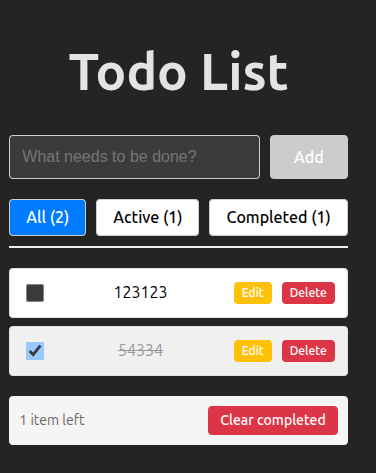
/**
 * Todo list application
 * Concepts: Array state, CRUD operations, unique keys
 */
import { useState } from 'react';

function TodoList() {
  const [todos, setTodos] = useState([]);
  const [inputValue, setInputValue] = useState('');
  const [filter, setFilter] = useState('all'); // 'all', 'active', 'completed'

  // Add todo
  const addTodo = () => {
    if (inputValue.trim() === '') return;

    const newTodo = {
      id: Date.now(), // Simple unique ID
      text: inputValue,
      completed: false,
      createdAt: new Date().toISOString(),
    };

    // ✅ Create new array (immutability)
    setTodos([...todos, newTodo]);
    setInputValue(''); // Clear input
  };

  // Toggle todo completion
  const toggleTodo = (id) => {
    setTodos(
      todos.map((todo) =>
        todo.id === id
          ? { ...todo, completed: !todo.completed } // ✅ Create new object
          : todo,
      ),
    );
  };

  // Delete todo
  const deleteTodo = (id) => {
    setTodos(todos.filter((todo) => todo.id !== id));
  };

  // Edit todo
  const editTodo = (id, newText) => {
    setTodos(
      todos.map((todo) => (todo.id === id ? { ...todo, text: newText } : todo)),
    );
  };

  // Clear completed
  const clearCompleted = () => {
    setTodos(todos.filter((todo) => !todo.completed));
  };

  // Filter todos
  const getFilteredTodos = () => {
    switch (filter) {
      case 'active':
        return todos.filter((todo) => !todo.completed);
      case 'completed':
        return todos.filter((todo) => todo.completed);
      default:
        return todos;
    }
  };

  const filteredTodos = getFilteredTodos();
  const activeCount = todos.filter((t) => !t.completed).length;
  const completedCount = todos.filter((t) => t.completed).length;

  return (
    <div style={{ maxWidth: '600px', margin: '0 auto', padding: '20px' }}>
      <h1>Todo List</h1>

      {/* Add Todo */}
      <div style={{ display: 'flex', gap: '10px', marginBottom: '20px' }}>
        <input
          type='text'
          value={inputValue}
          onChange={(e) => setInputValue(e.target.value)}
          onKeyDown={(e) => e.key === 'Enter' && addTodo()}
          placeholder='What needs to be done?'
          style={{
            flex: 1,
            padding: '12px',
            fontSize: '16px',
            border: '1px solid #ccc',
            borderRadius: '4px',
          }}
        />
        <button
          onClick={addTodo}
          disabled={!inputValue.trim()}
          style={{
            padding: '12px 24px',
            backgroundColor: inputValue.trim() ? '#28a745' : '#ccc',
            color: 'white',
            border: 'none',
            borderRadius: '4px',
            cursor: inputValue.trim() ? 'pointer' : 'not-allowed',
          }}
        >
          Add
        </button>
      </div>

      {/* Filter Tabs */}
      <div
        style={{
          display: 'flex',
          gap: '10px',
          marginBottom: '20px',
          borderBottom: '2px solid #eee',
          paddingBottom: '10px',
        }}
      >
        <button
          onClick={() => setFilter('all')}
          style={{
            padding: '8px 16px',
            backgroundColor: filter === 'all' ? '#007bff' : 'white',
            color: filter === 'all' ? 'white' : 'black',
            border: '1px solid #ccc',
            borderRadius: '4px',
            cursor: 'pointer',
          }}
        >
          All ({todos.length})
        </button>
        <button
          onClick={() => setFilter('active')}
          style={{
            padding: '8px 16px',
            backgroundColor: filter === 'active' ? '#007bff' : 'white',
            color: filter === 'active' ? 'white' : 'black',
            border: '1px solid #ccc',
            borderRadius: '4px',
            cursor: 'pointer',
          }}
        >
          Active ({activeCount})
        </button>
        <button
          onClick={() => setFilter('completed')}
          style={{
            padding: '8px 16px',
            backgroundColor: filter === 'completed' ? '#007bff' : 'white',
            color: filter === 'completed' ? 'white' : 'black',
            border: '1px solid #ccc',
            borderRadius: '4px',
            cursor: 'pointer',
          }}
        >
          Completed ({completedCount})
        </button>
      </div>

      {/* Todo Items */}
      {filteredTodos.length === 0 ? (
        <div style={{ textAlign: 'center', padding: '40px', color: '#999' }}>
          <p style={{ fontSize: '48px', margin: '0' }}>📝</p>
          <p>No todos {filter !== 'all' && filter}. Add one above!</p>
        </div>
      ) : (
        <ul style={{ listStyle: 'none', padding: 0 }}>
          {filteredTodos.map((todo) => (
            <TodoItem
              key={todo.id} // ✅ Unique key
              todo={todo}
              onToggle={toggleTodo}
              onDelete={deleteTodo}
              onEdit={editTodo}
            />
          ))}
        </ul>
      )}

      {/* Footer */}
      {todos.length > 0 && (
        <div
          style={{
            display: 'flex',
            justifyContent: 'space-between',
            alignItems: 'center',
            marginTop: '20px',
            padding: '10px',
            backgroundColor: '#f5f5f5',
            borderRadius: '4px',
          }}
        >
          <span style={{ fontSize: '14px', color: '#666' }}>
            {activeCount} item{activeCount !== 1 ? 's' : ''} left
          </span>
          {completedCount > 0 && (
            <button
              onClick={clearCompleted}
              style={{
                padding: '6px 12px',
                backgroundColor: '#dc3545',
                color: 'white',
                border: 'none',
                borderRadius: '4px',
                cursor: 'pointer',
                fontSize: '14px',
              }}
            >
              Clear completed
            </button>
          )}
        </div>
      )}
    </div>
  );
}

/**
 * Individual Todo Item Component
 */
function TodoItem({ todo, onToggle, onDelete, onEdit }) {
  const [isEditing, setIsEditing] = useState(false);
  const [editValue, setEditValue] = useState(todo.text);

  const handleEdit = () => {
    if (editValue.trim() === '') return;
    onEdit(todo.id, editValue);
    setIsEditing(false);
  };

  const handleCancel = () => {
    setEditValue(todo.text); // Reset to original
    setIsEditing(false);
  };

  return (
    <li
      style={{
        display: 'flex',
        alignItems: 'center',
        gap: '10px',
        padding: '12px',
        marginBottom: '8px',
        backgroundColor: todo.completed ? '#f0f0f0' : 'white',
        border: '1px solid #e0e0e0',
        borderRadius: '4px',
        transition: 'all 0.2s',
      }}
    >
      {/* Checkbox */}
      <input
        type='checkbox'
        checked={todo.completed}
        onChange={() => onToggle(todo.id)}
        style={{ cursor: 'pointer', width: '18px', height: '18px' }}
      />

      {/* Todo Text */}
      {isEditing ? (
        <input
          type='text'
          value={editValue}
          onChange={(e) => setEditValue(e.target.value)}
          onKeyDown={(e) => {
            if (e.key === 'Enter') handleEdit();
            if (e.key === 'Escape') handleCancel();
          }}
          autoFocus
          style={{
            flex: 1,
            padding: '6px',
            fontSize: '16px',
            border: '1px solid #007bff',
            borderRadius: '4px',
          }}
        />
      ) : (
        <span
          onDoubleClick={() => setIsEditing(true)}
          style={{
            flex: 1,
            textDecoration: todo.completed ? 'line-through' : 'none',
            color: todo.completed ? '#999' : 'black',
            cursor: 'pointer',
          }}
        >
          {todo.text}
        </span>
      )}

      {/* Actions */}
      {isEditing ? (
        <>
          <button
            onClick={handleEdit}
            style={{ padding: '4px 8px', fontSize: '12px' }}
          >
            ✓ Save
          </button>
          <button
            onClick={handleCancel}
            style={{ padding: '4px 8px', fontSize: '12px' }}
          >
            ✕ Cancel
          </button>
        </>
      ) : (
        <>
          <button
            onClick={() => setIsEditing(true)}
            style={{
              padding: '4px 8px',
              backgroundColor: '#ffc107',
              color: 'white',
              border: 'none',
              borderRadius: '4px',
              cursor: 'pointer',
              fontSize: '12px',
            }}
          >
            Edit
          </button>
          <button
            onClick={() => onDelete(todo.id)}
            style={{
              padding: '4px 8px',
              backgroundColor: '#dc3545',
              color: 'white',
              border: 'none',
              borderRadius: '4px',
              cursor: 'pointer',
              fontSize: '12px',
            }}
          >
            Delete
          </button>
        </>
      )}
    </li>
  );
}

export default TodoList;
🔍 Array State Operations:
// ✅ ADD to array
setTodos([...todos, newTodo]);
setTodos(todos.concat(newTodo));

// ✅ REMOVE from array
setTodos(todos.filter((todo) => todo.id !== idToRemove));

// ✅ UPDATE in array
setTodos(
  todos.map((todo) =>
    todo.id === idToUpdate
      ? { ...todo, completed: !todo.completed } // New object
      : todo,
  ),
);

// ✅ SORT array
setTodos([...todos].sort((a, b) => a.text.localeCompare(b.text)));

// ❌ NEVER mutate directly
todos.push(newTodo); // NO!
todos[0] = newTodo; // NO!
todos.splice(0, 1); // NO!
🔨 PHẦN 3: BÀI TẬP THỰC HÀNH (90 phút)
⭐ Exercise 1: Toggle Switch Component (15 phút)
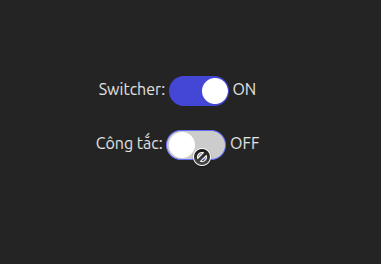
/**
 * 🎯 Mục tiêu: Tạo toggle switch với useState
 * ⏱️ Thời gian: 15 phút
 * 🚫 KHÔNG dùng: useEffect, useReducer
 *
 * Requirements:
 * 1. Toggle switch có 2 states: ON/OFF
 * 2. Click để toggle
 * 3. Hiển thị status text
 * 4. Thay đổi màu background khi ON/OFF
 * 5. Disable option (prop)
 *
 * 💡 Gợi ý:
 * - useState(false) cho ON/OFF state
 * - onClick={() => setIsOn(!isOn)}
 * - Conditional styling based on state
 */

// ❌ Cách SAI: Không dùng state
function ToggleSwitchWrong({ label }) {
  let isOn = false; // ❌ Plain variable won't trigger re-render

  const toggle = () => {
    isOn = !isOn; // ❌ Changes value but UI won't update
    console.log(isOn);
  };

  return (
    <button onClick={toggle}>
      {label}: {isOn ? 'ON' : 'OFF'}
    </button>
  );
}
💡 Solution
// ✅ Cách ĐÚNG: Dùng useState
function ToggleSwitchCorrect({ label = 'Switcher', disabled = false }) {
  const [isOn, setIsOn] = useState(false);

  const toggle = () => {
    if (!disabled) {
      setIsOn(!isOn);
    }
  };

  return (
    <div style={{ display: 'flex', alignItems: 'center', gap: '10px' }}>
      <span>{label}:</span>
      <button
        onClick={toggle}
        disabled={disabled}
        style={{
          width: '60px',
          height: '30px',
          backgroundColor: isOn ? '#28a745' : '#ccc',
          border: 'none',
          borderRadius: '15px',
          position: 'relative',
          cursor: disabled ? 'not-allowed' : 'pointer',
          transition: 'background-color 0.3s',
        }}
      >
        <div
          style={{
            width: '26px',
            height: '26px',
            backgroundColor: 'white',
            borderRadius: '50%',
            position: 'absolute',
            top: '2px',
            left: isOn ? '32px' : '2px',
            transition: 'left 0.3s',
            // Width: Box 60px , indicator: 26px, gap: 2px.
            // OFF MODE => Left position: 60px - 26px - 2px = 32px
          }}
        />
      </button>
      <span>{isOn ? 'ON' : 'OFF'}</span>
    </div>
  );
}
⭐⭐ Exercise 2: Shopping Cart (30 phút)
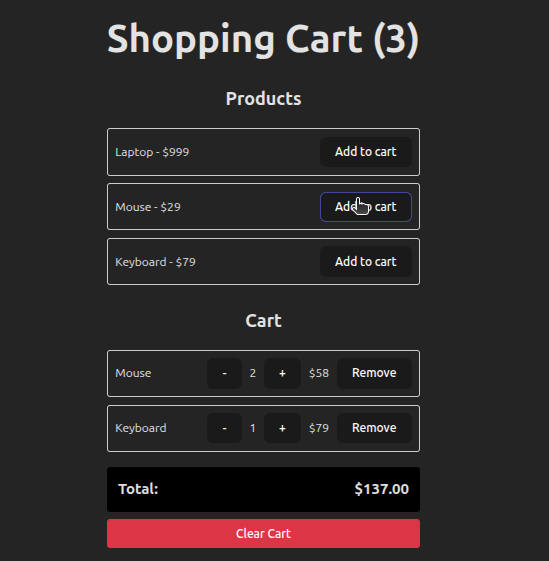
/**
 * 🎯 Mục tiêu: Quản lý shopping cart state
 * ⏱️ Thời gian: 30 phút
 *
 * Requirements:
 * 1. Add product to cart
 * 2. Remove product from cart
 * 3. Update quantity (increment/decrement)
 * 4. Calculate total price
 * 5. Clear cart
 * 6. Show cart count in header
 *
 * Data structure:
 * cartItems: [
 *   { id, name, price, quantity }
 * ]
 *
 * const products = [
 *   { id: 1, name: 'Laptop', price: 999 },
 *   { id: 2, name: 'Mouse', price: 29 },
 *   { id: 3, name: 'Keyboard', price: 79 },
 * ];
 *
 */
💡 Solution
const products = [
  { id: 1, name: 'Laptop', price: 999 },
  { id: 2, name: 'Mouse', price: 29 },
  { id: 3, name: 'Keyboard', price: 79 },
];
import { useState } from 'react';

export function ShoppingCart() {
  const [cartItems, setCartItems] = useState([]);
  // TODO: Implement addToCart
  const addToCart = (product) => {
    // Check if product already in cart
    const existingItem = cartItems.findIndex((item) => item.id === product.id);

    if (existingItem !== -1) {
      // Increase quantity
      setCartItems((prevCartItems) =>
        prevCartItems.map((item) =>
          item.id === product.id
            ? { ...item, quantity: item.quantity + 1 }
            : item,
        ),
      );
    } else {
      // Add new item
      setCartItems([...cartItems, { ...product, quantity: 1 }]);
    }
  };

  // TODO: Implement removeFromCart
  const removeFromCart = (productId) => {
    setCartItems((prevCartItems) =>
      prevCartItems.filter((item) => item.id !== productId),
    );
  };

  // TODO: Implement updateQuantity
  const updateQuantity = (productId, newQuantity) => {
    if (newQuantity < 1) return removeFromCart(productId);

    setCartItems((prevCartItems) =>
      prevCartItems.map((item) =>
        item.id === productId ? { ...item, quantity: newQuantity } : item,
      ),
    );
  };
  // TODO: Calculate total
  const total = cartItems.reduce(
    (sum, item) => sum + item.price * item.quantity,
    0,
  );

  const itemCount = cartItems.reduce((sum, item) => (sum += item.quantity), 0);

  return (
    <div style={{ margin: '0 auto', padding: '20px' }}>
      <h1>Shopping Cart ({itemCount})</h1>

      {/* Product List */}
      <ProductList
        products={products}
        onAddCart={addToCart}
      />

      {/* Cart Items */}
      <CartList
        cartItems={cartItems}
        onUpdateQuantity={updateQuantity}
        onRemoveFromCart={removeFromCart}
        total={total}
        onClearCart={setCartItems}
      />
    </div>
  );
}

const ProductList = ({ products = [], onAddCart }) => {
  return (
    <div style={{ marginBottom: '30px' }}>
      <h2>Products</h2>
      <div
        style={{
          display: 'grid',
          gap: '10px',
        }}
      >
        {products.map((product) => (
          <div
            key={product.id}
            style={{
              display: 'flex',
              justifyContent: 'space-between',
              alignItems: 'center',
              padding: '10px',
              border: '1px solid #ccc',
              borderRadius: '4px',
            }}
          >
            <span>
              {product.name} - ${product.price}
            </span>
            <button onClick={() => onAddCart(product)}>Add to cart</button>
          </div>
        ))}
      </div>
    </div>
  );
};

const CartList = ({
  cartItems,
  onUpdateQuantity,
  onRemoveFromCart,
  total = 0,
  onClearCart,
}) => {
  return (
    <div>
      <h2>Cart</h2>
      {cartItems.length === 0 ? (
        <p>Cart is empty</p>
      ) : (
        <>
          {cartItems.map((item) => (
            <div
              key={item.id}
              style={{
                display: 'flex',
                justifyContent: 'space-between',
                alignItems: 'center',
                padding: '10px',
                border: '1px solid #ccc',
                borderRadius: '4px',
                marginBottom: '10px',
              }}
            >
              <span>{item.name}</span>
              <div
                style={{ display: 'flex', gap: '10px', alignItems: 'center' }}
              >
                <button
                  onClick={() => onUpdateQuantity(item.id, item.quantity - 1)}
                >
                  -
                </button>
                <span>{item.quantity}</span>
                <button
                  onClick={() => onUpdateQuantity(item.id, item.quantity + 1)}
                >
                  +
                </button>
                <span>${item.price * item.quantity}</span>
                <button onClick={() => onRemoveFromCart(item.id)}>
                  Remove
                </button>
              </div>
            </div>
          ))}
          {/* Total */}
          <div
            style={{
              marginTop: '20px',
              padding: '15px',
              backgroundColor: '#000',
              borderRadius: '4px',
              display: 'flex',
              justifyContent: 'space-between',
              fontSize: '20px',
              fontWeight: 'bold',
            }}
          >
            <span>Total:</span>
            <span>${total.toFixed(2)}</span>
          </div>

          <button
            onClick={() => onClearCart([])}
            style={{
              marginTop: '10px',
              width: '100%',
              padding: '10px',
              backgroundColor: '#dc3545',
              color: 'white',
              border: 'none',
              borderRadius: '4px',
              cursor: 'pointer',
            }}
          >
            Clear Cart
          </button>
        </>
      )}
    </div>
  );
};
⭐⭐⭐ Exercise 3: Multi-Step Form với useState (45 phút)
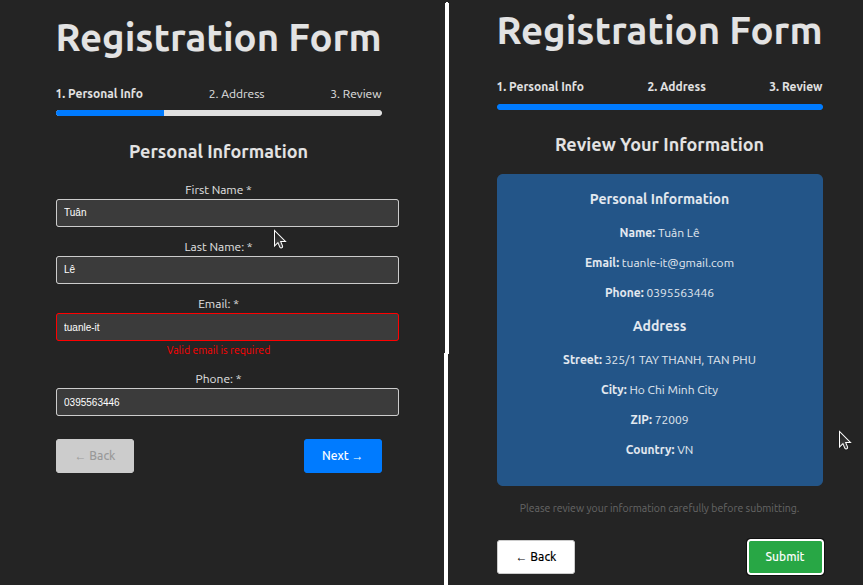
/**
 * 🎯 Mục tiêu: Form nhiều bước với state management
 * ⏱️ Thời gian: 45 phút
 *
 * Requirements:
 * 1. 3 steps: Personal Info, Address, Review
 * 2. Next/Back navigation
 * 3. Progress indicator
 * 4. Data persistence across steps
 * 5. Validation per step
 * 6. Final submission
 *
 * 💡 Gợi ý:
 * - currentStep state (1, 2, 3)
 * - formData state (object với tất cả fields)
 * - errors state
 * - Conditional rendering based on currentStep
 */
💡 Solution
function MultiStepForm() {
  const [currentStep, setCurrentStep] = useState(1);
  const [formData, setFormData] = useState({
    // Step 1
    firstName: '',
    lastName: '',
    email: '',
    phone: '',
    // Step 2
    address: '',
    city: '',
    zipCode: '',
    country: '',
  });
  const [errors, setErrors] = useState({});

  // Update form field
  const updateField = (field, value) => {
    setFormData({ ...formData, [field]: value });
    // Clear error when user types
    if (errors[field]) {
      setErrors({ ...errors, [field]: '' });
    }
  };

  // Validate Step 1
  const validateStep1 = () => {
    const newErrors = {};
    if (!formData.firstName) newErrors.firstName = 'First name is required';
    if (!formData.lastName) newErrors.lastName = 'Last name is required';
    if (!formData.email || !/^[^\s@]+@[^\s@]+\.[^\s@]+$/.test(formData.email)) {
      newErrors.email = 'Valid email is required';
    }
    if (!formData.phone || !/^[0-9]{10}$/.test(formData.phone)) {
      newErrors.phone = 'Valid 10-digit phone is required';
    }
    setErrors(newErrors);
    return Object.keys(newErrors).length === 0;
  };

  // Validate Step 2
  const validateStep2 = () => {
    const newErrors = {};
    if (!formData.address) newErrors.address = 'Address is required';
    if (!formData.city) newErrors.city = 'City is required';
    if (!formData.zipCode || !/^[0-9]{5}$/.test(formData.zipCode)) {
      newErrors.zipCode = 'Valid 5-digit ZIP is required';
    }
    if (!formData.country) newErrors.country = 'Country is required';
    setErrors(newErrors);
    return Object.keys(newErrors).length === 0;
  };

  // Navigation
  const goNext = () => {
    let isValid = false;

    if (currentStep === 1) isValid = validateStep1();
    if (currentStep === 2) isValid = validateStep2();

    if (isValid) {
      setCurrentStep((prev) => prev + 1);
    }
  };

  const goBack = () => {
    setCurrentStep((prev) => prev - 1);
  };

  // Submit
  const handleSubmit = () => {
    console.log('✅ Form submitted:', formData);
    alert('Registration complete!');
    // Reset
    setCurrentStep(1);
    setFormData({
      firstName: '',
      lastName: '',
      email: '',
      phone: '',
      address: '',
      city: '',
      zipCode: '',
      country: '',
    });
  };

  // Progress percentage
  const progress = (currentStep / 3) * 100;

  return (
    <div style={{ maxWidth: '600px', margin: '0 auto', padding: '20px' }}>
      <h1>Registration Form</h1>

      {/* Progress Bar */}
      <div style={{ marginBottom: '30px' }}>
        <div
          style={{
            display: 'flex',
            justifyContent: 'space-between',
            marginBottom: '10px',
          }}
        >
          <span style={{ fontWeight: currentStep >= 1 ? 'bold' : 'normal' }}>
            1. Personal Info
          </span>
          <span style={{ fontWeight: currentStep >= 2 ? 'bold' : 'normal' }}>
            2. Address
          </span>
          <span style={{ fontWeight: currentStep >= 3 ? 'bold' : 'normal' }}>
            3. Review
          </span>
        </div>
        <div
          style={{
            height: '8px',
            backgroundColor: '#e0e0e0',
            borderRadius: '4px',
            overflow: 'hidden',
          }}
        >
          <div
            style={{
              width: `${progress}%`,
              height: '100%',
              backgroundColor: '#007bff',
              transition: 'width 0.3s',
            }}
          />
        </div>
      </div>

      {/* Step 1: Personal Info */}
      {currentStep === 1 && (
        <div>
          <h2>Personal Information</h2>

          <div style={{ marginBottom: '15px' }}>
            <label>First Name *</label>
            <input
              type='text'
              value={formData.firstName}
              onChange={(e) => updateField('firstName', e.target.value)}
              style={{
                width: '100%',
                padding: '10px',
                border: errors.firstName ? '2px solid red' : '1px solid #ccc',
                borderRadius: '4px',
              }}
            />
            {errors.firstName && (
              <span style={{ color: 'red', fontSize: '14px' }}>
                {errors.firstName}
              </span>
            )}
          </div>

          <div style={{ marginBottom: '15px' }}>
            <label>Last Name: *</label>
            <input
              type='text'
              value={formData.lastName}
              onChange={(e) => updateField('lastName', e.target.value)}
              style={{
                width: '100%',
                padding: '10px',
                border: errors.lastName ? '2px solid red' : '1px solid #ccc',
                borderRadius: '4px',
              }}
            />
            {errors.lastName && (
              <span style={{ color: 'red', fontSize: '14px' }}>
                {errors.lastName}
              </span>
            )}
          </div>

          <div style={{ marginBottom: '15px' }}>
            <label>Email: *</label>
            <input
              type='email'
              value={formData.email}
              onChange={(e) => updateField('email', e.target.value)}
              style={{
                width: '100%',
                padding: '10px',
                border: errors.email ? '2px solid red' : '1px solid #ccc',
                borderRadius: '4px',
              }}
            />
            {errors.email && (
              <span style={{ color: 'red', fontSize: '14px' }}>
                {errors.email}
              </span>
            )}
          </div>

          <div style={{ marginBottom: '15px' }}>
            <label>Phone: *</label>
            <input
              type='tel'
              value={formData.phone}
              onChange={(e) => updateField('phone', e.target.value)}
              placeholder='10 digits'
              style={{
                width: '100%',
                padding: '10px',
                border: errors.phone ? '2px solid red' : '1px solid #ccc',
                borderRadius: '4px',
              }}
            />
            {errors.phone && (
              <span style={{ color: 'red', fontSize: '14px' }}>
                {errors.phone}
              </span>
            )}
          </div>
        </div>
      )}

      {/* Step 2: Address */}
      {currentStep === 2 && (
        <div>
          <h2>Address Information</h2>

          <div style={{ marginBottom: '15px' }}>
            <label>Street Address: *</label>
            <input
              type='text'
              value={formData.address}
              onChange={(e) => updateField('address', e.target.value)}
              style={{
                width: '100%',
                padding: '10px',
                border: errors.address ? '2px solid red' : '1px solid #ccc',
                borderRadius: '4px',
              }}
            />
            {errors.address && (
              <span style={{ color: 'red', fontSize: '14px' }}>
                {errors.address}
              </span>
            )}
          </div>

          <div style={{ marginBottom: '15px' }}>
            <label>City: *</label>
            <input
              type='text'
              value={formData.city}
              onChange={(e) => updateField('city', e.target.value)}
              style={{
                width: '100%',
                padding: '10px',
                border: errors.city ? '2px solid red' : '1px solid #ccc',
                borderRadius: '4px',
              }}
            />
            {errors.city && (
              <span style={{ color: 'red', fontSize: '14px' }}>
                {errors.city}
              </span>
            )}
          </div>

          <div style={{ marginBottom: '15px' }}>
            <label>ZIP Code: *</label>
            <input
              type='text'
              value={formData.zipCode}
              onChange={(e) => updateField('zipCode', e.target.value)}
              placeholder='5 digits'
              maxLength={5}
              style={{
                width: '100%',
                padding: '10px',
                border: errors.zipCode ? '2px solid red' : '1px solid #ccc',
                borderRadius: '4px',
              }}
            />
            {errors.zipCode && (
              <span style={{ color: 'red', fontSize: '14px' }}>
                {errors.zipCode}
              </span>
            )}
          </div>

          <div style={{ marginBottom: '15px' }}>
            <label>Country: *</label>
            <select
              value={formData.country}
              onChange={(e) => updateField('country', e.target.value)}
              style={{
                width: '100%',
                padding: '10px',
                border: errors.country ? '2px solid red' : '1px solid #ccc',
                borderRadius: '4px',
              }}
            >
              <option value=''>-- Select Country --</option>
              <option value='US'>United States</option>
              <option value='CA'>Canada</option>
              <option value='UK'>United Kingdom</option>
              <option value='VN'>Vietnam</option>
            </select>
            {errors.country && (
              <span style={{ color: 'red', fontSize: '14px' }}>
                {errors.country}
              </span>
            )}
          </div>
        </div>
      )}

      {/* Step 3: Review */}
      {currentStep === 3 && (
        <div>
          <h2>Review Your Information</h2>

          <div
            style={{
              backgroundColor: '#f8f9fa',
              padding: '20px',
              borderRadius: '8px',
              marginBottom: '20px',
            }}
          >
            <h3 style={{ marginTop: 0 }}>Personal Information</h3>
            <p>
              <strong>Name:</strong> {formData.firstName} {formData.lastName}
            </p>
            <p>
              <strong>Email:</strong> {formData.email}
            </p>
            <p>
              <strong>Phone:</strong> {formData.phone}
            </p>

            <h3>Address</h3>
            <p>
              <strong>Street:</strong> {formData.address}
            </p>
            <p>
              <strong>City:</strong> {formData.city}
            </p>
            <p>
              <strong>ZIP:</strong> {formData.zipCode}
            </p>
            <p>
              <strong>Country:</strong> {formData.country}
            </p>
          </div>

          <p style={{ fontSize: '14px', color: '#666' }}>
            Please review your information carefully before submitting.
          </p>
        </div>
      )}

      {/* Navigation Buttons */}
      <div
        style={{
          display: 'flex',
          justifyContent: 'space-between',
          marginTop: '30px',
        }}
      >
        <button
          onClick={goBack}
          disabled={currentStep === 1}
          style={{
            padding: '12px 24px',
            backgroundColor: currentStep === 1 ? '#ccc' : 'white',
            color: currentStep === 1 ? '#999' : 'black',
            border: '1px solid #ccc',
            borderRadius: '4px',
            cursor: currentStep === 1 ? 'not-allowed' : 'pointer',
          }}
        >
          ← Back
        </button>

        {currentStep < 3 ? (
          <button
            onClick={goNext}
            style={{
              padding: '12px 24px',
              backgroundColor: '#007bff',
              color: 'white',
              border: 'none',
              borderRadius: '4px',
              cursor: 'pointer',
            }}
          >
            Next →
          </button>
        ) : (
          <button
            onClick={handleSubmit}
            style={{
              padding: '12px 24px',
              backgroundColor: '#28a745',
              color: 'white',
              border: 'none',
              borderRadius: '4px',
              cursor: 'pointer',
            }}
          >
            Submit
          </button>
        )}
      </div>
    </div>
  );
}
🔍 Key State Management Patterns:
// ✅ Single formData object for all fields
const [formData, setFormData] = useState({
  field1: '',
  field2: '',
  // ...
});

// ✅ Update specific field (immutably)
const updateField = (field, value) => {
  setFormData({ ...formData, [field]: value });
};

// ✅ Track current step
const [currentStep, setCurrentStep] = useState(1);

// ✅ Conditional rendering based on step
{
  currentStep === 1 && <Step1Form />;
}
{
  currentStep === 2 && <Step2Form />;
}

// ✅ Validation per step
const validateStep1 = () => {
  // Return true/false
  // Set errors if needed
};
⭐⭐⭐⭐ Exercise 4: Refactor Ngày 10 Project với useState (60 phút)
/**
 * 🎯 Mục tiêu: Refactor Product Catalog từ Ngày 10
 * ⏱️ Thời gian: 60 phút
 *
 * Tasks:
 * 1. Remove all DOM manipulation
 * 2. Replace với useState
 * 3. Proper filter/search với state
 * 4. Clean, declarative code
 *
 * State needed:
 * - searchQuery
 * - selectedCategory
 * - selectedPriceRange
 * - selectedProduct (for detail modal)
 * - cartItems
 */

// 🎯 NHIỆM VỤ CỦA BẠN:
/**
 * 1. Refactor SearchBar component:
 *    - Controlled input với value prop
 *    - onChange updates parent state
 *
 * 2. Refactor FilterPanel:
 *    - Highlight active category based on state
 *    - No manual DOM manipulation
 *
 * 3. Refactor ProductGrid:
 *    - Just render filtered products
 *    - No filtering logic inside
 *
 * 4. Compare code với Ngày 10:
 *    - Ít code hơn?
 *    - Dễ hiểu hơn?
 *    - Dễ maintain hơn?
 */

import { useState } from 'react';
import { products } from './data/products';

function ProductCatalogRefactored() {
  // ✅ All state in one place
  const [searchQuery, setSearchQuery] = useState('');
  const [selectedCategory, setSelectedCategory] = useState('all');
  const [selectedPriceRange, setSelectedPriceRange] = useState(null);
  const [selectedProduct, setSelectedProduct] = useState(null);
  const [cartItems, setCartItems] = useState([]);

  // ✅ Derived state - computed from other state
  const filteredProducts = products.filter((product) => {
    // Search filter
    const matchesSearch =
      product.name.toLowerCase().includes(searchQuery.toLowerCase()) ||
      product.description.toLowerCase().includes(searchQuery.toLowerCase());

    // Category filter
    const matchesCategory =
      selectedCategory === 'all' || product.category === selectedCategory;

    // Price filter
    const matchesPrice =
      !selectedPriceRange ||
      (product.price >= selectedPriceRange.min &&
        product.price <= selectedPriceRange.max);

    return matchesSearch && matchesCategory && matchesPrice;
  });

  // ✅ Event handlers
  const handleSearch = (query) => {
    setSearchQuery(query);
  };

  const handleCategoryChange = (category) => {
    setSelectedCategory(category);
  };

  const handlePriceChange = (range) => {
    setSelectedPriceRange(range);
  };

  const handleViewDetail = (product) => {
    setSelectedProduct(product);
  };

  const handleCloseDetail = () => {
    setSelectedProduct(null);
  };

  const addToCart = (product) => {
    const existingItem = cartItems.find((item) => item.id === product.id);

    if (existingItem) {
      setCartItems(
        cartItems.map((item) =>
          item.id === product.id
            ? { ...item, quantity: item.quantity + 1 }
            : item,
        ),
      );
    } else {
      setCartItems([...cartItems, { ...product, quantity: 1 }]);
    }
  };

  const cartCount = cartItems.reduce((sum, item) => sum + item.quantity, 0);

  return (
    <div style={{ minHeight: '100vh', backgroundColor: '#f8fafc' }}>
      <Header cartCount={cartCount} />

      <main
        style={{ maxWidth: '1400px', margin: '0 auto', padding: '40px 20px' }}
      >
        {/* Search Bar */}
        <SearchBar
          searchQuery={searchQuery}
          onSearch={handleSearch}
        />

        <div
          style={{
            display: 'grid',
            gridTemplateColumns: '300px 1fr',
            gap: '32px',
          }}
        >
          {/* Filters */}
          <FilterPanel
            selectedCategory={selectedCategory}
            selectedPriceRange={selectedPriceRange}
            onCategoryChange={handleCategoryChange}
            onPriceChange={handlePriceChange}
          />

          {/* Products */}
          <ProductGrid
            products={filteredProducts}
            onViewDetail={handleViewDetail}
            onAddToCart={addToCart}
          />
        </div>
      </main>

      {/* Product Detail Modal */}
      {selectedProduct && (
        <ProductDetail
          product={selectedProduct}
          onClose={handleCloseDetail}
          onAddToCart={addToCart}
        />
      )}
    </div>
  );
}
Before & After Comparison:
// ❌ NGÀY 10: The Hacky Way
function App() {
  let currentCategory = 'all';

  const filterProducts = (category) => {
    currentCategory = category;

    // Manual DOM update
    const container = document.getElementById('products');
    const filtered = products.filter(
      (p) => currentCategory === 'all' || p.category === currentCategory,
    );

    // Custom event dispatch
    window.dispatchEvent(new CustomEvent('filter', { detail: filtered }));
  };

  return <div>...</div>;
}

// ✅ NGÀY 11: The React Way
function App() {
  const [selectedCategory, setSelectedCategory] = useState('all');

  const filteredProducts = products.filter(
    (p) => selectedCategory === 'all' || p.category === selectedCategory,
  );

  return (
    <div>
      <button onClick={() => setSelectedCategory('laptop')}>Laptops</button>
      <ProductGrid products={filteredProducts} />
    </div>
  );
}
⭐⭐⭐⭐⭐ Exercise 5: Advanced State Patterns (90 phút)
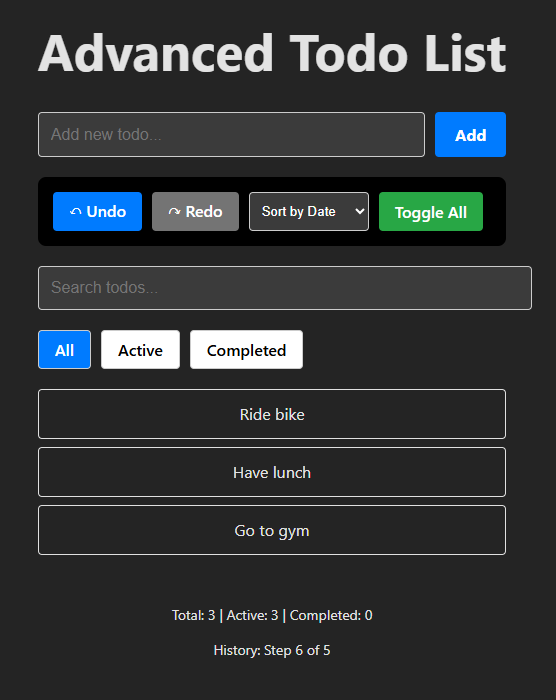
/**
 * 🎯 Mục tiêu: Học advanced useState patterns
 * ⏱️ Thời gian: 90 phút
 *
 * type Filter = 'all' | 'active' | 'completed';
 * type SortBy = 'date' | 'name';
 *
 *  interface Todo {
 *    id: number;
 *    text: string;
 *    completed: boolean;
 *    createdAt: string;
 *  }
 *
 * Features:
 * 1. Undo/Redo functionality
 * 2. Local storage persistence
 * 3. Optimistic updates
 * 4. Debounced search
 * 5. Complex state updates
 * 6. History kiểu Todo[][]
 */

// 🎯 NHIỆM VỤ CỦA BẠN:
/**
 * Implement các missing features:
 * 1. Add todo input
 * 2. Toggle individual todo
 * 3. Delete todo (với history)
 * 4. Edit todo (với history)
 * 5. localStorage persistence
 */
💡 Solution
/**
 * 🎯 Mục tiêu: Học advanced useState patterns
 * ⏱️ Thời gian: 90 phút
 *
 * type Filter = 'all' | 'active' | 'completed';
 * type SortBy = 'date' | 'name';
 *
 *  interface Todo {
 *    id: number;
 *    text: string;
 *    completed: boolean;
 *    createdAt: string;
 *  }
 *
 * Features:
 * 1. Undo/Redo functionality
 * 2. Local storage persistence
 * 3. Optimistic updates
 * 4. Debounced search
 * 5. Complex state updates
 * 6. History kiểu Todo[][]
 */

import { useState } from 'react';

// 🎯 NHIỆM VỤ CỦA BẠN:
/**
 * Implement các missing features:
 * 1. Add todo input
 * 2. Toggle individual todo
 * 3. Delete todo (với history)
 * 4. Edit todo (với history)
 * 5. localStorage persistence
 */

export function AdvancedTodoList() {
  // Main todo state
  const [todos, setTodos] = useState([]);
  const [newTodoText, setNewTodoText] = useState('');
  // History for undo/redo
  const [history, setHistory] = useState([]);
  const [historyIndex, setHistoryIndex] = useState(-1);

  // UI state
  const [filter, setFilter] = useState('all');
  const [sortBy, setSortBy] = useState('date');
  const [searchQuery, setSearchQuery] = useState('');

  // ✅ PATTERN 1: Function Form for Complex Updates
  const addTodo = (text) => {
    if (!text.trim()) return;

    setTodos((prevTodos) => {
      const newTodo = {
        id: Date.now(),
        text,
        completed: false,
        createdAt: new Date().toISOString(),
      };

      const newTodos = [...prevTodos, newTodo];

      // Save to history
      saveToHistory(newTodos);

      // Save to localStorage
      localStorage.setItem('todos', JSON.stringify(newTodos));

      return newTodos;
    });
    setNewTodoText(''); // Clear input
  };

  // ✅ PATTERN 2: Batch Updates
  const toggleAllTodos = () => {
    setTodos((prevTodos) => {
      const allCompleted = prevTodos.every((t) => t.completed);
      const newTodos = prevTodos.map((todo) => ({
        ...todo,
        completed: !allCompleted,
      }));

      saveToHistory(newTodos);
      localStorage.setItem('todos', JSON.stringify(newTodos));

      return newTodos;
    });
  };

  // ✅ PATTERN 3: History Management
  const saveToHistory = (newTodos) => {
    setHistory((prevHistory) => {
      // Remove future history if we're in the middle
      const newHistory = prevHistory.slice(0, historyIndex + 1);
      return [...newHistory, newTodos];
    });
    setHistoryIndex((prev) => prev + 1);
  };

  const undo = () => {
    if (historyIndex > 0) {
      setHistoryIndex(historyIndex - 1);
      setTodos(history[historyIndex - 1]);
      localStorage.setItem('todos', JSON.stringify(history[historyIndex - 1]));
    }
  };

  const redo = () => {
    if (historyIndex < history.length - 1) {
      setHistoryIndex(historyIndex + 1);
      setTodos(history[historyIndex + 1]);
      localStorage.setItem('todos', JSON.stringify(history[historyIndex + 1]));
    }
  };

  // ✅ PATTERN 4: Derived State
  const filteredAndSortedTodos = todos
    .filter((todo) => {
      // Filter
      if (filter === 'active') return !todo.completed;
      if (filter === 'completed') return todo.completed;

      // Search
      if (searchQuery) {
        return todo.text.toLowerCase().includes(searchQuery.toLowerCase());
      }

      return true;
    })
    .sort((a, b) => {
      // Sort
      if (sortBy === 'date') {
        return new Date(b.createdAt) - new Date(a.createdAt);
      } else if (sortBy === 'name') {
        return a.text.localeCompare(b.text);
      }
      return 0;
    });

  // ✅ PATTERN 5: Load from localStorage on mount
  // Note: This is a preview of useEffect (Ngày 17)
  // For now, just understand the concept
  const loadFromStorage = () => {
    const saved = localStorage.getItem('todos');
    if (saved) {
      const parsedTodos = JSON.parse(saved);
      setTodos(parsedTodos);
      setHistory([parsedTodos]);
      setHistoryIndex(0);
    }
  };

  // Call once on component mount (manual for now)
  // loadFromStorage(); // Uncomment này sau khi học useEffect

  return (
    <div style={{ maxWidth: '800px', margin: '0 auto', padding: '20px' }}>
      <h1>Advanced Todo List</h1>

      {/* Add Todo */}
      <div
        style={{
          display: 'flex',
          gap: '10px',
          marginBottom: '20px',
        }}
      >
        <input
          type='text'
          value={newTodoText}
          onChange={(e) => setNewTodoText(e.target.value)}
          onKeyDown={(e) => {
            if (e.key === 'Enter') {
              addTodo(newTodoText);
            }
          }}
          placeholder='Add new todo...'
          style={{
            flex: 1,
            padding: '12px',
            border: '1px solid #ccc',
            borderRadius: '4px',
            fontSize: '16px',
          }}
        />

        <button
          onClick={() => addTodo(newTodoText)}
          style={{
            padding: '12px 20px',
            backgroundColor: '#007bff',
            color: 'white',
            border: 'none',
            borderRadius: '4px',
            cursor: 'pointer',
            fontWeight: 'bold',
          }}
        >
          Add
        </button>
      </div>

      {/* Toolbar */}
      <div
        style={{
          display: 'flex',
          gap: '10px',
          marginBottom: '20px',
          padding: '15px',
          backgroundColor: '#000',
          borderRadius: '8px',
        }}
      >
        {/* Undo/Redo */}
        <button
          onClick={undo}
          disabled={historyIndex <= 0}
          style={{
            padding: '8px 16px',
            backgroundColor: historyIndex <= 0 ? '#747474' : '#007bff',
            color: 'white',
            border: 'none',
            borderRadius: '4px',
            cursor: historyIndex <= 0 ? 'not-allowed' : 'pointer',
          }}
        >
          ↶ Undo
        </button>
        <button
          onClick={redo}
          disabled={historyIndex >= history.length - 1}
          style={{
            padding: '8px 16px',
            backgroundColor:
              historyIndex >= history.length - 1 ? '#747474' : '#007bff',
            color: 'white',
            border: 'none',
            borderRadius: '4px',
            cursor:
              historyIndex >= history.length - 1 ? 'not-allowed' : 'pointer',
          }}
        >
          ↷ Redo
        </button>

        {/* Sort */}
        <select
          value={sortBy}
          onChange={(e) => setSortBy(e.target.value)}
          style={{
            padding: '8px',
            borderRadius: '4px',
            border: '1px solid #ccc',
          }}
        >
          <option value='date'>Sort by Date</option>
          <option value='name'>Sort by Name</option>
        </select>

        {/* Toggle All */}
        <button
          onClick={toggleAllTodos}
          style={{
            padding: '8px 16px',
            backgroundColor: '#28a745',
            color: 'white',
            border: 'none',
            borderRadius: '4px',
            cursor: 'pointer',
          }}
        >
          Toggle All
        </button>
      </div>

      {/* Search */}
      <input
        type='text'
        value={searchQuery}
        onChange={(e) => setSearchQuery(e.target.value)}
        placeholder='Search todos...'
        style={{
          width: '100%',
          padding: '12px',
          marginBottom: '20px',
          border: '1px solid #ccc',
          borderRadius: '4px',
          fontSize: '16px',
        }}
      />

      {/* Filter Tabs */}
      <div style={{ display: 'flex', gap: '10px', marginBottom: '20px' }}>
        {['all', 'active', 'completed'].map((f) => (
          <button
            key={f}
            onClick={() => setFilter(f)}
            style={{
              padding: '8px 16px',
              backgroundColor: filter === f ? '#007bff' : 'white',
              color: filter === f ? 'white' : 'black',
              border: '1px solid #ccc',
              borderRadius: '4px',
              cursor: 'pointer',
              textTransform: 'capitalize',
            }}
          >
            {f}
          </button>
        ))}
      </div>

      {/* Todo List */}
      <div>
        {filteredAndSortedTodos.map((todo) => (
          <div
            key={todo.id}
            style={{
              padding: '12px',
              marginBottom: '8px',
              border: '1px solid #e0e0e0',
              borderRadius: '4px',
            }}
          >
            {todo.text}
          </div>
        ))}
      </div>

      {/* Stats */}
      <div
        style={{
          marginTop: '20px',
          padding: '15px',
          borderRadius: '8px',
          fontSize: '14px',
        }}
      >
        <p>
          Total: {todos.length} | Active:{' '}
          {todos.filter((t) => !t.completed).length} | Completed:{' '}
          {todos.filter((t) => t.completed).length}
        </p>
        <p>
          History: Step {historyIndex + 1} of {history.length}
        </p>
      </div>
    </div>
  );
}
📊 PHẦN 4: SO SÁNH PATTERNS (30 phút)
State Management Decision Tree
Cần quản lý data thay đổi?
│
├─> NO ──> Props hoặc constants
│
└─> YES
    │
    ├─> Data từ parent component?
    │   └─> YES ──> Props (data flows down)
    │
    └─> Data owned by this component?
        └─> YES
            │
            ├─> Simple value (string, number, boolean)?
            │   └─> YES ──> useState(primitive)
            │
            ├─> Array or Object?
            │   └─> YES
            │       │
            │       ├─> Simple CRUD operations?
            │       │   └─> YES ──> useState(array/object)
            │       │
            │       └─> Complex updates? Multiple related states?
            │           └─> YES ──> useReducer (Ngày 12)
            │
            └─> Shared across many components?
                └─> YES ──> Context API (Ngày 14) or State Management Library
Bảng So Sánh: State Solutions
| Scenario | Solution | Example |
|---|---|---|
| Toggle visibility | useState(boolean) | const [isOpen, setIsOpen] = useState(false) |
| Form input | useState(string) | const [email, setEmail] = useState('') |
| Counter | useState(number) | const [count, setCount] = useState(0) |
| Todo list | useState(array) | const [todos, setTodos] = useState([]) |
| User profile | useState(object) | const [user, setUser] = useState({ name: '', email: '' }) |
| Multi-step form | useState(number) + useState(object) | Step counter + form data |
| Shopping cart | useState(array) | Array of cart items |
| Complex form | useReducer (Ngày 12) | Form với nhiều fields và validation |
| Global auth state | Context API (Ngày 14) | User authentication status |
Common Patterns & Best Practices
// ✅ PATTERN 1: Separate vs Combined State
// When to separate:
const [firstName, setFirstName] = useState('');
const [lastName, setLastName] = useState('');
const [email, setEmail] = useState('');
// ↑ Use when: Fields updated independently, simple validation

// When to combine:
const [formData, setFormData] = useState({
  firstName: '',
  lastName: '',
  email: '',
});
// ↑ Use when: Fields submitted together, cross-field validation

// ✅ PATTERN 2: Derived State (Don't store computed values)
// ❌ BAD:
const [todos, setTodos] = useState([]);
const [completedCount, setCompletedCount] = useState(0); // ❌ Redundant!

// ✅ GOOD:
const [todos, setTodos] = useState([]);
const completedCount = todos.filter((t) => t.completed).length; // ✅ Computed

// ✅ PATTERN 3: Update Objects Immutably
const [user, setUser] = useState({ name: 'John', age: 30 });

// ❌ BAD:
user.age = 31;
setUser(user); // Won't trigger re-render!

// ✅ GOOD:
setUser({ ...user, age: 31 }); // New object

// ✅ PATTERN 4: Update Arrays Immutably
const [items, setItems] = useState([1, 2, 3]);

// ❌ BAD:
items.push(4);
setItems(items); // Won't trigger re-render!

// ✅ GOOD:
setItems([...items, 4]); // New array

// ✅ PATTERN 5: Function Form for Updates Based on Previous State
// ❌ RISKY:
setCount(count + 1);
setCount(count + 1); // Still count + 1, not count + 2!

// ✅ SAFE:
setCount((prev) => prev + 1);
setCount((prev) => prev + 1); // Now it's prev + 2!
🧪 PHẦN 5: DEBUG LAB (25 phút)
Bug 1: State Not Updating ⚠️
// ❌ BUG: Clicking button doesn't update UI
function BuggyCounter() {
  let count = 0; // ❌ Regular variable, not state!

  const increment = () => {
    count = count + 1;
    console.log('Count:', count); // Logs correctly
    // But UI doesn't update!
  };

  return (
    <div>
      <p>Count: {count}</p>
      <button onClick={increment}>+1</button>
    </div>
  );
}

// 🤔 QUESTIONS:
// 1. Why doesn't the UI update?
// 2. What's the difference between `let count` and `useState`?
// 3. How to fix?

// ✅ SOLUTION:
function FixedCounter() {
  const [count, setCount] = useState(0); // ✅ Use useState!

  const increment = () => {
    setCount(count + 1); // ✅ Triggers re-render
  };

  return (
    <div>
      <p>Count: {count}</p>
      <button onClick={increment}>+1</button>
    </div>
  );
}

// 📚 EXPLANATION:
// - Regular variables don't trigger re-renders
// - Only state changes (setState calls) trigger re-renders
// - useState provides React-managed state that persists across renders
Bug 2: Stale State in Event Handler ⚠️
// ❌ BUG: Increment by 3 doesn't work
function BuggyCounter() {
  const [count, setCount] = useState(0);

  const incrementBy3 = () => {
    setCount(count + 1); // count = 0, so 0 + 1 = 1
    setCount(count + 1); // count still 0, so 0 + 1 = 1
    setCount(count + 1); // count still 0, so 0 + 1 = 1
    // Result: count = 1, not 3!
  };

  return (
    <div>
      <p>Count: {count}</p>
      <button onClick={incrementBy3}>+3</button>
    </div>
  );
}

// 🤔 QUESTIONS:
// 1. Why is count still 0 in all three setCount calls?
// 2. What is "stale closure"?
// 3. How to fix?

// ✅ SOLUTION:
function FixedCounter() {
  const [count, setCount] = useState(0);

  const incrementBy3 = () => {
    setCount((prev) => prev + 1); // prev = 0, result = 1
    setCount((prev) => prev + 1); // prev = 1, result = 2
    setCount((prev) => prev + 1); // prev = 2, result = 3
    // Result: count = 3 ✅
  };

  return (
    <div>
      <p>Count: {count}</p>
      <button onClick={incrementBy3}>+3</button>
    </div>
  );
}

// 📚 EXPLANATION:
// - setState is asynchronous - doesn't update immediately
// - count variable captures value at time function was created (closure)
// - Function form `setState(prev => ...)` always gets latest value
// - RULE: Use function form when new state depends on old state
Bug 3: Mutating State Directly ⚠️
// ❌ BUG: Todo doesn't toggle
function BuggyTodoList() {
  const [todos, setTodos] = useState([
    { id: 1, text: 'Learn React', completed: false },
  ]);

  const toggleTodo = (id) => {
    const todo = todos.find((t) => t.id === id);
    todo.completed = !todo.completed; // ❌ Mutating directly!
    setTodos(todos); // ❌ Same array reference, no re-render!
  };

  return (
    <div>
      {todos.map((todo) => (
        <div key={todo.id}>
          <input
            type='checkbox'
            checked={todo.completed}
            onChange={() => toggleTodo(todo.id)}
          />
          {todo.text}
        </div>
      ))}
    </div>
  );
}

// 🤔 QUESTIONS:
// 1. Why doesn't the checkbox update?
// 2. What's wrong with mutating the object?
// 3. How to properly update nested state?

// ✅ SOLUTION:
function FixedTodoList() {
  const [todos, setTodos] = useState([
    { id: 1, text: 'Learn React', completed: false },
  ]);

  const toggleTodo = (id) => {
    // ✅ Create NEW array with NEW objects
    setTodos(
      todos.map((todo) =>
        todo.id === id
          ? { ...todo, completed: !todo.completed } // ✅ New object
          : todo,
      ),
    );
  };

  return (
    <div>
      {todos.map((todo) => (
        <div key={todo.id}>
          <input
            type='checkbox'
            checked={todo.completed}
            onChange={() => toggleTodo(todo.id)}
          />
          {todo.text}
        </div>
      ))}
    </div>
  );
}

// 📚 EXPLANATION:
// - React compares state by reference (===)
// - If reference is same, React assumes nothing changed
// - MUST create new array/object for React to detect change
// - Use spread operator (...) or array methods that return new arrays
✅ PHẦN 6: TỰ ĐÁNH GIÁ (15 phút)
Knowledge Check
Đánh dấu ✅ những điều bạn đã hiểu:
useState Basics:
- [ ] Hiểu useState hook syntax
- [ ] Biết cách declare và use state
- [ ] Hiểu array destructuring
[value, setter] - [ ] Biết state triggers re-render
- [ ] Hiểu initial value chỉ dùng lần đầu
State Updates:
- [ ] Biết cách update state với setter function
- [ ] Hiểu setState là asynchronous
- [ ] Biết khi nào dùng function form
setState(prev => ...) - [ ] Hiểu immutability requirement
- [ ] Biết cách update objects immutably
- [ ] Biết cách update arrays immutably
Common Patterns:
- [ ] Controlled components
- [ ] Derived state
- [ ] Conditional rendering based on state
- [ ] Form handling với state
- [ ] List management với state
Debugging:
- [ ] Debug state not updating
- [ ] Fix stale closure issues
- [ ] Avoid direct mutations
- [ ] Use React DevTools to inspect state
Code Review Checklist
Review useState usage trong code:
Correctness:
- [ ] All interactive data uses useState?
- [ ] No plain variables for changing data?
- [ ] State updates use setter functions?
- [ ] No direct state mutations?
Best Practices:
- [ ] Descriptive state names (
isOpennotstate)? - [ ] Function form when needed (
prev =>)? - [ ] Objects/arrays updated immutably?
- [ ] Minimal state (no redundant derived state)?
Performance:
- [ ] Not storing computed values in state?
- [ ] State scoped appropriately (not too global)?
🏠 BÀI TẬP VỀ NHÀ
Bắt buộc (45 phút): Quiz App
Tạo quiz application với:
- Array of questions trong state
- Current question index
- User answers array
- Score calculation
- Result screen
- Restart functionality
Requirements:
- Multiple choice questions
- Next/Previous navigation
- Progress indicator
- Submit và show results
- Retry quiz
const questions = [
  {
    id: 1,
    question: 'React là gì?',
    options: [
      'Một framework backend',
      'Một thư viện JavaScript để xây UI',
      'Một database',
      'Một ngôn ngữ lập trình',
    ],
    correctAnswer: 1,
  },
  {
    id: 2,
    question: 'Hook nào dùng để quản lý state?',
    options: ['useEffect', 'useContext', 'useState', 'useRef'],
    correctAnswer: 2,
  },
  {
    id: 3,
    question: 'JSX là gì?',
    options: [
      'Một template engine',
      'Một ngôn ngữ mới',
      'Cú pháp mở rộng của JavaScript',
      'Một framework CSS',
    ],
    correctAnswer: 2,
  },
];
🖥️ Mẫu giao diện
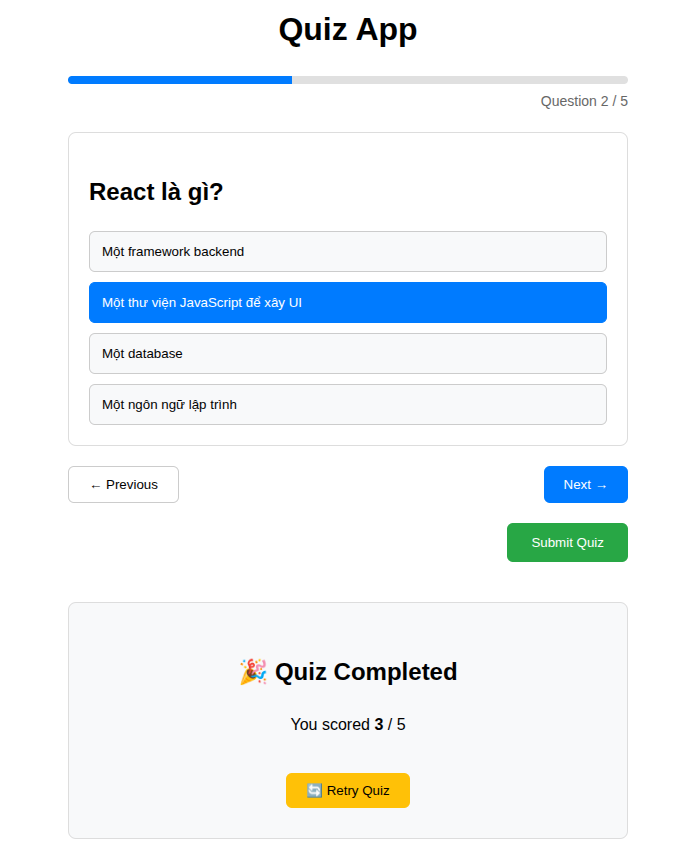
export default function QuizApp() {
  return (
    <div
      style={{
        maxWidth: '600px',
        margin: '40px auto',
        padding: '20px',
        fontFamily: 'sans-serif',
      }}
    >
      {/* Title */}
      <h1 style={{ textAlign: 'center', marginBottom: '20px' }}>Quiz App</h1>

      {/* Progress */}
      <div style={{ marginBottom: '20px' }}>
        <div
          style={{
            height: '8px',
            backgroundColor: '#e0e0e0',
            borderRadius: '4px',
            overflow: 'hidden',
          }}
        >
          <div
            style={{
              width: '40%', // dynamic later
              height: '100%',
              backgroundColor: '#007bff',
            }}
          />
        </div>
        <span
          style={{
            fontSize: '14px',
            color: '#666',
            display: 'block',
            textAlign: 'right',
            marginTop: '6px',
          }}
        >
          Question 2 / 5
        </span>
      </div>

      {/* Question Card */}
      <div
        style={{
          backgroundColor: 'white',
          padding: '20px',
          borderRadius: '8px',
          border: '1px solid #ddd',
        }}
      >
        <h2 style={{ marginBottom: '20px' }}>React là gì?</h2>

        {/* Options */}
        <div style={{ display: 'flex', flexDirection: 'column', gap: '10px' }}>
          <button
            style={{
              padding: '12px',
              borderRadius: '6px',
              border: '1px solid #ccc',
              backgroundColor: '#f8f9fa',
              cursor: 'pointer',
              textAlign: 'left',
            }}
          >
            Một framework backend
          </button>

          <button
            style={{
              padding: '12px',
              borderRadius: '6px',
              border: '1px solid #007bff',
              backgroundColor: '#007bff',
              color: 'white',
              cursor: 'pointer',
              textAlign: 'left',
            }}
          >
            Một thư viện JavaScript để xây UI
          </button>

          <button
            style={{
              padding: '12px',
              borderRadius: '6px',
              border: '1px solid #ccc',
              backgroundColor: '#f8f9fa',
              cursor: 'pointer',
              textAlign: 'left',
            }}
          >
            Một database
          </button>

          <button
            style={{
              padding: '12px',
              borderRadius: '6px',
              border: '1px solid #ccc',
              backgroundColor: '#f8f9fa',
              cursor: 'pointer',
              textAlign: 'left',
            }}
          >
            Một ngôn ngữ lập trình
          </button>
        </div>
      </div>

      {/* Navigation */}
      <div
        style={{
          display: 'flex',
          justifyContent: 'space-between',
          marginTop: '20px',
        }}
      >
        <button
          style={{
            padding: '10px 20px',
            backgroundColor: 'white',
            border: '1px solid #ccc',
            borderRadius: '6px',
            cursor: 'pointer',
          }}
        >
          ← Previous
        </button>

        <button
          style={{
            padding: '10px 20px',
            backgroundColor: '#007bff',
            color: 'white',
            border: 'none',
            borderRadius: '6px',
            cursor: 'pointer',
          }}
        >
          Next →
        </button>
      </div>

      {/* Submit (chỉ hiện ở câu cuối – bạn tự control) */}
      <div style={{ textAlign: 'right', marginTop: '20px' }}>
        <button
          style={{
            padding: '12px 24px',
            backgroundColor: '#28a745',
            color: 'white',
            border: 'none',
            borderRadius: '6px',
            cursor: 'pointer',
          }}
        >
          Submit Quiz
        </button>
      </div>

      {/* Result Screen (toggle bằng logic của bạn) */}
      <div
        style={{
          marginTop: '40px',
          padding: '30px',
          textAlign: 'center',
          backgroundColor: '#f8f9fa',
          borderRadius: '8px',
          border: '1px solid #ddd',
        }}
      >
        <h2>🎉 Quiz Completed</h2>
        <p style={{ fontSize: '16px' }}>
          You scored <strong>3</strong> / 5
        </p>

        <button
          style={{
            marginTop: '20px',
            padding: '10px 20px',
            backgroundColor: '#ffc107',
            border: 'none',
            borderRadius: '6px',
            cursor: 'pointer',
          }}
        >
          🔄 Retry Quiz
        </button>
      </div>
    </div>
  );
}
💡 Xem đáp án
import { useState } from 'react';

const questions = [
  {
    id: 1,
    question: 'React là gì?',
    options: [
      'Một framework backend',
      'Một thư viện JavaScript để xây UI',
      'Một database',
      'Một ngôn ngữ lập trình',
    ],
    correctAnswer: 1,
  },
  {
    id: 2,
    question: 'Hook nào dùng để quản lý state?',
    options: ['useEffect', 'useContext', 'useState', 'useRef'],
    correctAnswer: 2,
  },
  {
    id: 3,
    question: 'JSX là gì?',
    options: [
      'Một template engine',
      'Một ngôn ngữ mới',
      'Cú pháp mở rộng của JavaScript',
      'Một framework CSS',
    ],
    correctAnswer: 2,
  },
];

export default function QuizApp() {
  const [currentIndex, setCurrentIndex] = useState(0);
  const [answers, setAnswers] = useState(Array(questions.length).fill(null));
  const [submitted, setSubmitted] = useState(false);

  const currentQuestion = questions[currentIndex];

  /* =====================
   * Handlers
   * ===================== */
  const selectAnswer = (optionIndex) => {
    const newAnswers = [...answers];
    newAnswers[currentIndex] = optionIndex;
    setAnswers(newAnswers);
  };

  const nextQuestion = () => {
    if (currentIndex < questions.length - 1) {
      setCurrentIndex(currentIndex + 1);
    }
  };

  const prevQuestion = () => {
    if (currentIndex > 0) {
      setCurrentIndex(currentIndex - 1);
    }
  };

  const submitQuiz = () => {
    setSubmitted(true);
  };

  const restartQuiz = () => {
    setCurrentIndex(0);
    setAnswers(Array(questions.length).fill(null));
    setSubmitted(false);
  };

  /* =====================
   * Calculations
   * ===================== */
  const score = answers.reduce((total, answer, index) => {
    if (answer === questions[index].correctAnswer) {
      return total + 1;
    }
    return total;
  }, 0);

  const progress = ((currentIndex + 1) / questions.length) * 100;

  /* =====================
   * Result Screen
   * ===================== */
  if (submitted) {
    return (
      <div
        style={{
          maxWidth: '600px',
          margin: '40px auto',
          padding: '20px',
          fontFamily: 'sans-serif',
        }}
      >
        <div
          style={{
            padding: '30px',
            textAlign: 'center',
            backgroundColor: '#f8f9fa',
            borderRadius: '8px',
            border: '1px solid #ddd',
          }}
        >
          <h2>🎉 Quiz Completed</h2>
          <p style={{ fontSize: '16px' }}>
            You scored <strong>{score}</strong> / {questions.length}
          </p>

          <button
            onClick={restartQuiz}
            style={{
              marginTop: '20px',
              padding: '10px 20px',
              backgroundColor: '#ffc107',
              border: 'none',
              borderRadius: '6px',
              cursor: 'pointer',
            }}
          >
            🔄 Retry Quiz
          </button>
        </div>
      </div>
    );
  }

  /* =====================
   * Quiz Screen
   * ===================== */
  return (
    <div
      style={{
        maxWidth: '600px',
        margin: '40px auto',
        padding: '20px',
        fontFamily: 'sans-serif',
      }}
    >
      <h1 style={{ textAlign: 'center', marginBottom: '20px' }}>Quiz App</h1>

      {/* Progress */}
      <div style={{ marginBottom: '20px' }}>
        <div
          style={{
            height: '8px',
            backgroundColor: '#e0e0e0',
            borderRadius: '4px',
            overflow: 'hidden',
          }}
        >
          <div
            style={{
              width: `${progress}%`,
              height: '100%',
              backgroundColor: '#007bff',
            }}
          />
        </div>
        <span
          style={{
            fontSize: '14px',
            color: '#666',
            display: 'block',
            textAlign: 'right',
            marginTop: '6px',
          }}
        >
          Question {currentIndex + 1} / {questions.length}
        </span>
      </div>

      {/* Question */}
      <div
        style={{
          backgroundColor: 'white',
          padding: '20px',
          borderRadius: '8px',
          border: '1px solid #ddd',
        }}
      >
        <h2 style={{ marginBottom: '20px' }}>{currentQuestion.question}</h2>

        <div style={{ display: 'flex', flexDirection: 'column', gap: '10px' }}>
          {currentQuestion.options.map((option, index) => {
            const selected = answers[currentIndex] === index;

            return (
              <button
                key={index}
                onClick={() => selectAnswer(index)}
                style={{
                  padding: '12px',
                  borderRadius: '6px',
                  border: selected ? '1px solid #007bff' : '1px solid #ccc',
                  backgroundColor: selected ? '#007bff' : '#f8f9fa',
                  color: selected ? 'white' : 'black',
                  cursor: 'pointer',
                  textAlign: 'left',
                }}
              >
                {option}
              </button>
            );
          })}
        </div>
      </div>

      {/* Navigation */}
      <div
        style={{
          display: 'flex',
          justifyContent: 'space-between',
          marginTop: '20px',
        }}
      >
        <button
          onClick={prevQuestion}
          disabled={currentIndex === 0}
          style={{
            padding: '10px 20px',
            backgroundColor: 'white',
            border: '1px solid #ccc',
            borderRadius: '6px',
            cursor: currentIndex === 0 ? 'not-allowed' : 'pointer',
            opacity: currentIndex === 0 ? 0.5 : 1,
          }}
        >
          ← Previous
        </button>

        {currentIndex < questions.length - 1 ? (
          <button
            onClick={nextQuestion}
            disabled={answers[currentIndex] === null}
            style={{
              padding: '10px 20px',
              backgroundColor: '#007bff',
              color: 'white',
              border: 'none',
              borderRadius: '6px',
              cursor:
                answers[currentIndex] === null ? 'not-allowed' : 'pointer',
              opacity: answers[currentIndex] === null ? 0.5 : 1,
            }}
          >
            Next →
          </button>
        ) : (
          <button
            onClick={submitQuiz}
            disabled={answers.includes(null)}
            style={{
              padding: '10px 20px',
              backgroundColor: '#28a745',
              color: 'white',
              border: 'none',
              borderRadius: '6px',
              cursor: answers.includes(null) ? 'not-allowed' : 'pointer',
              opacity: answers.includes(null) ? 0.5 : 1,
            }}
          >
            Submit Quiz
          </button>
        )}
      </div>
    </div>
  );
}
Nâng cao (90 phút): Expense Tracker
Build expense tracking app:
- Add expense (amount, category, date, description)
- Edit expense
- Delete expense
- Filter by category
- Filter by date range
- Calculate totals by category
- Chart/visualization của spending
- Export to CSV (bonus)
const expenses = [
  {
    id: 1,
    date: '2024-05-01',
    category: 'Food',
    description: 'Lunch',
    amount: 12,
  },
  {
    id: 2,
    date: '2024-05-02',
    category: 'Transport',
    description: 'Taxi',
    amount: 25,
  },
  {
    id: 3,
    date: '2024-05-03',
    category: 'Shopping',
    description: 'Shoes',
    amount: 120,
  },
];
🖥️ Mẫu giao diện
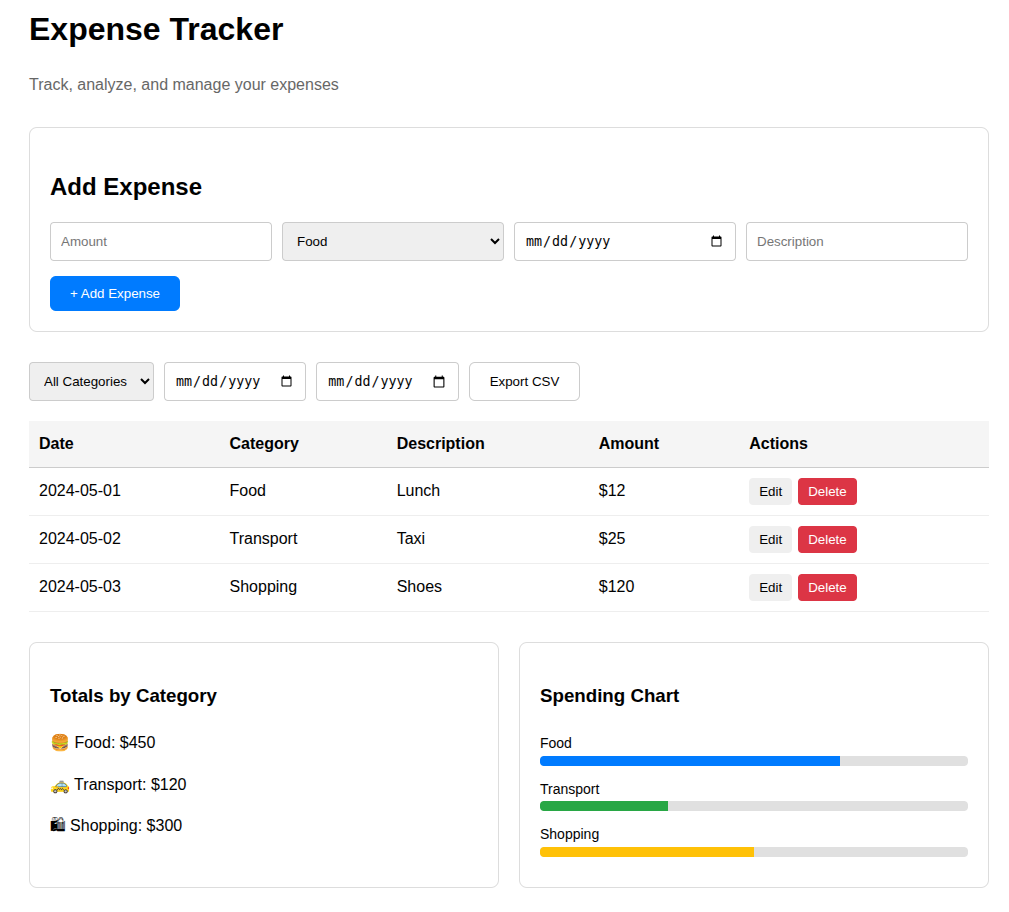
/* =====================
 * Styles
 * ===================== */
const th = {
  textAlign: 'left',
  padding: '10px',
  borderBottom: '1px solid #ccc',
};

const td = {
  padding: '10px',
  borderBottom: '1px solid #eee',
};

const actionBtn = {
  padding: '6px 10px',
  marginRight: '6px',
  border: 'none',
  borderRadius: '4px',
  cursor: 'pointer',
};

function ExpenseTracker() {
  return (
    <div
      style={{
        maxWidth: '1000px',
        margin: '40px auto',
        padding: '20px',
        fontFamily: 'sans-serif',
      }}
    >
      {/* Header */}
      <h1 style={{ marginBottom: '10px' }}>Expense Tracker</h1>
      <p style={{ color: '#666', marginBottom: '30px' }}>
        Track, analyze, and manage your expenses
      </p>

      {/* Add Expense */}
      <div
        style={{
          padding: '20px',
          border: '1px solid #ddd',
          borderRadius: '8px',
          marginBottom: '30px',
        }}
      >
        <h2 style={{ marginBottom: '15px' }}>Add Expense</h2>

        <div
          style={{
            display: 'grid',
            gridTemplateColumns: 'repeat(4, 1fr)',
            gap: '10px',
          }}
        >
          <input
            placeholder='Amount'
            style={{
              padding: '10px',
              border: '1px solid #ccc',
              borderRadius: '4px',
            }}
          />
          <select
            style={{
              padding: '10px',
              border: '1px solid #ccc',
              borderRadius: '4px',
            }}
          >
            <option>Food</option>
            <option>Transport</option>
            <option>Shopping</option>
            <option>Entertainment</option>
          </select>
          <input
            type='date'
            style={{
              padding: '10px',
              border: '1px solid #ccc',
              borderRadius: '4px',
            }}
          />
          <input
            placeholder='Description'
            style={{
              padding: '10px',
              border: '1px solid #ccc',
              borderRadius: '4px',
            }}
          />
        </div>

        <button
          style={{
            marginTop: '15px',
            padding: '10px 20px',
            backgroundColor: '#007bff',
            color: 'white',
            border: 'none',
            borderRadius: '6px',
            cursor: 'pointer',
          }}
        >
          + Add Expense
        </button>
      </div>

      {/* Filters */}
      <div
        style={{
          display: 'flex',
          gap: '10px',
          marginBottom: '20px',
        }}
      >
        <select
          style={{
            padding: '10px',
            border: '1px solid #ccc',
            borderRadius: '4px',
          }}
        >
          <option>All Categories</option>
          <option>Food</option>
          <option>Transport</option>
          <option>Shopping</option>
        </select>

        <input
          type='date'
          style={{
            padding: '10px',
            border: '1px solid #ccc',
            borderRadius: '4px',
          }}
        />
        <input
          type='date'
          style={{
            padding: '10px',
            border: '1px solid #ccc',
            borderRadius: '4px',
          }}
        />

        <button
          style={{
            padding: '10px 20px',
            border: '1px solid #ccc',
            borderRadius: '6px',
            backgroundColor: 'white',
            cursor: 'pointer',
          }}
        >
          Export CSV
        </button>
      </div>

      {/* Expense Table */}
      <table
        style={{
          width: '100%',
          borderCollapse: 'collapse',
          marginBottom: '30px',
        }}
      >
        <thead>
          <tr style={{ backgroundColor: '#f5f5f5' }}>
            <th style={th}>Date</th>
            <th style={th}>Category</th>
            <th style={th}>Description</th>
            <th style={th}>Amount</th>
            <th style={th}>Actions</th>
          </tr>
        </thead>
        <tbody>
          {expenses.map((e) => (
            <tr key={e.id}>
              <td style={td}>{e.date}</td>
              <td style={td}>{e.category}</td>
              <td style={td}>{e.description}</td>
              <td style={td}>${e.amount}</td>
              <td style={td}>
                <button style={actionBtn}>Edit</button>
                <button
                  style={{
                    ...actionBtn,
                    backgroundColor: '#dc3545',
                    color: 'white',
                  }}
                >
                  Delete
                </button>
              </td>
            </tr>
          ))}
        </tbody>
      </table>

      {/* Summary */}
      <div
        style={{
          display: 'grid',
          gridTemplateColumns: '1fr 1fr',
          gap: '20px',
        }}
      >
        {/* Totals */}
        <div
          style={{
            padding: '20px',
            border: '1px solid #ddd',
            borderRadius: '8px',
          }}
        >
          <h3>Totals by Category</h3>
          <p>🍔 Food: $450</p>
          <p>🚕 Transport: $120</p>
          <p>🛍 Shopping: $300</p>
        </div>

        {/* Chart (Dummy) */}
        <div
          style={{
            padding: '20px',
            border: '1px solid #ddd',
            borderRadius: '8px',
          }}
        >
          <h3>Spending Chart</h3>

          <div style={{ marginTop: '15px' }}>
            <Bar
              label='Food'
              width='70%'
              color='#007bff'
            />
            <Bar
              label='Transport'
              width='30%'
              color='#28a745'
            />
            <Bar
              label='Shopping'
              width='50%'
              color='#ffc107'
            />
          </div>
        </div>
      </div>
    </div>
  );
}

/* =====================
 * Small UI helpers
 * ===================== */
function Bar({ label, width, color }) {
  return (
    <div style={{ marginBottom: '10px' }}>
      <span style={{ fontSize: '14px' }}>{label}</span>
      <div
        style={{
          height: '10px',
          backgroundColor: '#e0e0e0',
          borderRadius: '4px',
          overflow: 'hidden',
        }}
      >
        <div
          style={{
            width,
            height: '100%',
            backgroundColor: color,
          }}
        />
      </div>
    </div>
  );
}
💡 Xem đáp án
import { useState } from 'react';

/* =====================
 * Styles
 * ===================== */
const th = {
  textAlign: 'left',
  padding: '10px',
  borderBottom: '1px solid #ccc',
};

const td = {
  padding: '10px',
  borderBottom: '1px solid #eee',
};

const actionBtn = {
  padding: '6px 10px',
  marginRight: '6px',
  border: 'none',
  borderRadius: '4px',
  cursor: 'pointer',
};

/* =====================
 * Dummy Data
 * ===================== */
const initialExpenses = [
  {
    id: 1,
    amount: 120,
    category: 'Food',
    date: '2024-01-10',
    description: 'Lunch',
  },
  {
    id: 2,
    amount: 50,
    category: 'Transport',
    date: '2024-01-11',
    description: 'Grab',
  },
  {
    id: 3,
    amount: 300,
    category: 'Shopping',
    date: '2024-01-12',
    description: 'Shoes',
  },
];
const CATEGORY_CONFIG = {
  Food: {
    label: '🍔 Food',
    color: '#007bff',
  },
  Transport: {
    label: '🚕 Transport',
    color: '#28a745',
  },
  Shopping: {
    label: '🛍 Shopping',
    color: '#ffc107',
  },
  Entertainment: {
    label: '🎬 Entertainment',
    color: '#dc3545',
  },
};
export default function ExpenseTracker() {
  /* =====================
   * State
   * ===================== */
  const [expenses, setExpenses] = useState(initialExpenses);
  const [editingId, setEditingId] = useState(null);

  const [form, setForm] = useState({
    amount: '',
    category: 'Food',
    date: '',
    description: '',
  });

  const [filterCategory, setFilterCategory] = useState('All');
  const [fromDate, setFromDate] = useState('');
  const [toDate, setToDate] = useState('');

  /* =====================
   * Submit Expense
   * ===================== */
  const submitExpense = () => {
    if (!form.amount || Number(form.amount) <= 0 || !form.date) return;

    // 👉 EDIT MODE
    if (editingId) {
      setExpenses((prev) =>
        prev.map((e) =>
          e.id === editingId
            ? {
                ...e,
                amount: Number(form.amount),
                category: form.category,
                date: form.date,
                description: form.description.trim(),
              }
            : e,
        ),
      );
    }
    // 👉 ADD MODE
    else {
      setExpenses((prev) => [
        ...prev,
        {
          id: Date.now(),
          amount: Number(form.amount),
          category: form.category,
          date: form.date,
          description: form.description.trim(),
        },
      ]);
    }

    // reset
    setForm({
      amount: '',
      category: 'Food',
      date: '',
      description: '',
    });
    setEditingId(null);
  };

  /* =====================
   * Delete
   * ===================== */
  const deleteExpense = (id) => {
    setExpenses((prev) => prev.filter((e) => e.id !== id));
  };

  /* =====================
   * Filters
   * ===================== */
  const filteredExpenses = expenses.filter((e) => {
    if (filterCategory !== 'All' && e.category !== filterCategory) return false;
    if (fromDate && e.date < fromDate) return false;
    if (toDate && e.date > toDate) return false;
    return true;
  });

  /* =====================
   * Totals
   * ===================== */
  const totalsByCategory = expenses.reduce((acc, e) => {
    acc[e.category] = (acc[e.category] || 0) + e.amount;
    return acc;
  }, {});

  const maxTotal = Math.max(...Object.values(totalsByCategory), 1);

  /* =====================
   * Export CSV
   * ===================== */
  const exportCSV = () => {
    const header = 'Date,Category,Description,Amount\n';
    const rows = expenses
      .map((e) => `${e.date},${e.category},${e.description},${e.amount}`)
      .join('\n');

    const blob = new Blob([header + rows], { type: 'text/csv' });
    const url = URL.createObjectURL(blob);

    const a = document.createElement('a');
    a.href = url;
    a.download = 'expenses.csv';
    a.click();
  };
  const isFormInvalid = !form.amount || !form.date;
  return (
    <div
      style={{
        maxWidth: '1000px',
        margin: '40px auto',
        padding: '20px',
        fontFamily: 'sans-serif',
      }}
    >
      {/* Header */}
      <h1 style={{ marginBottom: '10px' }}>Expense Tracker</h1>
      <p style={{ color: '#666', marginBottom: '30px' }}>
        Track, analyze, and manage your expenses
      </p>

      {/* Add Expense */}
      <div
        style={{
          padding: '20px',
          border: '1px solid #ddd',
          borderRadius: '8px',
          marginBottom: '30px',
        }}
      >
        <h2 style={{ marginBottom: '15px' }}>Add Expense</h2>

        <div
          style={{
            display: 'grid',
            gridTemplateColumns: 'repeat(4, 1fr)',
            gap: '10px',
          }}
        >
          <input
            placeholder='Amount'
            value={form.amount}
            onChange={(e) => setForm({ ...form, amount: e.target.value })}
            style={{
              padding: '10px',
              border: '1px solid #ccc',
              borderRadius: '4px',
            }}
          />
          <select
            value={form.category}
            onChange={(e) => setForm({ ...form, category: e.target.value })}
            style={{
              padding: '10px',
              border: '1px solid #ccc',
              borderRadius: '4px',
            }}
          >
            <option>Food</option>
            <option>Transport</option>
            <option>Shopping</option>
            <option>Entertainment</option>
          </select>
          <input
            type='date'
            value={form.date}
            onChange={(e) => setForm({ ...form, date: e.target.value })}
            style={{
              padding: '10px',
              border: '1px solid #ccc',
              borderRadius: '4px',
            }}
          />
          <input
            placeholder='Description'
            value={form.description}
            onChange={(e) => setForm({ ...form, description: e.target.value })}
            onKeyDown={(e) => {
              if (e.key === 'Enter') submitExpense();
            }}
            style={{
              padding: '10px',
              border: '1px solid #ccc',
              borderRadius: '4px',
            }}
          />
        </div>

        <button
          onClick={submitExpense}
          disabled={isFormInvalid}
          style={{
            marginTop: '15px',
            padding: '10px 20px',
            backgroundColor: isFormInvalid ? '#ccc' : '#007bff',
            color: 'white',
            border: 'none',
            borderRadius: '6px',
            cursor: isFormInvalid ? 'not-allowed' : 'pointer',
          }}
        >
          {editingId ? '✏️ Update Expense' : '+ Add Expense'}
        </button>
        {editingId && (
          <button
            onClick={() => {
              setForm({
                amount: '',
                category: 'Food',
                date: '',
                description: '',
              });
              setEditingId(null);
            }}
            style={{
              marginLeft: '10px',
              padding: '10px 20px',
              backgroundColor: '#6c757d',
              color: 'white',
              border: 'none',
              borderRadius: '6px',
              cursor: 'pointer',
            }}
          >
            Cancel
          </button>
        )}
      </div>

      {/* Filters */}
      <div style={{ display: 'flex', gap: '10px', marginBottom: '20px' }}>
        <select
          onChange={(e) => setFilterCategory(e.target.value)}
          style={{
            padding: '10px',
            border: '1px solid #ccc',
            borderRadius: '4px',
          }}
        >
          <option value='All'>All Categories</option>
          <option>Food</option>
          <option>Transport</option>
          <option>Shopping</option>
        </select>

        <input
          type='date'
          onChange={(e) => setFromDate(e.target.value)}
          style={{ padding: '10px' }}
        />
        <input
          type='date'
          onChange={(e) => setToDate(e.target.value)}
          style={{ padding: '10px' }}
        />

        <button
          onClick={exportCSV}
          style={{
            padding: '10px 20px',
            border: '1px solid #ccc',
            borderRadius: '6px',
            backgroundColor: 'white',
            cursor: 'pointer',
          }}
        >
          Export CSV
        </button>
      </div>

      {/* Expense Table */}
      <table
        style={{
          width: '100%',
          borderCollapse: 'collapse',
          marginBottom: '30px',
        }}
      >
        <thead>
          <tr style={{ backgroundColor: '#f5f5f5' }}>
            <th style={th}>Date</th>
            <th style={th}>Category</th>
            <th style={th}>Description</th>
            <th style={th}>Amount</th>
            <th style={th}>Actions</th>
          </tr>
        </thead>
        <tbody>
          {filteredExpenses.map((e) => (
            <tr key={e.id}>
              <td style={td}>{e.date}</td>
              <td style={td}>{e.category}</td>
              <td style={td}>{e.description}</td>
              <td style={td}>${e.amount}</td>
              <td style={td}>
                <button
                  style={actionBtn}
                  onClick={() => {
                    setForm({
                      amount: e.amount,
                      category: e.category,
                      date: e.date,
                      description: e.description,
                    });
                    setEditingId(e.id);
                  }}
                >
                  Edit
                </button>

                <button
                  onClick={() => deleteExpense(e.id)}
                  style={{
                    ...actionBtn,
                    backgroundColor: '#dc3545',
                    color: 'white',
                  }}
                >
                  Delete
                </button>
              </td>
            </tr>
          ))}
        </tbody>
      </table>

      {/* Summary */}
      <div
        style={{ display: 'grid', gridTemplateColumns: '1fr 1fr', gap: '20px' }}
      >
        <div
          style={{
            padding: '20px',
            border: '1px solid #ddd',
            borderRadius: '8px',
          }}
        >
          <h3>Totals by Category</h3>
          {Object.entries(totalsByCategory).map(([category, total]) => {
            const config = CATEGORY_CONFIG[category];

            return (
              <p key={category}>
                {config?.label || category}: ${total}
              </p>
            );
          })}
        </div>

        <div
          style={{
            padding: '20px',
            border: '1px solid #ddd',
            borderRadius: '8px',
          }}
        >
          <h3>Spending Chart</h3>
          <div style={{ marginTop: '15px' }}>
            {Object.entries(totalsByCategory).map(([category, total]) => {
              const config = CATEGORY_CONFIG[category];

              return (
                <Bar
                  key={category}
                  label={config?.label || category}
                  width={`${(total / maxTotal) * 100}%`}
                  color={config?.color || '#999'}
                />
              );
            })}
          </div>
        </div>
      </div>
    </div>
  );
}

/* =====================
 * Small UI helpers
 * ===================== */
function Bar({ label, width, color }) {
  return (
    <div style={{ marginBottom: '10px' }}>
      <span style={{ fontSize: '14px' }}>{label}</span>
      <div
        style={{
          height: '10px',
          backgroundColor: '#e0e0e0',
          borderRadius: '4px',
          overflow: 'hidden',
        }}
      >
        <div
          style={{
            width,
            height: '100%',
            backgroundColor: color,
          }}
        />
      </div>
    </div>
  );
}
📚 TÀI LIỆU THAM KHẢO
Bắt buộc đọc
React Docs - useState
- https://react.dev/reference/react/useState
- Đọc toàn bộ, rất quan trọng!
React Docs - State: A Component's Memory
- https://react.dev/learn/state-a-components-memory
- Mental model về state
Đọc thêm
React Docs - Updating Objects in State
- https://react.dev/learn/updating-objects-in-state
- Immutability patterns
React Docs - Updating Arrays in State
- https://react.dev/learn/updating-arrays-in-state
- Array manipulation patterns
🔗 KẾT NỐI KIẾN THỨC
Kiến thức nền (Đã dùng)
- Ngày 1-9: All concepts được enhance bằng state
- Ngày 9: Forms → Controlled components
- Ngày 10: Project → Refactor với state
Hướng tới (Sẽ học)
- Ngày 12: useReducer - Complex state management
- Ngày 13: Lifting state up - State sharing
- Ngày 14: Context API - Global state
- Ngày 17: useEffect - Side effects với state
- Ngày 23: useMemo, useCallback - Performance optimization
💡 SENIOR INSIGHTS
Production Considerations
1. State Granularity:
// Too granular (many re-renders):
const [firstName, setFirstName] = useState('');
const [lastName, setLastName] = useState('');
const [email, setEmail] = useState('');
const [phone, setPhone] = useState('');
// 4 states = 4 potential re-renders

// Better (fewer re-renders):
const [formData, setFormData] = useState({
  firstName: '',
  lastName: '',
  email: '',
  phone: '',
});
// 1 state = 1 re-render when any field changes
2. State Colocation:
Rule: Keep state as close as possible to where it's used

Global state (App level):
- User authentication
- Theme
- Language

Component state (local):
- Form inputs
- UI toggles
- Local filters
3. When NOT to useState:
// ❌ Don't store what can be computed
const [todos, setTodos] = useState([]);
const [completedCount, setCompletedCount] = useState(0); // ❌

// ✅ Compute instead
const [todos, setTodos] = useState([]);
const completedCount = todos.filter((t) => t.completed).length; // ✅
Câu Hỏi Phỏng Vấn
Junior:
Q: useState trả về gì? A: Array với 2 elements:
[currentValue, setterFunction]Q: Làm sao update state? A: Gọi setter function:
setState(newValue)Q: State update có immediate không? A: Không, setState là asynchronous
Mid: 4. Q: Khi nào dùng function form setState(prev => ...)? A: Khi new state depends on previous state
Q: Tại sao phải update state immutably? A: React compares by reference. Same reference = no re-render.
Q: Difference giữa state và props? A: State: owned by component, mutable via setState. Props: passed from parent, read-only.
Senior: 7. Q: Optimize component với nhiều state? A: Combine related state, use useMemo/useCallback, split into smaller components
Q: Handle complex nested state updates? A: Use useReducer (Ngày 12) or state management library
Q: Debug stale closure trong useState? A: Use function form, React DevTools, or useRef for mutable values
🎯 PREVIEW NGÀY MAI
Ngày 12: useReducer - Complex State Management
Tomorrow we'll learn:
- When useState isn't enough
- useReducer for complex state logic
- Reducer pattern
- Action creators
- State machines
- Refactor complex useState to useReducer
Prepare:
- Review today's todo list with many state variables
- Think about how to simplify complex state updates
- Rest well - useReducer is powerful but needs focus! 🚀
🎉 Chúc mừng! Bạn đã master useState!
useState là foundation của React state management. Mọi pattern sau này đều build trên kiến thức này. Practice nhiều để thành thạo! 💪
Key Takeaway: State makes React reactive. Change state → UI updates automatically. That's the magic! ✨