📅 NGÀY 12: useState - Patterns & Best Practices
🎯 Mục tiêu học tập (5 phút)
Sau bài học này, bạn sẽ:
- [ ] Hiểu và áp dụng functional updates để tránh stale closure bugs
- [ ] Sử dụng lazy initialization để optimize performance
- [ ] Thiết kế state structure hợp lý (flat vs nested, single vs multiple)
- [ ] Áp dụng immutability patterns khi update objects/arrays
- [ ] Nhận biết và tránh derived state anti-pattern
🤔 Kiểm tra đầu vào (5 phút)
Trả lời 3 câu hỏi sau để kích hoạt kiến thức từ Ngày 11:
- Câu 1: Code này sẽ hiển thị gì sau khi click 3 lần?
const [count, setCount] = useState(0);

const handleClick = () => {
  setCount(count + 1);
  setCount(count + 1);
  setCount(count + 1);
};
Câu 2: State và Props khác nhau thế nào? Điều gì xảy ra khi state thay đổi?
Câu 3: Tại sao code này có vấn đề?
const [user, setUser] = useState({ name: 'Alice', age: 25 });
user.age = 26; // Mutating directly
💡 Xem đáp án
- Hiển thị
1(không phải 3!) - Đây chính là vấn đề mà functional updates sẽ giải quyết - Props: read-only, từ parent; State: mutable, internal. Khi state thay đổi → component re-render
- Vi phạm immutability - React không detect được thay đổi → không re-render
📖 PHẦN 1: GIỚI THIỆU KHÁI NIỆM (30 phút)
1.1 Vấn Đề Thực Tế
Hôm qua (Ngày 11) chúng ta đã học useState cơ bản với cú pháp:
const [count, setCount] = useState(0);
setCount(5); // Direct update
Nhưng hãy xem tình huống này trong real app:
// ❌ BUG ẨN TRONG CODE NÀY!
function LikeButton() {
  const [likes, setLikes] = useState(0);

  const handleTripleClick = () => {
    setLikes(likes + 1);
    setLikes(likes + 1);
    setLikes(likes + 1);
  };

  return <button onClick={handleTripleClick}>❤️ {likes}</button>;
}
Kỳ vọng: Click 1 lần → tăng 3 likes
Thực tế: Click 1 lần → chỉ tăng 1 like 😱
Tại sao? Đây là stale closure - một trong những bugs phổ biến nhất trong React!
1.2 Giải Pháp
Hôm nay chúng ta học 5 patterns nâng cao của useState:
- Functional Updates - Fix stale closure
- Lazy Initialization - Optimize expensive computations
- State Structure - Design state hiệu quả
- Immutability Patterns - Update objects/arrays đúng cách
- Derived State - Tránh duplicate state
1.3 Mental Model
┌─────────────────────────────────────────────────┐
│          useState ADVANCED PATTERNS             │
├─────────────────────────────────────────────────┤
│                                                 │
│  ┌─────────────────┐                            │
│  │ Functional      │  setCount(prev => prev+1)  │
│  │ Updates         │  ✅ Always latest state    │
│  └─────────────────┘                            │
│                                                 │
│  ┌─────────────────┐                            │
│  │ Lazy            │  useState(() => heavy())   │
│  │ Initialization  │  ✅ Run once on mount      │
│  └─────────────────┘                            │
│                                                 │
│  ┌─────────────────┐                            │
│  │ State           │  Multiple small vs         │
│  │ Structure       │  One big object?           │
│  └─────────────────┘                            │
│                                                 │
│  ┌─────────────────┐                            │
│  │ Immutability    │  {...obj, age: 26}         │
│  │ Patterns        │  [...arr, newItem]         │
│  └─────────────────┘                            │
│                                                 │
│  ┌─────────────────┐                            │
│  │ Derived         │  fullName = first + last   │
│  │ State           │  ✅ Calculate, don't store │
│  └─────────────────┘                            │
└─────────────────────────────────────────────────┘
Analogy dễ hiểu:
- Functional updates = Gửi thư với "tăng lương thêm 10%" thay vì "lương = 5 triệu" (vì có thể đã tăng rồi)
- Lazy initialization = Nấu cơm electric cooker một lần, không phải nấu lại mỗi lần ăn
- Immutability = Viết draft email mới thay vì sửa email đã gửi
1.4 Hiểu Lầm Phổ Biến
❌ Myth 1: "setCount(count + 1) luôn đúng"
✅ Truth: Sai khi có multiple updates hoặc async operations
❌ Myth 2: "useState chậm vì heavy computation"
✅ Truth: Chỉ chậm nếu không dùng lazy initialization
❌ Myth 3: "Store mọi thứ in state"
✅ Truth: Derived values nên calculate, không store
💻 PHẦN 2: LIVE CODING (45 phút)
Demo 1: Functional Updates - Pattern Cơ Bản ⭐
❌ CÁCH SAI: Direct Updates (Stale Closure)
function Counter() {
  const [count, setCount] = useState(0);

  // ❌ VẤN ĐỀ: Tất cả 3 lần đều đọc count = 0
  const increment3Times = () => {
    setCount(count + 1); // count = 0, set to 1
    setCount(count + 1); // count vẫn = 0, set to 1
    setCount(count + 1); // count vẫn = 0, set to 1
    // Kết quả: count = 1 (không phải 3!)
  };

  // ❌ VẤN ĐỀ: setTimeout capture stale value
  const incrementAsync = () => {
    setTimeout(() => {
      setCount(count + 1); // count là giá trị lúc click, không phải lúc timeout
    }, 1000);
  };

  return (
    <div>
      <p>Count: {count}</p>
      <button onClick={increment3Times}>+3 (BUG!)</button>
      <button onClick={incrementAsync}>+1 sau 1s (BUG!)</button>
    </div>
  );
}
Tại sao sai?
countlà constant trong mỗi render- Closure capture giá trị tại thời điểm tạo function
- Multiple updates đọc cùng 1 giá trị cũ
✅ CÁCH ĐÚNG: Functional Updates
function Counter() {
  const [count, setCount] = useState(0);

  // ✅ ĐÚNG: Mỗi lần dùng giá trị mới nhất
  const increment3Times = () => {
    setCount((prev) => prev + 1); // prev = 0, return 1
    setCount((prev) => prev + 1); // prev = 1, return 2
    setCount((prev) => prev + 1); // prev = 2, return 3
    // Kết quả: count = 3 ✅
  };

  // ✅ ĐÚNG: Luôn lấy giá trị mới nhất khi timeout chạy
  const incrementAsync = () => {
    setTimeout(() => {
      setCount((prev) => prev + 1); // prev là giá trị mới nhất
    }, 1000);
  };

  return (
    <div>
      <p>Count: {count}</p>
      <button onClick={increment3Times}>+3 ✅</button>
      <button onClick={incrementAsync}>+1 sau 1s ✅</button>
    </div>
  );
}
Tại sao đúng?
prevluôn là latest state value- React queue updates và chạy tuần tự
- Không bị stale closure
Demo 2: Lazy Initialization - Kịch Bản Thực Tế ⭐⭐
❌ CÁCH SAI: Expensive Computation Chạy Mỗi Render
// Hàm tính toán nặng (ví dụ: đọc từ localStorage)
function getInitialTodos() {
  console.log('🔥 Running expensive computation...');

  // Giả lập heavy computation
  const start = Date.now();
  while (Date.now() - start < 100) {
    // Block 100ms
  }

  // Đọc từ localStorage
  const saved = localStorage.getItem('todos');
  return saved ? JSON.parse(saved) : [];
}

// ❌ VẤN ĐỀ: getInitialTodos() chạy MỖI RENDER!
function TodoApp() {
  const [todos, setTodos] = useState(getInitialTodos()); // 🔥 Chạy mỗi render!
  const [input, setInput] = useState('');

  // Mỗi lần gõ input → component re-render → getInitialTodos() chạy lại!
  // Dù chỉ cần giá trị initial 1 lần

  return (
    <div>
      <input
        value={input}
        onChange={(e) => setInput(e.target.value)}
      />
      {/* UI... */}
    </div>
  );
}
Vấn đề:
getInitialTodos()chạy mỗi render (ngay cả khi đang gõ input!)- Waste performance
- Console log spam
✅ CÁCH ĐÚNG: Lazy Initialization
function getInitialTodos() {
  console.log('✅ Running ONCE on mount...');

  const start = Date.now();
  while (Date.now() - start < 100) {}

  const saved = localStorage.getItem('todos');
  return saved ? JSON.parse(saved) : [];
}

// ✅ ĐÚNG: Pass function, React chỉ gọi 1 lần khi mount
function TodoApp() {
  const [todos, setTodos] = useState(() => getInitialTodos()); // ✅ Function!
  const [input, setInput] = useState('');

  // Gõ input → re-render → getInitialTodos() KHÔNG chạy lại

  return (
    <div>
      <input
        value={input}
        onChange={(e) => setInput(e.target.value)}
      />
      <p>Todos: {todos.length}</p>
      {/* Console chỉ log 1 lần! */}
    </div>
  );
}
Quy tắc vàng:
// ❌ SAI: Function call
useState(expensiveFunction());

// ✅ ĐÚNG: Function reference
useState(() => expensiveFunction());

// ⚠️ CHÚ Ý: Chỉ dùng khi initial value thực sự expensive
useState(0); // OK - simple value
useState(() => 0); // Overkill - không cần thiết
useState(() => readFromDB()); // GOOD - expensive operation
Demo 3: State Structure & Immutability - Edge Cases ⭐⭐⭐
❌ CÁCH SAI: Nhiều State Không Liên Quan
// ❌ VẤN ĐỀ: State không được group logic
function UserProfile() {
  const [firstName, setFirstName] = useState('');
  const [lastName, setLastName] = useState('');
  const [email, setEmail] = useState('');
  const [age, setAge] = useState(0);
  const [address, setAddress] = useState('');
  const [city, setCity] = useState('');
  const [country, setCountry] = useState('');

  // Reset form cần 7 dòng code!
  const handleReset = () => {
    setFirstName('');
    setLastName('');
    setEmail('');
    setAge(0);
    setAddress('');
    setCity('');
    setCountry('');
  };

  // Update phức tạp, dễ miss fields
}
✅ CÁCH ĐÚNG: Group Related State
// ✅ ĐÚNG: Group state có liên quan
function UserProfile() {
  const [user, setUser] = useState({
    firstName: '',
    lastName: '',
    email: '',
    age: 0,
    address: {
      street: '',
      city: '',
      country: '',
    },
  });

  // Reset đơn giản hơn
  const handleReset = () => {
    setUser({
      firstName: '',
      lastName: '',
      email: '',
      age: 0,
      address: { street: '', city: '', country: '' },
    });
  };

  // Update với immutability
  const updateField = (field, value) => {
    setUser((prev) => ({
      ...prev, // Spread old values
      [field]: value, // Override field
    }));
  };

  // Update nested object
  const updateAddress = (field, value) => {
    setUser((prev) => ({
      ...prev,
      address: {
        ...prev.address, // Spread old address
        [field]: value, // Override address field
      },
    }));
  };

  return (
    <div>
      <input
        value={user.firstName}
        onChange={(e) => updateField('firstName', e.target.value)}
      />
      <input
        value={user.address.city}
        onChange={(e) => updateAddress('city', e.target.value)}
      />
    </div>
  );
}
🔥 Immutability Patterns Deep Dive
function DataManager() {
  const [items, setItems] = useState([
    { id: 1, name: 'Item 1', completed: false },
    { id: 2, name: 'Item 2', completed: true },
  ]);

  // ✅ PATTERN 1: Add item
  const addItem = (name) => {
    const newItem = {
      id: Date.now(),
      name,
      completed: false,
    };

    setItems((prev) => [...prev, newItem]); // Spread + add
  };

  // ✅ PATTERN 2: Remove item
  const removeItem = (id) => {
    setItems((prev) => prev.filter((item) => item.id !== id));
  };

  // ✅ PATTERN 3: Update item
  const toggleItem = (id) => {
    setItems((prev) =>
      prev.map(
        (item) =>
          item.id === id
            ? { ...item, completed: !item.completed } // Create new object
            : item, // Keep old reference
      ),
    );
  };

  // ✅ PATTERN 4: Update nested property
  const updateItemName = (id, newName) => {
    setItems((prev) =>
      prev.map((item) => (item.id === id ? { ...item, name: newName } : item)),
    );
  };

  // ✅ PATTERN 5: Replace entire array
  const replaceItems = (newItems) => {
    setItems(newItems); // Direct replacement OK
  };

  // ❌ NEVER DO THIS:
  const wrongUpdate = (id) => {
    const item = items.find((i) => i.id === id);
    item.completed = true; // 🚫 Mutation!
    setItems(items); // 🚫 Same reference!
  };
}
🔨 PHẦN 3: BÀI TẬP THỰC HÀNH (60 phút)
⭐ Exercise 1: Fix Stale Closure Bug (15 phút)
/**
 * 🎯 Mục tiêu: Sửa bug stale closure trong code dưới đây
 * ⏱️ Thời gian: 15 phút
 * 🚫 KHÔNG dùng: useEffect, useRef
 *
 * Requirements:
 * 1. Fix bug trong handleDoubleClick (phải tăng 2 lần)
 * 2. Fix bug trong handleDelayedIncrement (phải dùng latest value)
 * 3. Giải thích TẠI SAO functional updates fix được bugs
 *
 * 💡 Gợi ý: Thay direct updates bằng functional updates
 */

// ❌ CODE CÓ BUG:
function BuggyCounter() {
  const [count, setCount] = useState(0);

  // BUG: Chỉ tăng 1 lần dù gọi 2 lần
  const handleDoubleClick = () => {
    setCount(count + 1);
    setCount(count + 1);
  };

  // BUG: Nếu click nhiều lần nhanh, giá trị sai
  const handleDelayedIncrement = () => {
    setTimeout(() => {
      setCount(count + 1);
    }, 1000);
  };

  return (
    <div>
      <p>Count: {count}</p>
      <button onClick={handleDoubleClick}>+2 (BUG!)</button>
      <button onClick={handleDelayedIncrement}>+1 sau 1s (BUG!)</button>
      <button onClick={() => setCount(0)}>Reset</button>
    </div>
  );
}

// ✅ NHIỆM VỤ CỦA BẠN:
// TODO: Fix handleDoubleClick
// TODO: Fix handleDelayedIncrement
// TODO: Giải thích tại sao fix này work
💡 Solution
function FixedCounter() {
  const [count, setCount] = useState(0);

  // ✅ FIX: Functional updates
  const handleDoubleClick = () => {
    setCount((prev) => prev + 1); // prev = current value
    setCount((prev) => prev + 1); // prev = after first update
  };

  // ✅ FIX: Functional updates với async
  const handleDelayedIncrement = () => {
    setTimeout(() => {
      setCount((prev) => prev + 1); // prev = latest value khi timeout
    }, 1000);
  };

  return (
    <div>
      <p>Count: {count}</p>
      <button onClick={handleDoubleClick}>+2 ✅</button>
      <button onClick={handleDelayedIncrement}>+1 sau 1s ✅</button>
      <button onClick={() => setCount(0)}>Reset</button>
    </div>
  );
}

/**
 * GIẢI THÍCH:
 *
 * Direct updates (count + 1):
 * - count là constant trong mỗi render
 * - Closure capture giá trị tại thời điểm function được tạo
 * - Multiple updates đọc cùng 1 giá trị
 *
 * Functional updates (prev => prev + 1):
 * - prev luôn là latest state value
 * - React queue các updates
 * - Mỗi update nhận output của update trước
 * - Không bị stale closure vì không depend on outer variable
 */
⭐⭐ Exercise 2: Lazy Initialization Pattern (25 phút)
/**
 * 🎯 Mục tiêu: Optimize expensive initialization
 * ⏱️ Thời gian: 25 phút
 *
 * Scenario: Shopping cart app đọc từ localStorage
 *
 * 🤔 PHÂN TÍCH:
 * Approach A: Direct initialization - useState(getCartFromStorage())
 * Pros: Code ngắn gọn
 * Cons: Chạy mỗi render, waste performance
 *
 * Approach B: Lazy initialization - useState(() => getCartFromStorage())
 * Pros: Chỉ chạy 1 lần on mount
 * Cons: Syntax hơi dài hơn (nhưng đáng giá!)
 *
 * 💭 BẠN CHỌN GÌ VÀ TẠI SAO?
 * Document quyết định của bạn, sau đó implement.
 */

// Helper function (đã có sẵn)
function getCartFromStorage() {
  console.log('🔍 Reading from localStorage...');

  // Simulate expensive operation
  const start = Date.now();
  while (Date.now() - start < 50) {} // Block 50ms

  const saved = localStorage.getItem('cart');
  return saved ? JSON.parse(saved) : [];
}

// ❌ CODE CÓ PERFORMANCE ISSUE:
function ShoppingCart() {
  const [cart, setCart] = useState(getCartFromStorage()); // Chạy mỗi render!
  const [searchTerm, setSearchTerm] = useState('');

  // Mỗi lần gõ search → re-render → getCartFromStorage() chạy lại!

  const addToCart = (product) => {
    setCart((prev) => [...prev, product]);
  };

  return (
    <div>
      <input
        placeholder='Search products...'
        value={searchTerm}
        onChange={(e) => setSearchTerm(e.target.value)}
      />
      <p>Cart: {cart.length} items</p>
      {/* Mỗi keystroke = 1 lần đọc localStorage 😱 */}
    </div>
  );
}

// ✅ NHIỆM VỤ CỦA BẠN:
// TODO: Viết version optimized với lazy initialization
// TODO: Test bằng cách gõ vào search input
// TODO: Check console - getCartFromStorage() chỉ log 1 lần
// TODO: Document decision: Khi nào nên dùng lazy init?
💡 Solution
// ✅ OPTIMIZED VERSION:
function ShoppingCartOptimized() {
  const [cart, setCart] = useState(() => getCartFromStorage()); // Function!
  const [searchTerm, setSearchTerm] = useState('');

  const addToCart = (product) => {
    setCart((prev) => {
      const newCart = [...prev, product];
      localStorage.setItem('cart', JSON.stringify(newCart));
      return newCart;
    });
  };

  return (
    <div>
      <input
        placeholder='Search products...'
        value={searchTerm}
        onChange={(e) => setSearchTerm(e.target.value)}
      />
      <p>Cart: {cart.length} items</p>
      <button onClick={() => addToCart({ id: Date.now(), name: 'Product' })}>
        Add Item
      </button>
    </div>
  );
}

/**
 * 📋 DECISION DOCUMENT:
 *
 * Approach chosen: Lazy Initialization
 *
 * Rationale:
 * - getCartFromStorage() là expensive (I/O operation + JSON parse)
 * - Chỉ cần initial value 1 lần
 * - Component re-render nhiều lần (search input changes)
 * - Performance gain đáng kể (50ms x N renders)
 *
 * When to use Lazy Initialization:
 * ✅ Reading from localStorage/sessionStorage
 * ✅ Complex calculations
 * ✅ Reading from DOM
 * ✅ Parsing large data structures
 *
 * When NOT needed:
 * ❌ Simple values (0, '', [], {})
 * ❌ Fast computations
 * ❌ Values already in memory
 */
⭐⭐⭐ Exercise 3: User Profile Form (40 phút)
/**
 * 🎯 Mục tiêu: Quản lý complex form state với immutability
 * ⏱️ Thời gian: 40 phút
 *
 * 📋 Product Requirements:
 * User Story: "Là user, tôi muốn edit profile với thông tin personal và address"
 *
 * ✅ Acceptance Criteria:
 * - [ ] Form có fields: firstName, lastName, email, phone
 * - [ ] Nested address: street, city, country
 * - [ ] Update fields không mutate state
 * - [ ] Reset button clear toàn bộ form
 * - [ ] Display full name (derived from first + last)
 *
 * 🎨 Technical Constraints:
 * - Dùng 1 state object cho toàn bộ form
 * - Immutable updates cho cả top-level và nested fields
 * - Không duplicate data (fullName phải derived)
 *
 * 🚨 Edge Cases cần handle:
 * - Empty string inputs
 * - Update nested fields không ảnh hưởng top-level
 * - Reset phải clear cả nested objects
 */

// ✅ NHIỆM VỤ CỦA BẠN:

// TODO 1: Design state structure
const INITIAL_STATE = {
  // TODO: Define structure
};

function UserProfileForm() {
  const [profile, setProfile] = useState(INITIAL_STATE);

  // TODO 2: Implement updateField (for top-level fields)
  const updateField = (field, value) => {
    // TODO: Immutable update
  };

  // TODO 3: Implement updateAddress (for nested fields)
  const updateAddress = (field, value) => {
    // TODO: Immutable nested update
  };

  // TODO 4: Implement handleReset
  const handleReset = () => {
    // TODO: Reset to initial state
  };

  // TODO 5: Compute derived state (fullName)
  const fullName = ''; // TODO: Derive from firstName + lastName

  return (
    <div>
      <h2>Edit Profile</h2>

      {/* TODO 6: Implement form fields */}
      <input placeholder='First Name' />
      <input placeholder='Last Name' />
      <input placeholder='Email' />
      <input placeholder='Phone' />

      <h3>Address</h3>
      <input placeholder='Street' />
      <input placeholder='City' />
      <input placeholder='Country' />

      <div>
        <p>Full Name: {fullName}</p>
        <button onClick={handleReset}>Reset</button>
      </div>

      {/* Debug view */}
      <pre>{JSON.stringify(profile, null, 2)}</pre>
    </div>
  );
}

// 📝 Implementation Checklist:
// - [ ] State structure designed
// - [ ] updateField works for top-level
// - [ ] updateAddress works for nested
// - [ ] Reset clears everything
// - [ ] fullName derives correctly
// - [ ] No mutations anywhere
💡 Solution
const INITIAL_STATE = {
  firstName: '',
  lastName: '',
  email: '',
  phone: '',
  address: {
    street: '',
    city: '',
    country: '',
  },
};

function UserProfileForm() {
  const [profile, setProfile] = useState(INITIAL_STATE);

  // ✅ Update top-level field
  const updateField = (field, value) => {
    setProfile((prev) => ({
      ...prev,
      [field]: value,
    }));
  };

  // ✅ Update nested address field
  const updateAddress = (field, value) => {
    setProfile((prev) => ({
      ...prev,
      address: {
        ...prev.address,
        [field]: value,
      },
    }));
  };

  // ✅ Reset to initial state
  const handleReset = () => {
    setProfile(INITIAL_STATE);
  };

  // ✅ Derived state (computed, not stored)
  const fullName =
    `${profile.firstName} ${profile.lastName}`.trim() || '(Not set)';

  return (
    <div style={{ padding: '20px', fontFamily: 'system-ui' }}>
      <h2>Edit Profile</h2>

      <div
        style={{
          display: 'flex',
          flexDirection: 'column',
          gap: '10px',
          maxWidth: '400px',
        }}
      >
        <input
          placeholder='First Name'
          value={profile.firstName}
          onChange={(e) => updateField('firstName', e.target.value)}
        />
        <input
          placeholder='Last Name'
          value={profile.lastName}
          onChange={(e) => updateField('lastName', e.target.value)}
        />
        <input
          placeholder='Email'
          value={profile.email}
          onChange={(e) => updateField('email', e.target.value)}
        />
        <input
          placeholder='Phone'
          value={profile.phone}
          onChange={(e) => updateField('phone', e.target.value)}
        />

        <h3>Address</h3>
        <input
          placeholder='Street'
          value={profile.address.street}
          onChange={(e) => updateAddress('street', e.target.value)}
        />
        <input
          placeholder='City'
          value={profile.address.city}
          onChange={(e) => updateAddress('city', e.target.value)}
        />
        <input
          placeholder='Country'
          value={profile.address.country}
          onChange={(e) => updateAddress('country', e.target.value)}
        />

        <div
          style={{ marginTop: '20px', padding: '10px', background: '#f0f0f0' }}
        >
          <p>
            <strong>Full Name:</strong> {fullName}
          </p>
          <button onClick={handleReset}>Reset Form</button>
        </div>

        <details>
          <summary>Debug: State</summary>
          <pre style={{ background: '#000', color: '#0f0', padding: '10px' }}>
            {JSON.stringify(profile, null, 2)}
          </pre>
        </details>
      </div>
    </div>
  );
}

/**
 * KEY LEARNINGS:
 *
 * 1. State Structure:
 *    - Group related data (personal info vs address)
 *    - Nested objects for logical grouping
 *
 * 2. Immutability:
 *    - Top-level: {...prev, field: value}
 *    - Nested: {...prev, nested: {...prev.nested, field: value}}
 *
 * 3. Derived State:
 *    - fullName computed from firstName + lastName
 *    - Không store riêng → luôn sync
 *
 * 4. Reusable Patterns:
 *    - updateField: generic top-level updater
 *    - updateAddress: specific nested updater
 *    - Reset: restore to initial constant
 */
⭐⭐⭐⭐ Exercise 4: Shopping Cart with Quantities (60 phút)
/**
 * 🎯 Mục tiêu: Architectural decisions cho shopping cart
 * ⏱️ Thời gian: 60 phút
 *
 * 🏗️ PHASE 1: Research & Design (20 phút)
 *
 * So sánh 3 approaches:
 *
 * A) Array of objects: [{id, name, price, quantity}, ...]
 * B) Object with IDs as keys: {[id]: {name, price, quantity}, ...}
 * C) Separate arrays: products[] + quantities[]
 *
 * Document pros/cons mỗi approach, sau đó chọn 1.
 *
 * ADR Template:
 * - Context: Shopping cart cần add/remove/update quantity
 * - Decision: Approach [A/B/C]
 * - Rationale: Tại sao?
 * - Consequences: Trade-offs accepted
 * - Alternatives Considered: Tại sao không chọn approach khác?
 *
 * 💻 PHASE 2: Implementation (30 phút)
 *
 * Requirements:
 * - Add product to cart
 * - Remove product from cart
 * - Increase/decrease quantity
 * - Calculate total price (derived state)
 * - Clear cart
 *
 * 🧪 PHASE 3: Testing (10 phút)
 * Manual testing checklist:
 * - [ ] Add same product twice → quantity increases
 * - [ ] Decrease quantity to 0 → remove from cart
 * - [ ] Total price updates correctly
 */

// Sample products
const PRODUCTS = [
  { id: 1, name: 'Laptop', price: 1000 },
  { id: 2, name: 'Mouse', price: 20 },
  { id: 3, name: 'Keyboard', price: 50 },
];

// ✅ NHIỆM VỤ CỦA BẠN:

// PHASE 1: Viết ADR (Architecture Decision Record)
/**
 * ADR: Shopping Cart State Structure
 *
 * Context:
 * [TODO: Mô tả vấn đề]
 *
 * Decision:
 * [TODO: Approach đã chọn]
 *
 * Rationale:
 * [TODO: Tại sao chọn approach này]
 *
 * Consequences:
 * [TODO: Trade-offs accepted]
 *
 * Alternatives Considered:
 * [TODO: Các options khác và tại sao không chọn]
 */

// PHASE 2: Implementation
function ShoppingCart() {
  const [cart, setCart] =
    useState(/* TODO: Initial state based on your decision */);

  const addToCart = (product) => {
    // TODO: Add product or increment quantity if exists
  };

  const removeFromCart = (productId) => {
    // TODO: Remove product
  };

  const increaseQuantity = (productId) => {
    // TODO: +1 quantity
  };

  const decreaseQuantity = (productId) => {
    // TODO: -1 quantity, remove if reaches 0
  };

  const clearCart = () => {
    // TODO: Clear all items
  };

  // TODO: Calculate total (derived state)
  const total = 0;

  return <div>{/* TODO: Implement UI */}</div>;
}

// PHASE 3: Write test cases
/**
 * Manual Test Cases:
 * 1. [TODO: Test scenario 1]
 * 2. [TODO: Test scenario 2]
 * 3. [TODO: Test scenario 3]
 */
💡 Solution với ADR
/**
 * ADR: Shopping Cart State Structure
 *
 * Context:
 * - Cần store products với quantities
 * - Frequent operations: add, remove, update quantity
 * - Derive total price
 * - Check if product exists in cart
 *
 * Decision: Approach B - Object with product IDs as keys
 * {
 *   [productId]: { product, quantity }
 * }
 *
 * Rationale:
 * - O(1) lookup by ID (vs O(n) with array)
 * - Easy to check existence: cart[id]
 * - Easy to update quantity: {...cart, [id]: {}}
 * - Convert to array khi render: Object.values(cart)
 *
 * Consequences (Accepted Trade-offs):
 * - Cần Object.values() để iterate
 * - Không có natural ordering (OK for cart)
 *
 * Alternatives Considered:
 * - Array approach (A): O(n) lookups, need .find() everywhere
 * - Separate arrays (C): Hard to keep in sync, complex updates
 */

const PRODUCTS = [
  { id: 1, name: 'Laptop', price: 1000 },
  { id: 2, name: 'Mouse', price: 20 },
  { id: 3, name: 'Keyboard', price: 50 },
];

function ShoppingCart() {
  // State: { [productId]: { product, quantity } }
  const [cart, setCart] = useState({});

  // Add or increment
  const addToCart = (product) => {
    setCart((prev) => {
      const existing = prev[product.id];

      if (existing) {
        // Product exists → increment quantity
        return {
          ...prev,
          [product.id]: {
            ...existing,
            quantity: existing.quantity + 1,
          },
        };
      } else {
        // New product → add with quantity 1
        return {
          ...prev,
          [product.id]: {
            product,
            quantity: 1,
          },
        };
      }
    });
  };

  // Remove product
  const removeFromCart = (productId) => {
    setCart((prev) => {
      const newCart = { ...prev };
      delete newCart[productId];
      return newCart;
    });
  };

  // Increase quantity
  const increaseQuantity = (productId) => {
    setCart((prev) => ({
      ...prev,
      [productId]: {
        ...prev[productId],
        quantity: prev[productId].quantity + 1,
      },
    }));
  };

  // Decrease quantity (remove if 0)
  const decreaseQuantity = (productId) => {
    setCart((prev) => {
      const item = prev[productId];

      if (item.quantity === 1) {
        // Remove if quantity becomes 0
        const newCart = { ...prev };
        delete newCart[productId];
        return newCart;
      } else {
        // Decrease quantity
        return {
          ...prev,
          [productId]: {
            ...item,
            quantity: item.quantity - 1,
          },
        };
      }
    });
  };

  // Clear cart
  const clearCart = () => {
    setCart({});
  };

  // ✅ Derived state: total price
  const total = Object.values(cart).reduce(
    (sum, item) => sum + item.product.price * item.quantity,
    0,
  );

  // Convert to array for rendering
  const cartItems = Object.values(cart);

  return (
    <div style={{ padding: '20px', fontFamily: 'system-ui' }}>
      <h2>Shopping Cart</h2>

      {/* Product List */}
      <div style={{ marginBottom: '20px' }}>
        <h3>Products</h3>
        {PRODUCTS.map((product) => (
          <div
            key={product.id}
            style={{ marginBottom: '10px' }}
          >
            <span>
              {product.name} - ${product.price}
            </span>
            <button onClick={() => addToCart(product)}>Add to Cart</button>
          </div>
        ))}
      </div>

      {/* Cart Items */}
      <div>
        <h3>Cart ({cartItems.length} items)</h3>
        {cartItems.length === 0 ? (
          <p>Cart is empty</p>
        ) : (
          <>
            {cartItems.map((item) => (
              <div
                key={item.product.id}
                style={{
                  display: 'flex',
                  gap: '10px',
                  alignItems: 'center',
                  marginBottom: '10px',
                }}
              >
                <span>{item.product.name}</span>
                <button onClick={() => decreaseQuantity(item.product.id)}>
                  -
                </button>
                <span>{item.quantity}</span>
                <button onClick={() => increaseQuantity(item.product.id)}>
                  +
                </button>
                <span>${item.product.price * item.quantity}</span>
                <button onClick={() => removeFromCart(item.product.id)}>
                  Remove
                </button>
              </div>
            ))}

            <div
              style={{
                marginTop: '20px',
                padding: '10px',
                background: '#f0f0f0',
              }}
            >
              <strong>Total: ${total}</strong>
              <button
                onClick={clearCart}
                style={{ marginLeft: '10px' }}
              >
                Clear Cart
              </button>
            </div>
          </>
        )}
      </div>

      {/* Debug */}
      <details style={{ marginTop: '20px' }}>
        <summary>Debug: Cart State</summary>
        <pre style={{ background: '#000', color: '#0f0', padding: '10px' }}>
          {JSON.stringify(cart, null, 2)}
        </pre>
      </details>
    </div>
  );
}

/**
 * Manual Test Cases:
 *
 * ✅ Test 1: Add same product twice
 * - Click "Add to Cart" 2 lần cho Laptop
 * - Expect: Quantity = 2, Total = $2000
 *
 * ✅ Test 2: Decrease to zero removes item
 * - Add Mouse, click "-" button
 * - Expect: Mouse removed from cart
 *
 * ✅ Test 3: Total updates correctly
 * - Add Laptop (1000), Mouse (20), Keyboard (50)
 * - Increase Laptop quantity to 2
 * - Expect: Total = 2000 + 20 + 50 = $2070
 *
 * ✅ Test 4: Clear cart works
 * - Add multiple items
 * - Click "Clear Cart"
 * - Expect: Cart empty, Total = $0
 */
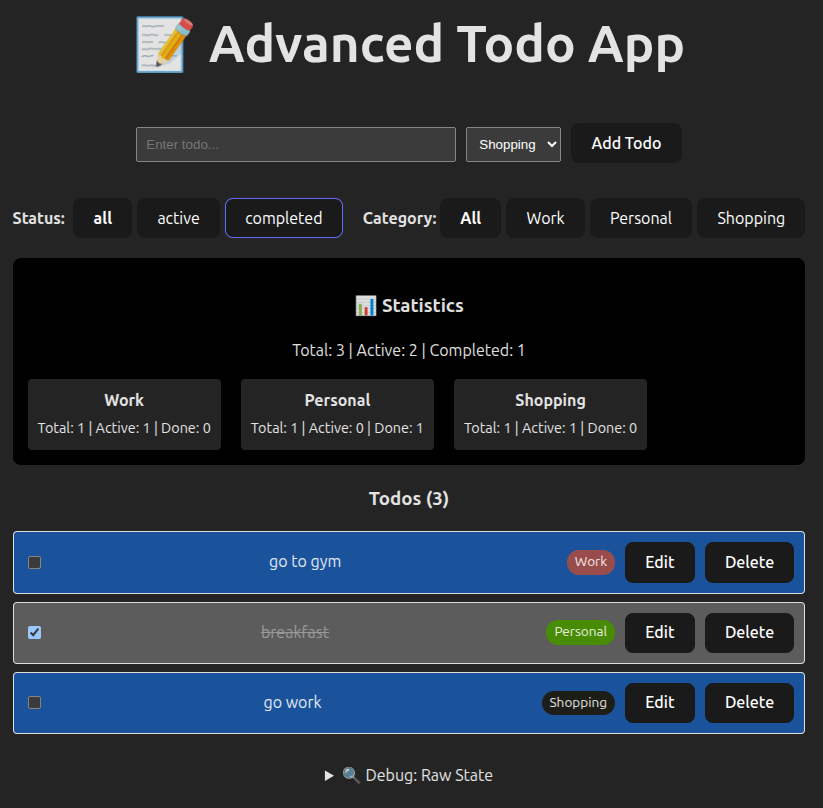
⭐⭐⭐⭐⭐ Exercise 5: Advanced Todo App with Categories (90 phút)
/**
 * 🎯 Mục tiêu: Production-ready todo app
 * ⏱️ Thời gian: 90 phút
 *
 * 📋 Feature Specification:
 * - Add/Edit/Delete todos
 * - Mark as complete/incomplete
 * - Assign category to each todo
 * - Filter by category
 * - Filter by status (all/active/completed)
 * - Persist to localStorage
 * - Show statistics (total, active, completed per category)
 *
 * 🏗️ Technical Design Doc:
 * 1. Component Architecture: Single component (Ngày 12 chưa học composition)
 * 2. State Management: useState với proper structure
 * 3. Data Structure: Array vs Object trade-offs
 * 4. Performance: Lazy initialization cho localStorage
 * 5. Derived State: Statistics computed, not stored
 *
 * ✅ Production Checklist:
 * - [ ] Proper state structure (justify your choice)
 * - [ ] Immutable updates throughout
 * - [ ] Lazy initialization for localStorage
 * - [ ] Derived state for statistics
 * - [ ] No duplicate state
 * - [ ] Input validation (empty strings)
 * - [ ] Edge cases handled (delete last todo, etc.)
 * - [ ] Clear variable names
 * - [ ] Comments explaining complex logic
 *
 * 📝 Documentation:
 * - Write ADR cho state structure decision
 * - Comment complex immutability patterns
 * - Document filter logic
 */

const CATEGORIES = ['Work', 'Personal', 'Shopping'];

// Starter code
function AdvancedTodoApp() {
  // TODO: Design state structure
  // Consider:
  // - How to store todos?
  // - How to store current filters?
  // - What should be in state vs derived?

  const [todos, setTodos] = useState(() => {
    // TODO: Lazy initialization from localStorage
  });

  const [filter, setFilter] = useState(/* TODO */);
  const [categoryFilter, setCategoryFilter] = useState(/* TODO */);

  // TODO: Implement CRUD operations
  const addTodo = (text, category) => {};
  const toggleTodo = (id) => {};
  const deleteTodo = (id) => {};
  const editTodo = (id, newText) => {};

  // TODO: Derive filtered todos
  const filteredTodos = todos; // Replace with actual filter logic

  // TODO: Derive statistics
  const stats = {
    total: 0,
    active: 0,
    completed: 0,
    byCategory: {},
  };

  // TODO: Persist to localStorage when todos change
  // (Hint: You'll learn useEffect tomorrow, for now just add comment)

  return <div>{/* TODO: Implement UI */}</div>;
}
💡 Full Solution
/**
 * ADR: Advanced Todo App State Structure
 *
 * Decision: Array of todo objects + separate filter states
 *
 * State shape:
 * {
 *   todos: [{ id, text, category, completed, createdAt }, ...],
 *   statusFilter: 'all' | 'active' | 'completed',
 *   categoryFilter: 'all' | 'Work' | 'Personal' | 'Shopping'
 * }
 *
 * Rationale:
 * - Array natural for ordered list
 * - Filters in separate state → easy to reset independently
 * - Statistics derived → always in sync
 * - Compatible với localStorage (JSON.stringify/parse)
 *
 * Trade-offs Accepted:
 * - O(n) operations (acceptable for todo lists)
 * - Need .find() for lookups (not frequent)
 */

const CATEGORIES = ['Work', 'Personal', 'Shopping'];

function AdvancedTodoApp() {
  // ✅ Lazy initialization from localStorage
  const [todos, setTodos] = useState(() => {
    const saved = localStorage.getItem('advanced-todos');
    return saved ? JSON.parse(saved) : [];
  });

  const [statusFilter, setStatusFilter] = useState('all');
  const [categoryFilter, setCategoryFilter] = useState('all');
  const [inputText, setInputText] = useState('');
  const [inputCategory, setInputCategory] = useState(CATEGORIES[0]);
  const [editingId, setEditingId] = useState(null);

  // ✅ Add todo với validation
  const addTodo = () => {
    const trimmed = inputText.trim();
    if (!trimmed) return; // Validate

    const newTodo = {
      id: Date.now(),
      text: trimmed,
      category: inputCategory,
      completed: false,
      createdAt: new Date().toISOString(),
    };

    setTodos((prev) => {
      const updated = [...prev, newTodo];
      localStorage.setItem('advanced-todos', JSON.stringify(updated));
      return updated;
    });

    setInputText(''); // Clear input
  };

  // ✅ Toggle complete status
  const toggleTodo = (id) => {
    setTodos((prev) => {
      const updated = prev.map((todo) =>
        todo.id === id ? { ...todo, completed: !todo.completed } : todo,
      );
      localStorage.setItem('advanced-todos', JSON.stringify(updated));
      return updated;
    });
  };

  // ✅ Delete todo
  const deleteTodo = (id) => {
    setTodos((prev) => {
      const updated = prev.filter((todo) => todo.id !== id);
      localStorage.setItem('advanced-todos', JSON.stringify(updated));
      return updated;
    });
  };

  // ✅ Edit todo
  const startEdit = (id) => {
    const todo = todos.find((t) => t.id === id);
    setEditingId(id);
    setInputText(todo.text);
  };

  const saveEdit = () => {
    const trimmed = inputText.trim();
    if (!trimmed) return;

    setTodos((prev) => {
      const updated = prev.map((todo) =>
        todo.id === editingId ? { ...todo, text: trimmed } : todo,
      );
      localStorage.setItem('advanced-todos', JSON.stringify(updated));
      return updated;
    });

    setEditingId(null);
    setInputText('');
  };

  // ✅ Derived: Filtered todos
  const filteredTodos = todos.filter((todo) => {
    // Status filter
    if (statusFilter === 'active' && todo.completed) return false;
    if (statusFilter === 'completed' && !todo.completed) return false;

    // Category filter
    if (categoryFilter !== 'all' && todo.category !== categoryFilter)
      return false;

    return true;
  });

  // ✅ Derived: Statistics
  const stats = todos.reduce(
    (acc, todo) => {
      acc.total++;
      if (todo.completed) {
        acc.completed++;
      } else {
        acc.active++;
      }

      // By category
      if (!acc.byCategory[todo.category]) {
        acc.byCategory[todo.category] = { total: 0, active: 0, completed: 0 };
      }
      acc.byCategory[todo.category].total++;
      if (todo.completed) {
        acc.byCategory[todo.category].completed++;
      } else {
        acc.byCategory[todo.category].active++;
      }

      return acc;
    },
    {
      total: 0,
      active: 0,
      completed: 0,
      byCategory: {},
    },
  );

  return (
    <div
      style={{
        padding: '20px',
        fontFamily: 'system-ui',
        maxWidth: '800px',
        margin: '0 auto',
      }}
    >
      <h1>📝 Advanced Todo App</h1>

      {/* Add/Edit Form */}
      <div
        style={{
          marginBottom: '20px',
          padding: '15px',
          background: '#f5f5f5',
          borderRadius: '8px',
        }}
      >
        <input
          type='text'
          value={inputText}
          onChange={(e) => setInputText(e.target.value)}
          onKeyDown={(e) =>
            e.key === 'Enter' && (editingId ? saveEdit() : addTodo())
          }
          placeholder='Enter todo...'
          style={{ padding: '8px', width: '300px', marginRight: '10px' }}
        />

        {!editingId && (
          <select
            value={inputCategory}
            onChange={(e) => setInputCategory(e.target.value)}
            style={{ padding: '8px', marginRight: '10px' }}
          >
            {CATEGORIES.map((cat) => (
              <option
                key={cat}
                value={cat}
              >
                {cat}
              </option>
            ))}
          </select>
        )}

        {editingId ? (
          <>
            <button onClick={saveEdit}>Save</button>
            <button
              onClick={() => {
                setEditingId(null);
                setInputText('');
              }}
            >
              Cancel
            </button>
          </>
        ) : (
          <button onClick={addTodo}>Add Todo</button>
        )}
      </div>

      {/* Filters */}
      <div style={{ marginBottom: '20px', display: 'flex', gap: '20px' }}>
        <div>
          <strong>Status:</strong>{' '}
          {['all', 'active', 'completed'].map((status) => (
            <button
              key={status}
              onClick={() => setStatusFilter(status)}
              style={{
                marginLeft: '5px',
                fontWeight: statusFilter === status ? 'bold' : 'normal',
              }}
            >
              {status}
            </button>
          ))}
        </div>

        <div>
          <strong>Category:</strong>{' '}
          <button
            onClick={() => setCategoryFilter('all')}
            style={{ fontWeight: categoryFilter === 'all' ? 'bold' : 'normal' }}
          >
            All
          </button>
          {CATEGORIES.map((cat) => (
            <button
              key={cat}
              onClick={() => setCategoryFilter(cat)}
              style={{
                marginLeft: '5px',
                fontWeight: categoryFilter === cat ? 'bold' : 'normal',
              }}
            >
              {cat}
            </button>
          ))}
        </div>
      </div>

      {/* Statistics */}
      <div
        style={{
          marginBottom: '20px',
          padding: '15px',
          background: '#e3f2fd',
          borderRadius: '8px',
        }}
      >
        <h3>📊 Statistics</h3>
        <p>
          Total: {stats.total} | Active: {stats.active} | Completed:{' '}
          {stats.completed}
        </p>
        <div style={{ display: 'flex', gap: '20px', marginTop: '10px' }}>
          {CATEGORIES.map((cat) => {
            const catStats = stats.byCategory[cat] || {
              total: 0,
              active: 0,
              completed: 0,
            };
            return (
              <div
                key={cat}
                style={{
                  padding: '10px',
                  background: 'white',
                  borderRadius: '4px',
                }}
              >
                <strong>{cat}</strong>
                <div style={{ fontSize: '0.9em', marginTop: '5px' }}>
                  Total: {catStats.total} | Active: {catStats.active} | Done:{' '}
                  {catStats.completed}
                </div>
              </div>
            );
          })}
        </div>
      </div>

      {/* Todo List */}
      <div>
        <h3>Todos ({filteredTodos.length})</h3>
        {filteredTodos.length === 0 ? (
          <p style={{ color: '#999' }}>No todos match current filters</p>
        ) : (
          filteredTodos.map((todo) => (
            <div
              key={todo.id}
              style={{
                display: 'flex',
                alignItems: 'center',
                gap: '10px',
                padding: '10px',
                marginBottom: '8px',
                background: todo.completed ? '#f0f0f0' : 'white',
                border: '1px solid #ddd',
                borderRadius: '4px',
              }}
            >
              <input
                type='checkbox'
                checked={todo.completed}
                onChange={() => toggleTodo(todo.id)}
              />
              <span
                style={{
                  flex: 1,
                  textDecoration: todo.completed ? 'line-through' : 'none',
                  color: todo.completed ? '#999' : '#000',
                }}
              >
                {todo.text}
              </span>
              <span
                style={{
                  padding: '2px 8px',
                  background: '#e0e0e0',
                  borderRadius: '12px',
                  fontSize: '0.85em',
                }}
              >
                {todo.category}
              </span>
              <button onClick={() => startEdit(todo.id)}>Edit</button>
              <button onClick={() => deleteTodo(todo.id)}>Delete</button>
            </div>
          ))
        )}
      </div>

      {/* Debug */}
      <details style={{ marginTop: '30px' }}>
        <summary>🔍 Debug: Raw State</summary>
        <pre
          style={{
            background: '#000',
            color: '#0f0',
            padding: '15px',
            overflow: 'auto',
          }}
        >
          {JSON.stringify({ todos, statusFilter, categoryFilter }, null, 2)}
        </pre>
      </details>
    </div>
  );
}

/**
 * CÁC PATTERN CHUẨN DÙNG TRONG PRODUCTION:
 *
 * 1. ✅ Khởi tạo Lazy (Lazy Initialization):
 *    - Chỉ đọc localStorage một lần khi mount
 *    - Tác vụ tốn kém không chạy lại mỗi lần render
 *
 * 2. ✅ Bất biến (Immutability):
 *    - map() để cập nhật
 *    - filter() để xoá
 *    - spread để thêm
 *
 * 3. ✅ State tự suy (Derived State):
 *    - filteredTodos được tính từ todos + filters
 *    - stats được tính từ todos
 *    - Không duplicate → luôn đồng bộ
 *
 * 4. ✅ Xác thực hợp lệ (Validation):
 *    - .trim() chuỗi rỗng
 *    - Return sớm (early return)
 *
 * 5. ✅ Tính Lưu trữ (Persistence):
 *    - localStorage.setItem sau mỗi lần thay đổi
 *    - (Ghi chú: dùng useEffect sẽ gọn hơn!)
 *
 * 6. ✅ Hoàn thiện UX:
 *    - Xoá input sau khi thêm
 *    - Nhấn Enter để submit
 *    - Chế độ edit có huỷ (cancel)
 *    - Phản hồi trực quan (gạch ngang, màu sắc)
 */
📊 PHẦN 4: SO SÁNH PATTERNS (30 phút)
Bảng So Sánh Trade-offs
| Pattern | Pros ✅ | Cons ❌ | When to Use 🎯 |
|---|---|---|---|
Direct UpdatessetCount(count + 1) | • Đơn giản, dễ đọc • Ít code hơn | • Stale closure bugs • Không work với async • Sai với multiple updates | • Single update đơn giản • Không có async/events |
Functional UpdatessetCount(prev => prev + 1) | • Luôn có latest value • Work với async • Safe với multiple updates | • Hơi verbose hơn • Cần hiểu closure | • Async operations • Multiple updates • Event handlers • DEFAULT CHOICE |
Lazy InitializationuseState(() => fn()) | • Chỉ chạy 1 lần • Optimize performance | • Thêm boilerplate • Phức tạp hơn cho simple values | • Reading localStorage • Expensive computation • Heavy parsing |
Multiple States[a, setA], [b, setB] | • Clear separation • Easy to understand | • Many setter functions • Hard to reset together • Prop drilling | • Unrelated values • Different update patterns |
Single Object State{a, b, c} | • Group related data • Easy to reset • Pass to children | • Complex updates • Easy to mutate accidentally • Spread overhead | • Form data • User profile • Related values |
Decision Tree
Q1: Đây có phải là giá trị khởi tạo tốn kém để tính toán không?
├─ CÓ  → Dùng khởi tạo lười (lazy initialization): useState(() => fn())
└─ KHÔNG → Tiếp tục Q2

Q2: State có được cập nhật dựa trên giá trị trước đó không?
├─ CÓ  → Dùng cập nhật dạng hàm (functional updates): setState(prev => ...)
│        (đặc biệt trong async/sự kiện)
└─ KHÔNG → Tiếp tục Q3

Q3: Các giá trị này có liên quan/cập nhật cùng nhau không?
├─ CÓ  → Dùng một state object duy nhất: useState({a, b, c})
└─ KHÔNG → Dùng các state riêng biệt: useState(a), useState(b)

Q4: Bạn có đang cập nhật object hoặc array không?
└─ LUÔN LUÔN → Dùng các mẫu bất biến (immutability):
           • Object: {...prev, key: value}
           • Array: [...prev, item] hoặc .map()/.filter()

Q5: Giá trị này có thể được tính từ state khác không?
└─ CÓ  → ĐỪNG lưu nó! Hãy suy ra:
         const fullName = firstName + lastName
🧪 PHẦN 5: DEBUG LAB (20 phút)
Bug 1: Stale Closure trong Event Handler ⭐
// 🐛 BUG: Counter không tăng đúng khi click nhanh
function BuggyCounter() {
  const [count, setCount] = useState(0);

  const handleClick = () => {
    setTimeout(() => {
      setCount(count + 1); // BUG HERE
    }, 100);
  };

  return (
    <div>
      <p>Count: {count}</p>
      <button onClick={handleClick}>Click me fast!</button>
    </div>
  );
}

/**
 * 🔍 DEBUG QUESTIONS:
 * 1. Click button 5 lần nhanh. Count sẽ là bao nhiêu? Tại sao?
 * 2. Vấn đề nằm ở đâu?
 * 3. Làm thế nào để fix?
 */
💡 Solution
Vấn đề:
- Mỗi click tạo 1 setTimeout với closure capture
counttại thời điểm click - Tất cả 5 setTimeout đều đọc
count = 0 - Khi chạy, tất cả đều set
count = 1 - Kết quả:
count = 1(không phải 5!)
Fix:
const handleClick = () => {
  setTimeout(() => {
    setCount((prev) => prev + 1); // ✅ Use latest value
  }, 100);
};
Lesson: Luôn dùng functional updates trong async operations!
Bug 2: Mutating State Object ⭐⭐
// 🐛 BUG: Form không update khi gõ
function BuggyForm() {
  const [user, setUser] = useState({ name: '', email: '' });

  const handleChange = (field, value) => {
    user[field] = value; // BUG: Mutating!
    setUser(user); // BUG: Same reference!
  };

  return (
    <div>
      <input
        value={user.name}
        onChange={(e) => handleChange('name', e.target.value)}
      />
      <pre>{JSON.stringify(user)}</pre>
    </div>
  );
}

/**
 * 🔍 DEBUG QUESTIONS:
 * 1. Tại sao input không hiển thị text khi gõ?
 * 2. JSON.stringify có update không? Tại sao?
 * 3. Làm thế nào để fix?
 */
💡 Solution
Vấn đề:
- Line 5: Mutating object directly (vi phạm immutability)
- Line 6:
setUser(user)- same reference, React không detect change - React so sánh references (===), không deep compare
- Vì reference giống nhau → không re-render
Fix:
const handleChange = (field, value) => {
  setUser((prev) => ({
    ...prev, // Create new object
    [field]: value,
  }));
};
Lesson: Never mutate state! Always create new objects/arrays.
Bug 3: Không Cần Thiết Store Derived State ⭐⭐⭐
// 🐛 BUG: fullName out of sync
function BuggyProfile() {
  const [firstName, setFirstName] = useState('');
  const [lastName, setLastName] = useState('');
  const [fullName, setFullName] = useState(''); // BUG: Duplicate state

  const updateFirstName = (value) => {
    setFirstName(value);
    setFullName(value + ' ' + lastName); // BUG: Can forget to update
  };

  const updateLastName = (value) => {
    setLastName(value);
    // BUG: Forgot to update fullName!
  };

  return (
    <div>
      <input
        value={firstName}
        onChange={(e) => updateFirstName(e.target.value)}
      />
      <input
        value={lastName}
        onChange={(e) => updateLastName(e.target.value)}
      />
      <p>Full Name: {fullName}</p>
    </div>
  );
}

/**
 * 🔍 DEBUG QUESTIONS:
 * 1. Gõ vào firstName → fullName update. Gõ lastName → fullName có update không?
 * 2. Vấn đề gì với cách store fullName in state?
 * 3. Solution tốt hơn là gì?
 */
💡 Solution
Vấn đề:
- fullName là derived state - có thể tính từ firstName + lastName
- Store riêng → phải manually sync → dễ quên → bug!
- Line 14: Quên update fullName khi lastName thay đổi
Fix:
function FixedProfile() {
  const [firstName, setFirstName] = useState('');
  const [lastName, setLastName] = useState('');

  // ✅ Derive, don't store
  const fullName = `${firstName} ${lastName}`.trim();

  return (
    <div>
      <input
        value={firstName}
        onChange={(e) => setFirstName(e.target.value)}
      />
      <input
        value={lastName}
        onChange={(e) => setLastName(e.target.value)}
      />
      <p>Full Name: {fullName}</p>
    </div>
  );
}
Lesson: Don't duplicate state! If it can be computed, compute it.
Rule of Thumb:
// ❌ BAD: Storing derived value
const [items, setItems] = useState([]);
const [itemCount, setItemCount] = useState(0); // Duplicate!

// ✅ GOOD: Computing derived value
const [items, setItems] = useState([]);
const itemCount = items.length; // Compute!
✅ PHẦN 6: TỰ ĐÁNH GIÁ (15 phút)
Knowledge Check
Đánh dấu những gì bạn đã hiểu:
- [ ] Tôi hiểu stale closure là gì và tại sao xảy ra
- [ ] Tôi biết khi nào dùng functional updates vs direct updates
- [ ] Tôi có thể giải thích lazy initialization và khi nào dùng
- [ ] Tôi biết cách update objects immutably với spread
- [ ] Tôi biết cách update arrays immutably với map/filter/concat
- [ ] Tôi biết khi nào nên group state vs split state
- [ ] Tôi hiểu derived state và tránh duplicate state
- [ ] Tôi có thể debug stale closure bugs
- [ ] Tôi có thể debug mutation bugs
- [ ] Tôi hiểu trade-offs của mỗi pattern
Code Review Checklist
Khi review code useState, check:
Functional Updates:
- [ ] Dùng
prev => ...khi update dựa trên previous value - [ ] Dùng functional updates trong async operations
- [ ] Dùng functional updates trong event handlers
Lazy Initialization:
- [ ] Dùng
() => fn()cho expensive initial values - [ ] KHÔNG dùng lazy init cho simple values
Immutability:
- [ ] Objects:
{...prev, key: value}(không mutate) - [ ] Arrays:
[...prev],.map(),.filter()(không mutate) - [ ] Nested: Spread ở mọi level
State Structure:
- [ ] Related values grouped together
- [ ] Unrelated values separated
- [ ] No derived state duplication
🏠 BÀI TẬP VỀ NHÀ
Bắt buộc (30 phút)
Exercise: Fix Production Bugs
BuggyApp/
├─ CounterBug.jsx       // Stale closure
├─ FormBug.jsx          // Mutation
├─ ProfileBug.jsx       // Derived state
└─ CartBug.jsx          // Lazy init missing
Nhiệm vụ:
- Tìm và fix bug trong mỗi file
- Giải thích tại sao bug xảy ra
- Viết test case để verify fix
CounterBug.jsx
import { useState } from 'react';

function CounterBug() {
  const [count, setCount] = useState(0);

  const handleBurst = () => {
    for (let i = 0; i < 5; i++) {
      setTimeout(() => {
        setCount(count + 1);
      }, i * 100);
    }
  };

  return (
    <div>
      <h3>Count: {count}</h3>
      <button onClick={handleBurst}>Burst +5 (sai)</button>
      <button onClick={() => setCount(0)}>Reset</button>
    </div>
  );
}

export default CounterBug;
💡 Xem đáp án
import { useState } from 'react';

/**
 * CounterBug - Fixed version
 * Vấn đề gốc: stale closure trong setTimeout + burst click
 * Mỗi lần click tạo nhiều setTimeout, tất cả đều capture cùng giá trị count cũ
 */
function CounterBugFixed() {
  const [count, setCount] = useState(0);

  const handleBurst = () => {
    for (let i = 0; i < 5; i++) {
      setTimeout(() => {
        // ❌ Sai: setCount(count + 1) → tất cả đều dùng count lúc click
        // ✅ Đúng: dùng functional update → luôn lấy giá trị mới nhất
        setCount((prevCount) => prevCount + 1);

        // Optional: log để debug
        // console.log(`Timeout ${i} running, count became: ${prevCount + 1}`);
      }, i * 100);
    }
  };

  return (
    <div>
      <h3>Count: {count}</h3>
      <button onClick={handleBurst}>Burst +5 (đúng)</button>
      <button onClick={() => setCount(0)}>Reset</button>

      {/* Giải thích ngắn gọn cho người đọc code */}
      <small style={{ color: '#666', display: 'block', marginTop: 12 }}>
        Click nhiều lần nhanh → mỗi timeout sẽ tăng count chính xác (không bị
        stale)
      </small>
    </div>
  );
}

export default CounterBugFixed;
Test case gợi ý:
- Click "Burst +5" 1 lần → count tăng đúng 5
- Click liên tục 3 lần nhanh → count tăng ~15 (có thể lệch nhẹ do timing, nhưng không bị kẹt ở +5)
FormBug.jsx
import { useState } from 'react';

function FormBug() {
  const [form, setForm] = useState({
    name: '',
    email: '',
    address: { city: 'HCMC', district: '' },
  });

  const handleChange = (path, value) => {
    const parts = path.split('.');
    let current = form;

    if (parts.length === 2) {
      current[parts[0]][parts[1]] = value; // mutation
    } else {
      current[parts[0]] = value;
    }

    setForm(form); // same reference → không re-render
  };

  return (
    <div>
      <input
        value={form.name}
        onChange={(e) => handleChange('name', e.target.value)}
        placeholder='Name'
      />
      <input
        value={form.email}
        onChange={(e) => handleChange('email', e.target.value)}
        placeholder='Email'
      />
      <input
        value={form.address.district}
        onChange={(e) => handleChange('address.district', e.target.value)}
        placeholder='District'
      />
      <pre>{JSON.stringify(form, null, 2)}</pre>
    </div>
  );
}

export default FormBug;
💡 Xem đáp án
import { useState } from 'react';

/**
 * FormBug - Fixed version
 * Vấn đề gốc:
 * 1. Mutate object trực tiếp → vi phạm immutability
 * 2. setForm(form) → truyền cùng reference → React không re-render
 */
function FormBugFixed() {
  const [form, setForm] = useState({
    name: '',
    email: '',
    address: { city: 'HCMC', district: '' },
  });

  const handleChange = (path, value) => {
    const parts = path.split('.');

    setForm((prev) => {
      // Tạo bản sao mới
      if (parts.length === 1) {
        // Cập nhật top-level
        return {
          ...prev,
          [parts[0]]: value,
        };
      }

      // Cập nhật nested (address.district)
      if (parts.length === 2 && parts[0] === 'address') {
        return {
          ...prev,
          address: {
            ...prev.address,
            [parts[1]]: value,
          },
        };
      }

      // Trường hợp khác (nếu mở rộng sau này)
      return prev;
    });
  };

  return (
    <div>
      <input
        value={form.name}
        onChange={(e) => handleChange('name', e.target.value)}
        placeholder='Name'
      />
      <input
        value={form.email}
        onChange={(e) => handleChange('email', e.target.value)}
        placeholder='Email'
      />
      <input
        value={form.address.district}
        onChange={(e) => handleChange('address.district', e.target.value)}
        placeholder='District'
      />

      <pre style={{ fontSize: '0.9em', background: '#f8f8f8', padding: 12 }}>
        {JSON.stringify(form, null, 2)}
      </pre>

      <small style={{ color: '#555' }}>
        Bây giờ gõ vào bất kỳ field nào cũng sẽ cập nhật và re-render đúng
      </small>
    </div>
  );
}

export default FormBugFixed;
Test case gợi ý:
- Gõ vào Name → thấy state và UI cập nhật ngay
- Gõ vào District → address.district thay đổi, không bị mất dữ liệu khác
ProfileBug.jsx
import { useState } from 'react';

function ProfileBug() {
  const [user, setUser] = useState({ first: '', last: '' });
  const [fullName, setFullName] = useState(''); // duplicate derived state

  const update = (field, value) => {
    setUser((prev) => ({ ...prev, [field]: value }));

    // Manual sync – dễ quên
    if (field === 'first') {
      setFullName(value + ' ' + user.last);
    } else if (field === 'last') {
      setFullName(user.first + ' ' + value);
    }
  };

  return (
    <div>
      <input
        value={user.first}
        onChange={(e) => update('first', e.target.value)}
        placeholder='First name'
      />
      <input
        value={user.last}
        onChange={(e) => update('last', e.target.value)}
        placeholder='Last name'
      />
      <p>Full name: {fullName || '(chưa đồng bộ)'}</p>
    </div>
  );
}

export default ProfileBug;
💡 Xem đáp án
import { useState } from 'react';

/**
 * ProfileBug - Fixed version
 * Vấn đề gốc:
 *   Lưu fullName riêng → dễ bị lệch (out of sync)
 *   Phải manual sync ở mọi nơi → dễ quên
 *
 * Cách fix tốt nhất: **derived state** (tính toán từ first + last)
 */
function ProfileBugFixed() {
  const [user, setUser] = useState({ first: '', last: '' });

  // ✅ Derived value - luôn đúng, không cần lưu riêng
  const fullName =
    [user.first, user.last].filter(Boolean).join(' ').trim() || '(chưa nhập)';

  const update = (field, value) => {
    setUser((prev) => ({
      ...prev,
      [field]: value,
    }));
    // KHÔNG CẦN setFullName nữa → tránh bug quên sync
  };

  return (
    <div>
      <input
        value={user.first}
        onChange={(e) => update('first', e.target.value)}
        placeholder='First name'
      />
      <input
        value={user.last}
        onChange={(e) => update('last', e.target.value)}
        placeholder='Last name'
      />
      <p>
        Full name: <strong>{fullName}</strong>
      </p>

      <small style={{ color: '#666' }}>
        Full name luôn đồng bộ mà không cần lưu state riêng
      </small>
    </div>
  );
}

export default ProfileBugFixed;
Test case gợi ý:
- Gõ First name → full name cập nhật ngay
- Gõ Last name → full name vẫn đúng (không bị thiếu phần trước)
- Xóa cả hai → hiển thị "(chưa nhập)"
CartBug.jsx
import { useState } from 'react';

function getCart() {
  console.log('🔥 Đọc localStorage + parse JSON nặng...');
  const start = Date.now();
  while (Date.now() - start < 100) {} // giả lập nặng

  const data = localStorage.getItem('cart');
  return data ? JSON.parse(data) : [];
}

function CartBug() {
  const [cart, setCart] = useState(getCart()); // chạy mỗi render!
  const [search, setSearch] = useState('');

  const addItem = () => {
    const newCart = [...cart, { id: Date.now(), name: 'Item mới' }];
    localStorage.setItem('cart', JSON.stringify(newCart));
    setCart(newCart);
  };

  const filtered = cart.filter((item) =>
    item.name.toLowerCase().includes(search.toLowerCase()),
  );

  return (
    <div>
      <input
        value={search}
        onChange={(e) => setSearch(e.target.value)}
        placeholder='Tìm trong giỏ...'
      />
      <button onClick={addItem}>Thêm item</button>
      <p>
        Giỏ: {cart.length} | Lọc được: {filtered.length}
      </p>
      <small>(Mở console → thấy log spam khi gõ search)</small>
    </div>
  );
}

export default CartBug;
💡 Xem đáp án
import { useState } from 'react';

function getCart() {
  console.log('🔥 Đọc localStorage + parse JSON nặng...');
  const start = Date.now();
  while (Date.now() - start < 100) {} // giả lập nặng

  const data = localStorage.getItem('cart');
  return data ? JSON.parse(data) : [];
}

/**
 * CartBug - Fixed version (sử dụng lazy initialization)
 * Vấn đề gốc: getCart() chạy MỖI render → rất tốn khi gõ search
 */
function CartBugFixed() {
  // ✅ Lazy initialization: chỉ chạy 1 lần khi mount
  const [cart, setCart] = useState(() => getCart());

  const [search, setSearch] = useState('');

  const addItem = () => {
    setCart((prev) => {
      const newCart = [...prev, { id: Date.now(), name: 'Item mới' }];
      localStorage.setItem('cart', JSON.stringify(newCart));
      return newCart;
    });
  };

  // Lọc từ cart (đã có sẵn trong state)
  const filtered = cart.filter((item) =>
    item.name.toLowerCase().includes(search.toLowerCase()),
  );

  return (
    <div>
      <input
        value={search}
        onChange={(e) => setSearch(e.target.value)}
        placeholder='Tìm trong giỏ...'
      />
      <button onClick={addItem}>Thêm item</button>
      <p>
        Giỏ: <strong>{cart.length}</strong> | Lọc được:{' '}
        <strong>{filtered.length}</strong>
      </p>

      <small style={{ color: '#555', display: 'block', marginTop: 12 }}>
        Mở console → giờ chỉ thấy log ĐỌC localStorage 1 lần duy nhất khi mount
      </small>
    </div>
  );
}

export default CartBugFixed;
Test case gợi ý:
- Mở console → mount component → thấy log "Đọc localStorage" chỉ 1 lần
- Gõ nhiều ký tự vào ô search → không thấy log lặp lại
- Thêm item → giỏ cập nhật, localStorage được lưu
Nâng cao (60 phút)
Exercise: Expense Tracker
Tạo app quản lý chi tiêu với:
- Add/Edit/Delete expenses
- Categories (Food, Transport, Entertainment, etc.)
- Date filtering (This Month, Last Month, Custom Range)
- Statistics: Total by category, Average per day
- Persist to localStorage
Yêu cầu:
- ✅ Functional updates everywhere
- ✅ Lazy initialization cho localStorage
- ✅ Immutable updates
- ✅ Derived statistics (don't store!)
- ✅ Decision document cho state structure
💡 Xem đáp án
/**
 * Expense Tracker - Production-ready version
 *
 * Features:
 * - Add / Edit / Delete expenses
 * - Categories
 * - Date filtering: This Month / Last Month / Custom Range
 * - Statistics: Total by category, Average per day
 * - Persist to localStorage (sử dụng lazy init + save sau mỗi thay đổi)
 *
 * Best Practices áp dụng:
 * - Functional updates ở mọi nơi
 * - Lazy initialization cho localStorage
 * - Immutable updates (spread + map/filter)
 * - Derived state cho statistics & filtered list
 * - Không duplicate state
 */

/* ==================== Architecture Decision Record (ADR) ==================== */
/*
ADR: State Structure cho Expense Tracker

Context:
- Cần lưu danh sách chi tiêu với các thuộc tính: id, amount, category, date, description
- Cần filter theo thời gian (this month, last month, custom range)
- Cần tính toán thống kê theo category và average per day
- Phải persist vào localStorage
- Update thường xuyên (add/edit/delete)

Decision: Sử dụng một mảng objects + các state filter riêng biệt

State shape:
{
  expenses: [
    { id: string, amount: number, category: string, date: string (ISO), description: string },
    ...
  ],
  filter: {
    mode: 'this-month' | 'last-month' | 'custom',
    startDate?: string,   // YYYY-MM-DD
    endDate?: string
  }
}

Rationale:
- Array phù hợp với danh sách có thứ tự thời gian
- Dễ filter và sort theo date
- Dễ persist trực tiếp bằng JSON
- Các filter là transient → tách riêng khỏi data chính
- Statistics hoàn toàn derived → không lưu dư thừa

Consequences (Trade-offs accepted):
- O(n) khi filter → chấp nhận được với số lượng chi tiêu cá nhân (<1000)
- Cần parse date nhiều lần khi filter → có thể optimize sau bằng useMemo (ngày sau)

Alternatives Considered:
- Object với id làm key → khó sort theo thời gian, phức tạp hơn khi filter date
- Redux / Zustand → overkill cho single component
- Tách expenses & summary → vi phạm "don't store derived state"
*/

/* ==================== Constants & Helpers ==================== */
const CATEGORIES = [
  'Ăn uống',
  'Di chuyển',
  'Nhà cửa & Tiện ích',
  'Giải trí',
  'Mua sắm',
  'Sức khỏe',
  'Học tập',
  'Khác',
];

const STORAGE_KEY = 'expense-tracker-2025';

/**
 * Load expenses từ localStorage (chỉ chạy 1 lần khi mount)
 */
function loadExpenses() {
  try {
    const saved = localStorage.getItem(STORAGE_KEY);
    if (!saved) return [];
    const parsed = JSON.parse(saved);
    return parsed.map((item) => ({
      ...item,
      date: new Date(item.date).toISOString().split('T')[0], // đảm bảo định dạng
    }));
  } catch (err) {
    console.error('Lỗi đọc localStorage:', err);
    return [];
  }
}

/* ==================== Main Component ==================== */
function ExpenseTracker() {
  // Lazy init: chỉ đọc localStorage 1 lần
  const [expenses, setExpenses] = useState(() => loadExpenses());

  // Filter controls
  const [filterMode, setFilterMode] = useState('this-month');
  const [customStart, setCustomStart] = useState('');
  const [customEnd, setCustomEnd] = useState('');

  // Form add/edit
  const [form, setForm] = useState({
    amount: '',
    category: CATEGORIES[0],
    date: new Date().toISOString().split('T')[0],
    description: '',
  });
  const [editingId, setEditingId] = useState(null);

  // ── Tính filtered expenses (derived, tính mỗi render) ──
  const getFilteredExpenses = () => {
    let startDate, endDate;

    const now = new Date();
    const thisMonthStart = new Date(now.getFullYear(), now.getMonth(), 1);
    const thisMonthEnd = new Date(now.getFullYear(), now.getMonth() + 1, 0);

    if (filterMode === 'this-month') {
      startDate = thisMonthStart;
      endDate = thisMonthEnd;
    } else if (filterMode === 'last-month') {
      startDate = new Date(now.getFullYear(), now.getMonth() - 1, 1);
      endDate = new Date(now.getFullYear(), now.getMonth(), 0);
    } else if (filterMode === 'custom' && customStart && customEnd) {
      startDate = new Date(customStart);
      endDate = new Date(customEnd);
      endDate.setHours(23, 59, 59, 999); // bao gồm cả ngày cuối
    } else {
      return [...expenses].sort((a, b) => new Date(b.date) - new Date(a.date));
    }

    return expenses
      .filter((exp) => {
        const d = new Date(exp.date);
        return d >= startDate && d <= endDate;
      })
      .sort((a, b) => new Date(b.date) - new Date(a.date)); // mới nhất lên đầu
  };

  const filteredExpenses = getFilteredExpenses();

  // ── Tính statistics (derived, tính mỗi render) ──
  const getStats = () => {
    if (filteredExpenses.length === 0) {
      return { total: 0, byCategory: {}, averagePerDay: 0 };
    }

    const byCategory = {};
    let total = 0;

    filteredExpenses.forEach((exp) => {
      const amt = Number(exp.amount);
      total += amt;
      byCategory[exp.category] = (byCategory[exp.category] || 0) + amt;
    });

    // Tính số ngày trong khoảng
    // 1000 ms * 60 giây * 60 phút * 24 giờ = 86_400_000 (ms / ngày)
    let days = 1;
    if (filteredExpenses.length > 0) {
      const first = new Date(filteredExpenses[0].date); // ngày đầu trong mảng (đơn vị ms)
      const last = new Date(filteredExpenses.at(-1).date); // ngày cuối trong mảng (đơn vị ms)

      // + 1 Để tính cả ngày đầu và ngày cuối
      // Từ 1/1 đến 1/1 → Hiệu thời gian = 0 ngày, nhưng thực tế là 1 ngày → cần +1
      days = Math.max(1, (first - last) / (1000 * 60 * 60 * 24) + 1);
    }
    if (filterMode === 'custom' && customStart && customEnd) {
      days = Math.max(
        1,
        (new Date(customEnd) - new Date(customStart)) / (1000 * 60 * 60 * 24) +
          1,
      );
    }

    return {
      total,
      byCategory,
      averagePerDay: total / days,
    };
  };

  const stats = getStats();

  // ── CRUD Handlers ──
  const saveExpense = () => {
    const amountNum = Number(form.amount);
    if (!form.amount || isNaN(amountNum) || amountNum <= 0) {
      alert('Vui lòng nhập số tiền hợp lệ (lớn hơn 0)');
      return;
    }

    setExpenses((prev) => {
      let nextExpenses;

      if (editingId) {
        // Edit
        nextExpenses = prev.map((exp) =>
          exp.id === editingId ? { ...exp, ...form, amount: amountNum } : exp,
        );
      } else {
        // Add
        nextExpenses = [
          ...prev,
          {
            id: Date.now().toString(),
            ...form,
            amount: amountNum,
          },
        ];
      }

      // Lưu localStorage
      localStorage.setItem(STORAGE_KEY, JSON.stringify(nextExpenses));
      return nextExpenses;
    });

    // Reset form
    setForm({
      amount: '',
      category: CATEGORIES[0],
      date: new Date().toISOString().split('T')[0],
      description: '',
    });
    setEditingId(null);
  };

  const startEdit = (exp) => {
    setForm({
      amount: exp.amount.toString(),
      category: exp.category,
      date: exp.date,
      description: exp.description || '',
    });
    setEditingId(exp.id);
  };

  const deleteExpense = (id) => {
    if (!window.confirm('Bạn có chắc muốn xóa khoản chi này?')) return;

    setExpenses((prev) => {
      const next = prev.filter((exp) => exp.id !== id);
      localStorage.setItem(STORAGE_KEY, JSON.stringify(next));
      return next;
    });
  };

  const cancelEdit = () => {
    setEditingId(null);
    setForm({
      amount: '',
      category: CATEGORIES[0],
      date: new Date().toISOString().split('T')[0],
      description: '',
    });
  };

  return (
    <div
      style={{
        maxWidth: 900,
        margin: '0 auto',
        padding: 20,
        fontFamily: 'system-ui',
      }}
    >
      <h1>💸 Quản lý chi tiêu</h1>

      {/* FORM */}
      <section
        style={{
          background: '#f8f9fa',
          padding: 20,
          borderRadius: 8,
          marginBottom: 24,
        }}
      >
        <h3>{editingId ? 'Sửa chi tiêu' : 'Thêm khoản chi mới'}</h3>

        <div
          style={{
            display: 'grid',
            gap: 16,
            gridTemplateColumns: 'repeat(auto-fit, minmax(220px, 1fr))',
          }}
        >
          <div>
            <label>Số tiền (₫)</label>
            <br />
            <input
              type='number'
              value={form.amount}
              onChange={(e) =>
                setForm((p) => ({ ...p, amount: e.target.value }))
              }
              placeholder='VD: 120000'
              style={{ width: '100%', padding: 8 }}
            />
          </div>

          <div>
            <label>Danh mục</label>
            <br />
            <select
              value={form.category}
              onChange={(e) =>
                setForm((p) => ({ ...p, category: e.target.value }))
              }
              style={{ width: '100%', padding: 8 }}
            >
              {CATEGORIES.map((c) => (
                <option
                  key={c}
                  value={c}
                >
                  {c}
                </option>
              ))}
            </select>
          </div>

          <div>
            <label>Ngày</label>
            <br />
            <input
              type='date'
              value={form.date}
              onChange={(e) => setForm((p) => ({ ...p, date: e.target.value }))}
              style={{ width: '100%', padding: 8 }}
            />
          </div>

          <div style={{ gridColumn: '1 / -1' }}>
            <label>Ghi chú</label>
            <br />
            <input
              type='text'
              value={form.description}
              onChange={(e) =>
                setForm((p) => ({ ...p, description: e.target.value }))
              }
              placeholder='VD: Ăn tối với bạn bè'
              style={{ width: '100%', padding: 8 }}
            />
          </div>
        </div>

        <div style={{ marginTop: 16 }}>
          <button
            onClick={saveExpense}
            style={{ padding: '10px 20px', marginRight: 12 }}
          >
            {editingId ? 'Lưu thay đổi' : 'Thêm'}
          </button>
          {editingId && (
            <button
              onClick={cancelEdit}
              style={{
                padding: '10px 20px',
                background: '#6c757d',
                color: 'white',
              }}
            >
              Hủy
            </button>
          )}
        </div>
      </section>

      {/* FILTER */}
      <section style={{ marginBottom: 24 }}>
        <h3>Lọc theo khoảng thời gian</h3>
        <div style={{ display: 'flex', flexWrap: 'wrap', gap: 12 }}>
          <button
            onClick={() => setFilterMode('this-month')}
            style={{
              fontWeight: filterMode === 'this-month' ? 'bold' : 'normal',
            }}
          >
            Tháng này
          </button>
          <button
            onClick={() => setFilterMode('last-month')}
            style={{
              fontWeight: filterMode === 'last-month' ? 'bold' : 'normal',
            }}
          >
            Tháng trước
          </button>
          <button
            onClick={() => setFilterMode('custom')}
            style={{ fontWeight: filterMode === 'custom' ? 'bold' : 'normal' }}
          >
            Tùy chọn
          </button>

          {filterMode === 'custom' && (
            <>
              <input
                type='date'
                value={customStart}
                onChange={(e) => setCustomStart(e.target.value)}
              />
              <input
                type='date'
                value={customEnd}
                onChange={(e) => setCustomEnd(e.target.value)}
              />
            </>
          )}
        </div>
      </section>

      {/* STATS */}
      <section
        style={{
          background: '#e6f4ff',
          padding: 16,
          borderRadius: 8,
          marginBottom: 24,
        }}
      >
        <h3>Thống kê</h3>
        <p style={{ fontSize: '1.3em' }}>
          Tổng chi: <strong>{stats.total.toLocaleString('vi-VN')} ₫</strong>
        </p>
        <p>
          Trung bình/ngày:{' '}
          <strong>
            {Math.round(stats.averagePerDay).toLocaleString('vi-VN')} ₫
          </strong>
        </p>

        <h4>Chi tiết theo danh mục:</h4>
        <ul style={{ paddingLeft: 20 }}>
          {Object.entries(stats.byCategory).map(([cat, value]) => (
            <li key={cat}>
              {cat}: <strong>{value.toLocaleString('vi-VN')} ₫</strong>
            </li>
          ))}
        </ul>
      </section>

      {/* LIST */}
      <section>
        <h3>Danh sách ({filteredExpenses.length} khoản)</h3>

        {filteredExpenses.length === 0 ? (
          <p style={{ color: '#6c757d' }}>
            Chưa có khoản chi nào trong khoảng thời gian này.
          </p>
        ) : (
          filteredExpenses.map((exp) => (
            <div
              key={exp.id}
              style={{
                padding: 12,
                marginBottom: 12,
                border: '1px solid #dee2e6',
                borderRadius: 6,
                background: '#fff',
              }}
            >
              <div style={{ display: 'flex', justifyContent: 'space-between' }}>
                <div>
                  <strong>{exp.amount.toLocaleString('vi-VN')} ₫</strong>
                  <span style={{ marginLeft: 12, color: '#555' }}>
                    {exp.description || '(không ghi chú)'}
                  </span>
                </div>
                <div>
                  <button
                    onClick={() => startEdit(exp)}
                    style={{ marginRight: 8 }}
                  >
                    Sửa
                  </button>
                  <button
                    onClick={() => deleteExpense(exp.id)}
                    style={{ background: '#dc3545', color: 'white' }}
                  >
                    Xóa
                  </button>
                </div>
              </div>
              <div
                style={{ marginTop: 6, color: '#6c757d', fontSize: '0.9em' }}
              >
                {new Date(exp.date).toLocaleDateString('vi-VN')} •{' '}
                {exp.category}
              </div>
            </div>
          ))
        )}
      </section>
    </div>
  );
}

export default ExpenseTracker;
📚 TÀI LIỆU THAM KHẢO
Bắt buộc đọc
React Docs - useState
- https://react.dev/reference/react/useState
- Đọc sections: "Updating based on previous state", "Avoiding recreating initial state"
React Docs - Choosing State Structure
- https://react.dev/learn/choosing-the-state-structure
- Đặc biệt chú ý: "Avoid duplication in state", "Group related state"
Đọc thêm
A Complete Guide to useEffect by Dan Abramov
- https://overreacted.io/a-complete-guide-to-useeffect/
- Section về closures (chuẩn bị cho useEffect ngày mai)
Immutability in React and Redux
🔗 KẾT NỐI KIẾN THỨC
Kiến thức nền (đã học)
- Ngày 11: useState basics -
const [state, setState] = useState(initial) - Ngày 10: Component composition
- Ngày 9: Forms concept (controlled inputs)
Hướng tới (sẽ học)
- Ngày 13: Forms với State - Áp dụng patterns hôm nay vào real forms
- Ngày 14: Lifting State Up - Share state giữa components
- Ngày 17: useEffect - Side effects và cleanup (closure issues ở đây!)
💡 SENIOR INSIGHTS
Cân Nhắc Production
Performance:
// ⚠️ Expensive re-computation mỗi render
function Dashboard() {
  const [data, setData] = useState([
    /* 10000 items */
  ]);

  // ❌ BAD: Filter chạy mỗi render
  const filtered = data.filter(/* complex logic */);

  // ✅ BETTER: Sẽ học useMemo ở Ngày 23
  // Bây giờ: Cân nhắc nếu filter thực sự expensive
}
Memory Leaks:
// ⚠️ Potential memory leak
function Timer() {
  const [count, setCount] = useState(0);

  // ❌ PROBLEM: setTimeout không được clear
  const start = () => {
    setTimeout(() => {
      setCount((prev) => prev + 1);
      start(); // Infinite recursion!
    }, 1000);
  };

  // ✅ Solution: Sẽ học useEffect cleanup ở Ngày 17
}
Câu Hỏi Phỏng Vấn
Junior Level:
Q: "Tại sao code này chỉ tăng 1 lần dù gọi setState 3 lần?"
setCount(count + 1);
setCount(count + 1);
setCount(count + 1);
A: Vì
countlà constant trong render, cả 3 lần đều đọc cùng giá trị. Fix: dùng functional updatessetCount(prev => prev + 1)
Mid Level:
Q: "Khi nào nên dùng lazy initialization?"
A: Khi initial value expensive (localStorage read, heavy computation, DOM read). React chỉ gọi function 1 lần on mount thay vì mỗi render.
Senior Level:
Q: "Thiết kế state structure cho feature X. Justify your choice."
A: Phải analyze:
- Related data? → Group into object
- Frequent updates? → Consider split
- Derived values? → Compute, don't store
- Update patterns? → Object vs Array
- Document trade-offs
War Stories
Story 1: The Stale Closure Bug
Một lần tôi debug bug "random" trong production: click button có khi work, có khi không. Sau 2 giờ mới phát hiện là stale closure trong setTimeout. User click nhanh → multiple timeouts với stale values. Fix: đổi sang functional updates. Lesson: Luôn dùng functional updates trong async!
Story 2: The Performance Nightmare
App chậm dần sau vài phút sử dụng. Root cause: đọc từ localStorage trong useState KHÔNG lazy. Mỗi keystroke = 1 lần parse JSON của 10MB data! Fix: lazy initialization. Performance từ 200ms → <1ms. Lesson: Profile before optimize, nhưng lazy init là low-hanging fruit.
Story 3: The Out-of-Sync Bug
Bug production: statistics không update khi user edit item. Code store count, total, average in separate states. Developer quên update average khi edit. Fix: Derive tất cả statistics. Không bao giờ store derived state! Trade-off: Re-compute mỗi render, nhưng always correct.
🎯 PREVIEW NGÀY MAI
Ngày 13: Forms với State
Hôm nay đã học useState patterns. Ngày mai sẽ áp dụng vào:
- Controlled vs Uncontrolled components
- Form validation với state
- Multiple inputs handling
- Custom hooks cho forms (giới thiệu concept)
Hôm nay: Master patterns ✅
Ngày mai: Apply to real forms 🎯
🎊 CHÚC MỪNG! Bạn đã hoàn thành Ngày 12!
Hôm nay bạn đã master 5 patterns quan trọng nhất của useState:
- ✅ Functional Updates - Fix stale closure
- ✅ Lazy Initialization - Optimize performance
- ✅ State Structure - Design decisions
- ✅ Immutability - Update safely
- ✅ Derived State - Avoid duplication
Những patterns này sẽ theo bạn suốt career React. Practice chúng cho đến khi thành second nature!
💪 Keep coding! Tomorrow: Forms mastery!